Broadcast Guest Updates on Your Wedding Day, Fast
Broadcast Guest Updates on Your Wedding Day, Fast
Use a one-way SMS or WhatsApp-style broadcast, run through one dashboard, backed by a single hospitality contact number. That combination beats group texts, guest-list emails, and phone trees every time you need to broadcast guest updates for a wedding without triggering forty replies. Here’s what to do in the next ten minutes:
- Segment your guest list into ceremony-only, reception-only, and hosted-hotel groups.
- Schedule one morning-of reminder for each segment.
- Run a delivery test to your own phone before sending to anyone else.
- Assign one hospitality number for inbound calls and questions.
Key Takeaways
A one-way SMS or WhatsApp broadcast, run through a single logged platform with a dedicated hospitality contact, is the most reliable way to deliver time-sensitive wedding-day updates without creating guest confusion or exposed phone numbers.
| Point | Details |
|---|---|
| Choose one-way broadcasts | Skip group chats and rely on SMS/WhatsApp-style messages to avoid reply-all noise. |
| Segment before the wedding | Tag guests by function, accommodation, and tech comfort so messages stay relevant. |
| Reserve email for long-form info | Use wedding websites and email for itineraries; save broadcasts for urgent, time-sensitive cues. |
| Assign a hospitality contact | Route inbound calls and questions away from the planner to keep the timeline on track. |
| Use a centralized platform | TheSpecialWedding.io logs delivery and read receipts across guest and vendor communications. |
Table of Contents
- Why One-Way Broadcasts Beat Group Chats for Wedding Communication
- What to Send Guests on the Wedding Day
- How Do You Segment Guests for Relevant Updates?
- Setting the Right Frequency and Etiquette for Day-Of Texts
- What Belongs in Email vs. What Belongs in a Day-Of Broadcast
- How to Set Up a Broadcast System Before the Wedding
- Copy-Ready Message Templates for Common Scenarios
- How TheSpecialWedding.io Centralizes Guest Broadcasts
- Ready to Run Your Next Wedding on One Dashboard?
- Frequently Asked Questions
- Sources
Why One-Way Broadcasts Beat Group Chats for Wedding Communication
Group texts feel personal until forty people start replying “omw!” at 8 a.m. on the wedding day. A one-way broadcast avoids that entirely: guests read the message, but the platform doesn’t invite a reply-all storm.
Here’s how the channels actually compare for day-of use:
- Group chat: Fast to set up, but every reply pings every guest, and someone always asks a question the whole thread didn’t need.
- Email: Reliable for detail, terrible for urgency. Guests check email on their own schedule, not yours.
- One-way SMS/WhatsApp broadcast: High immediate read rates, no thread noise, and no guest phone numbers exposed to each other.
- Phone calls: Necessary for a handful of guests, but not scalable past a dozen people.
Shifting from passive channels to a communication controller model, one that logs delivery and read status, turns “I hope they saw it” into something you can actually verify.
Pro Tip: Keep broadcasts strictly one-way for logistics, and route any guest who needs to talk to a person straight to your hospitality contact instead of your cell.
What to Send Guests on the Wedding Day
Not every update deserves a broadcast. Save that channel for anything time-sensitive enough that a guest reading it an hour late would actually cause a problem.
- Arrival nudge (60-90 minutes before ceremony): confirms parking or check-in location.
- Shuttle/pickup window (30 minutes before departure): exact time and location.
- Room or entrance change (as soon as it’s confirmed): redirect before guests walk the wrong way.
- Weather or venue shift (as soon as decided): indoor/outdoor call, dress adjustment.
- Ceremony start nudge (15-20 minutes before): last call to be seated.
- Emergency contact number (sent once, early): who to call if something goes wrong.
Planners who treat guest messaging like an operating system rather than an afterthought see far fewer late arrivals and duplicate questions.
That’s the tone to aim for: short, specific, and time-stamped.
How Do You Segment Guests for Relevant Updates?
Sending shuttle times to guests who drove themselves wastes their attention and buries the messages that matter. Build segments before the week of the wedding, not the morning of.
- Tag guests by function attendance: ceremony-only, reception-only, or full day.
- Tag by accommodation status: hosted hotel, own arrangements, local.
- Tag by tech comfort: text-friendly versus phone-preferred.
- Tag vendor-facing contacts separately from guest contacts entirely.
Once segmented, the routing gets simple:
- Ceremony-only guests get seating nudges, not shuttle info for a reception they’re skipping.
- Hosted guests get shuttle and hotel-specific updates.
- Less tech-savvy guests, often older relatives, get a personal call from your hospitality contact instead of a text they might miss.
Setting the Right Frequency and Etiquette for Day-Of Texts
Guests tune out after the third unnecessary ping. Three to five broadcasts across the entire wedding day is typically the ceiling, concentrated around real transitions, not routine narration.
A workable schedule:
- Morning-of reminder with the day’s timeline anchor points.
- A pre-ceremony nudge 60 minutes out.
- Only-if-needed updates for weather, room changes, or delays.
Ground rules worth setting in writing for anyone helping run the day:
- Never share guest phone numbers across the guest list, even by accident in a reply.
- Get opt-in consent before adding anyone to a broadcast list.
- Route replies to the hospitality contact, not back into the broadcast tool.
Pro Tip: Run a full dry-run broadcast to your planning team the day before. It catches typos, wrong links, and segment mistakes before a guest ever sees them.
What Belongs in Email vs. What Belongs in a Day-Of Broadcast
Long-form information, hotel blocks, dress code details, full itineraries, belongs in a wedding website or email, not a text message nobody wants to scroll through. Industry guidance recommends scheduling communication waves at roughly 14 days out, 5 days out, and morning-of, using email for structure and SMS for urgency.
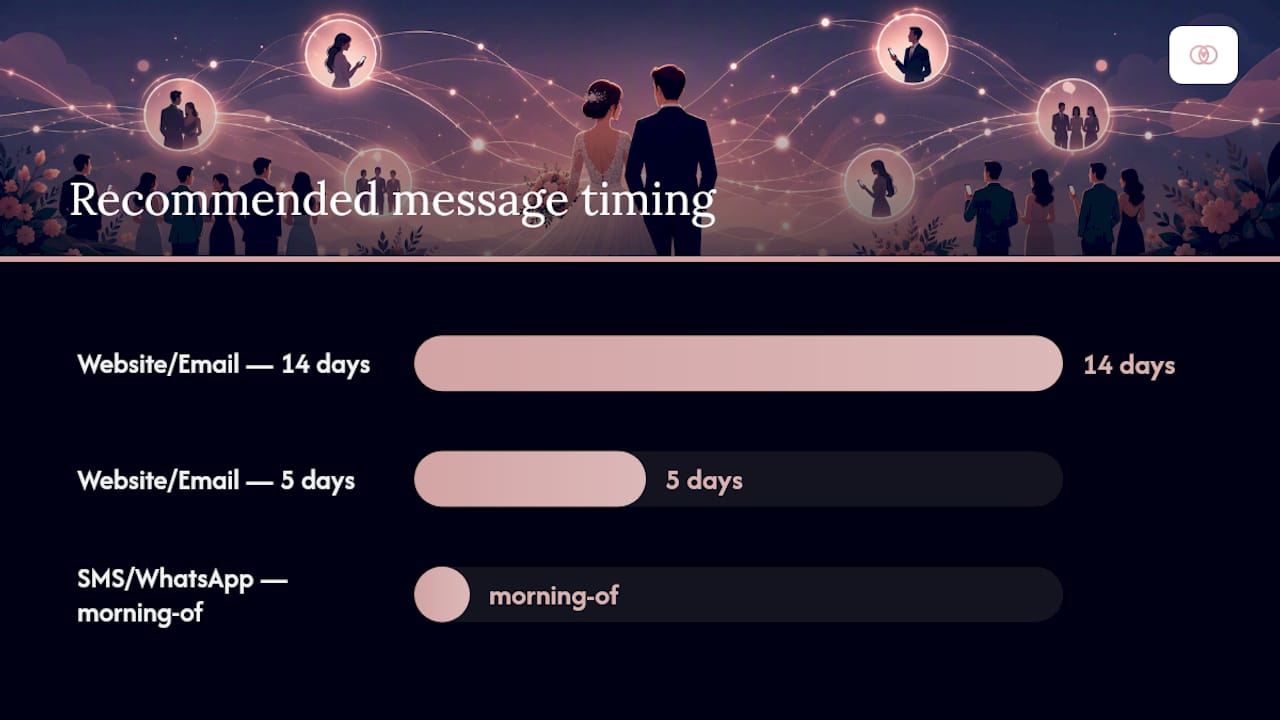
| Channel | Best For | Example Content |
|---|---|---|
| Wedding website/email | Long-form, pre-wedding info | Itinerary, hotel blocks, registry, dress code |
| SMS/WhatsApp broadcast | Time-sensitive, day-of cues | Shuttle time, room change, weather call |
Save the broadcast channel for the handful of messages that can’t wait for someone to check their inbox.
How to Set Up a Broadcast System Before the Wedding
Setup happens in two phases: before the event, and on the day itself.
Pre-event setup:
- Collect guest opt-ins and preferred contact method during RSVP.
- Build segments (ceremony-only, hosted, vendor-facing, less tech-savvy).
- Import verified phone numbers into your broadcast platform.
- Set and publicize one hospitality support number, separate from the planner’s personal line.
- Configure auto-acknowledgement replies so guests know a message was received.
- Set a fallback channel (email digest) for anyone who doesn’t text.
Day-of run checklist:
- Send a test message to your own team one hour before the first function.
- Assign one person to monitor inbound replies at the hospitality number.
- Assign a second person to escalate vendor-facing issues separately from guest messages.
- Send the morning-of reminder on schedule.
- Hold urgent updates until confirmed, then broadcast immediately to the affected segment only.
A centralized, logged platform that records delivery and read receipts turns this from a hope-based process into an auditable one.
Pro Tip: Dry-run the entire broadcast flow, including reply routing, at least once before the wedding. The gaps show up in the test, not the ceremony.
Copy-Ready Message Templates for Common Scenarios
Templates save you from writing under pressure. Keep each one under 160 characters where possible, and personalize with a name token only when it adds clarity.
- Arrival nudge: “Ceremony starts at 4 PM. Parking is at Lot B, a short walk to the garden entrance.”
- Shuttle reminder: “Shuttle departs the Marriott lobby at 3:15 PM sharp. Don’t wait, it won’t circle back.”
- Venue entry change: “Entrance moved to the east doors due to setup. Look for the white arch.”
- Weather contingency: “Ceremony is moving indoors due to rain. Same start time, Grand Ballroom.”
- Ceremony start nudge: “Please be seated now, ceremony begins in 10 minutes.”
Templates and concise wording consistently reduce repetitive guest questions and keep arrivals on schedule.
Label each template by recipient segment before the day so nobody sends the shuttle reminder to guests who drove themselves.
How TheSpecialWedding.io Centralizes Guest Broadcasts
Running broadcasts through a spreadsheet and three group chats is how messages get missed. TheSpecialWedding.io centralizes the whole workflow into one dashboard built for guest management and vendor coordination together.
The core features that matter on the wedding day:
- A single dashboard for guest segmentation, so ceremony-only and hosted-hotel groups stay separate.
- Scheduled SMS/WhatsApp-style broadcasts tied to specific segments.
- Delivery and read logging, so you can confirm a message actually reached its recipients.
- A dedicated hospitality contact field, separate from the planner’s personal number.
- Reusable message templates for the scenarios above.
A typical workflow: import the guest list, build segments, schedule the morning-of broadcast, then audit read receipts before the ceremony starts. Vendors follow the same logged workflow through shared event timelines.
Pro Tip: Require every vendor to join the event workspace before the wedding week. Their acknowledgement, plus your delivery logs, becomes your record if a “nobody told me” dispute comes up later.
Why This Model Actually Reduces Day-Of Stress
Segmenting guests and routing calls to a hospitality desk cuts down the same three questions repeated to you all afternoon. Fewer duplicated instructions mean fewer late arrivals, and a planner who isn’t fielding calls can actually run the timeline.
Ready to Run Your Next Wedding on One Dashboard?
Chasing guest replies across five different apps costs you the one thing you can’t get back on a wedding day: attention on the actual event. TheSpecialWedding.io gives planners and couples a single workspace to segment guests, schedule broadcasts, and log every delivery and read receipt in one place, so there’s no guessing whether the shuttle reminder landed.

If you’re staffing the day with outside help, the platform’s vendor directory connects you with vetted local partners, from rental companies to entertainment, who can already join your event workspace and receive the same logged updates your guests do. Start a free trial and build your first guest segment before your next wedding weekend.
Frequently Asked Questions
What’s the best way to broadcast guest updates for a wedding on the day itself? A one-way SMS or WhatsApp-style broadcast sent through a single platform, paired with a dedicated hospitality contact number for phone calls, keeps updates fast and low-noise.
Should I use a group text for wedding day updates? Group texts invite reply-all chains that bury your actual message. A one-way broadcast avoids that problem entirely.
How many day-of texts should I send guests? Three to five messages across the entire day is usually enough: a morning reminder, a pre-ceremony nudge, and any urgent changes as they happen.
What should never go in a day-of broadcast? Long-form details like full itineraries, hotel information, or dress code belong on the wedding website or in an earlier email, not a same-day text.
How do I handle guests who text back with questions? Route replies to your designated hospitality contact instead of the broadcast tool itself, so the planner isn’t pulled away from running the event.
Sources
- Designing Guest Communication: Messages, Timings, and What to Send When - The Wedding Trunk 6 Wedding Ideas and Wedding Stories
- Prodsens
- AI-Powered Real-Time Communication Logs: Ending the “I Didn’t Get the Email” Problem for Wedding Planners - DEV Community
Recommended
- Guest Management Strategies for Weddings That Work | The Special Wedding Blog
- Guest Communication in Weddings: A Planner’s Guide | The Special Wedding Blog
- Manage wedding guest lists without staff | The Special Wedding Blog
- Wedding Workflow Automation for Pros: A Practical Guide | The Special Wedding Blog
Free wedding planner templates
Skip the blank page — these templates ship with the form fields you actually need.
Browse all 9 free templates →