Client Intake Workflow: A Step-by-Step Guide for Planners
Client Intake Workflow: A Step-by-Step Guide for Planners
A client intake workflow is a repeatable, measurable sequence that moves prospects to signed clients. Build a 6-step version now and you cut manual work while raising your conversion rate.
What it achieves:
- Faster lead-to-consult conversion
- Fewer dropped details and duplicate data entry
- A first impression that signals you run a real business
Do this in the next 30 minutes:
- Capture: confirm every inbound inquiry lands in one place, not three inboxes
- Screen: write down your three non-negotiable qualifying questions
- Schedule: check that your booking link actually works on a phone
Key Takeaways
A well-built client intake workflow converts more leads because it removes friction at the exact points where prospects tend to hesitate or teams tend to drop the ball.
| Point | Details |
|---|---|
| Six-stage structure works best | Capture, screen, schedule, collect information, sign, and hand off in that order. |
| Screening saves consultation time | Ask date, budget range, and venue status before booking a call. |
| Short forms convert better | Keep first-pass intake forms under 15 fields with conditional logic. |
| Automate signatures first | E-signature and contract automation cut time-to-signature more than any other single fix. |
| Track four core metrics | Conversion rate, form completion rate, time-to-signature, and response time. |
| Pilot before full rollout | Run new workflows on fresh leads for two to four weeks before replacing the old system. |
| Thespecialwedding centralizes the workflow | Its client portals, templates, and automation connect intake forms directly to active planning workspaces. |
Table of Contents
- What Is a Client Intake Workflow and Why It Matters
- The 6-Step Client Intake Workflow That Actually Converts
- What Should a Client Intake Form Actually Ask?
- Which Tools Should You Automate First?
- How Do You Measure Intake Performance?
- How Should You Store and Protect Intake Data?
- How Do You Roll Out an Intake Workflow Without Disrupting Current Clients?
- What Most Planners Get Wrong About Intake
- Ready to Put This Workflow Into an Actual System?
- Frequently Asked Questions About Client Intake Workflows
- Sources
What Is a Client Intake Workflow and Why It Matters
A client intake workflow is the defined sequence a business follows from the moment a prospect reaches out to the moment they become an active, paying client. It covers lead capture, qualification, scheduling, information gathering, and agreement signing. Once the contract is signed, you’re in onboarding territory, not intake.
That boundary matters more than most planners realize. Intake is about deciding whether this is the right client and getting them to commit. Onboarding is about delivering on that commitment. Blur the two and you end up collecting vendor preferences before you’ve even confirmed the date works for your calendar.
Three things happen when you tighten this workflow:
- Revenue conversion improves. The American Bar Association frames intake as a firm’s first sales opportunity, not paperwork, and notes that active listening and transparent fee discussion during intake directly influence whether a prospect signs.
- Operations get lighter. Standardized steps mean staff handle intake the same way every time, whether it’s you or a coordinator answering the inquiry.
- Trust builds before the contract exists. A prospect who gets a same-day response and a clear next step assumes the wedding itself will run the same way.
Intake ends the moment the agreement is signed and the client moves into your active project system. Everything after that, timeline building, vendor coordination, guest logistics, belongs to onboarding.
The 6-Step Client Intake Workflow That Actually Converts
Most published models describe intake in four stages, Clio’s practitioner guide among them, running from lead acquisition through signed agreement. For planners, splitting that into six steps gives you more control over where leads actually stall.
1. Lead capture
Every inquiry, whether from your website, Instagram DM, referral, or a wedding show booth, needs to land in a single system within minutes, not by end of day.
- Route all channels into one inbox or CRM field, never a personal email folder
- Send an automatic acknowledgment within five minutes
- Tag the source so you know which marketing actually produces clients
- Avoid: manually copying leads between a notebook and a spreadsheet
Mini-checklist: one intake channel, one automatic reply, one source tag.
2. Pre-screening and qualification
Before you book a call, find out if this lead fits your business. The ABA’s intake best-practices guide recommends pre-screening as a standard step precisely because it prevents wasted consultation time on poor-fit prospects.
- Ask date, venue status, and rough budget range before the call
- Flag date conflicts immediately so you’re not scheduling a call you’ll cancel
- Avoid: taking every consultation call regardless of fit, which burns hours you can’t bill
3. Scheduling
A booking link beats back-and-forth email every time. Give prospects a self-service calendar with buffer time built in, and confirm by text as well as email since inquiries often come from a phone.
- Offer at least two consultation formats (video and phone, for example)
- Send a reminder 24 hours out
- Avoid: manual calendar invites that require three email rounds to nail a time
4. Intake information collection
This is where a structured questionnaire replaces a rambling first call. Send it after scheduling and before the consultation so you walk in prepared instead of taking notes live.
- Use conditional logic so a backyard wedding doesn’t get asked about hotel room blocks
- Keep it under 15 fields for the first pass; save deep detail for onboarding
- Avoid: a single giant form that asks everything a full planning contract would need
5. Agreement and signature
Once you’ve quoted and the prospect says yes, speed matters. The ABA’s nine-step model points to automated agreements and e-signature tools as the step that most reduces administrative drag and shortens time-to-signature.
- Pre-fill the contract from intake data rather than retyping it
- Set a signature deadline to keep momentum (48 to 72 hours is common)
- Avoid: PDF contracts emailed as attachments with no tracking
6. Handoff and open matter
The signed contract triggers the handoff into active planning. Zapier’s seven-step onboarding model treats this transition as its own distinct phase, with final tasks like welcome communication and system setup happening only after signature, not before.
- Move the client file into your project system the same day the contract lands
- Send a welcome message confirming next steps and timeline
- Avoid: letting a signed client sit in the same folder as active prospects
Pro Tip: Build your intake steps around your slowest bottleneck first, not your favorite one to fix. If most stalled leads die at scheduling, fix that before you touch your contract template.
Boutique studios that do high-touch work often add a discovery call before step two instead of relying purely on form answers. Volume-driven planners running short sales funnels sometimes compress steps two and three into a single automated sequence. Larger agencies with account teams tend to formalize step six into a structured handoff meeting between the sales-side planner and the execution-side coordinator, an approach wedding coordinator handoff strategies covers in more detail.
What Should a Client Intake Form Actually Ask?
Field priority matters more than field count. A form that asks for everything gets abandoned; a form that asks for the wrong three things gets you an unqualified consultation.
Must-have fields:
- Full name, email, phone
- Wedding date (or date range if undecided)
- Guest count estimate
- Budget range (a bracket, not an exact figure)
Should-have fields:
- Venue status (booked, shortlisted, still searching)
- Decision timeline (how soon they need to hire a planner)
- How they heard about you
Nice-to-have fields:
- Style or aesthetic preferences
- Specific vendor requests already in motion
Keep the first-pass form short. Clio’s intake research notes that the information-collection stage works best when it’s scoped tightly to what’s needed to quote and qualify, with deeper detail deferred to later stages. On mobile, that means fewer than 15 fields, large tap targets, and no more than one open-ended text box. Use conditional logic so a “still searching for a venue” answer skips venue-specific questions entirely; structured questionnaire templates built this way tend to see fewer abandoned submissions than static, one-size-fits-all forms.
A sample template breaks cleanly into four field groups: contact info (name, email, phone), event basics (date, guest count, venue status), budget range (bracketed, not exact), and decision timeline and constraints (when they’re hiring, must-have preferences).

Pro Tip: Ask for a budget range, never an exact number, on the first form. Prospects round down when asked for a hard figure, which skews your qualification before you’ve even talked to them.
Which Tools Should You Automate First?
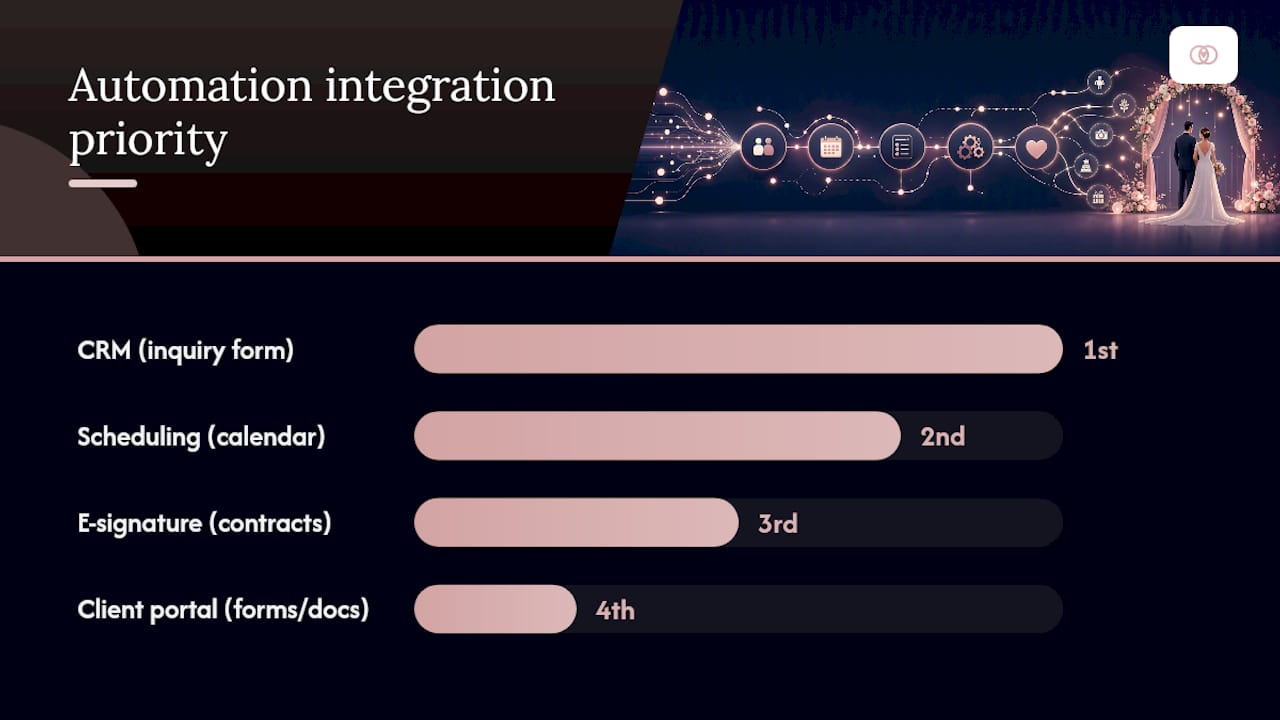
Four tool categories cover most of the intake workflow: a CRM to hold lead data, a scheduling tool for consultations, e-signature software for agreements, and a client portal to house forms and documents in one place. Client portals specifically solve the problem of intake data getting stuck in email threads instead of flowing into the actual planning workspace.
Integration priority checklist:
- Connect your inquiry form to your CRM first. If leads still need manual entry, nothing downstream will save you time.
- Connect scheduling to the CRM second, so booked calls automatically update a lead’s stage.
- Connect e-signature to your contract templates third, pulling fields directly from intake answers instead of retyping them.
- Connect the client portal last, once the first three are solid, so signed clients land somewhere organized instead of a static folder.
Two example flows show how this compounds. In the first, a website inquiry auto-populates a CRM record, triggers a calendar link by email, and once the call is booked, sends the intake questionnaire automatically two days ahead of the consultation. In the second, a completed intake form auto-generates a quote, the quote approval triggers a contract workflow, and signature completion moves the client into an active project space without anyone touching a keyboard in between.
Automated agreements and e-signature integration are the single highest-leverage automation according to the ABA’s intake framework, since manual contract handling is usually the slowest step in the entire sequence.
How Do You Measure Intake Performance?
Four numbers tell you almost everything about whether your intake workflow is working:
- Lead-to-consult conversion rate: the percentage of inquiries that turn into a booked call. A steep drop here usually means your response time or qualification questions are off.
- Intake form completion rate: the share of started forms that get finished. Low completion often points to a form that’s too long or asks for information too soon.
- Time-to-signature: days between quote sent and contract signed. This is the metric automation affects most directly.
- Contact response time: minutes or hours between inquiry and first reply.
Response time carries outsized weight. The American Bar Association’s take on intake frames responsiveness as directly tied to whether a prospect trusts the business enough to move forward, which makes a same-day reply a floor, not a bonus.
Track these weekly on a simple dashboard with four fields: inquiries received, consults booked, forms completed, contracts signed. Review monthly to spot where leads drop off, and use that view the same way you’d report progress to a business partner or investor, a practice covered in more depth in client reporting for agencies.
How Should You Store and Protect Intake Data?
Intake forms collect names, contact details, budgets, and sometimes financial information tied to deposits. Treat that data with the same care you’d want applied to your own.
- Grant access on a least-privilege basis: not every team member needs to see every prospect’s budget figures
- Use a platform that encrypts data in transit and at rest rather than storing form responses in a shared spreadsheet
- Set a retention policy: decide how long you keep data for prospects who never signed, and delete it on schedule
- Get explicit consent for any marketing use of the contact information collected at intake
Sector-specific rules can apply depending on what you collect. Healthcare-adjacent vendors need HIPAA awareness; anyone drafting binding contracts should confirm state-specific consumer contract requirements apply correctly. When intake data touches anything beyond standard event logistics, a quick check with legal counsel costs less than a data mishap later.
Pro Tip: Audit who has access to your intake system every six months. Former contractors and seasonal staff are the most common source of stale access permissions.
How Do You Roll Out an Intake Workflow Without Disrupting Current Clients?
Rolling out a new intake system works best as a staged pilot, not an overnight switch.
- Map your current flow. Write down every step a lead actually goes through today, including the messy parts.
- Build your forms and templates. Start with the must-have fields only; add complexity later.
- Integrate your tools. Connect the CRM, scheduling, and e-signature pieces in that order.
- Train your team. Walk staff through one full mock inquiry, start to signature, before going live.
- Pilot with new leads only. Run it for two to four weeks alongside your old process, not as a full replacement yet.
- Iterate based on results. Fix the step where leads actually stall, not the step you assumed would be the problem.
Watch three numbers during the pilot: form completion rate, conversion uplift versus your prior average, and staff hours saved per client processed.
Consider a small studio handling twelve inquiries a month. Before automation, a planner manually tracked inquiries in a spreadsheet, emailed contracts as PDFs, and lost track of two leads a month simply because no one followed up. After mapping the flow into a digital planning workspace with automated intake forms and e-signature contracts, the same studio can track every inquiry from first message to signed deposit inside one system.
A structured, seven-step approach to onboarding, distinct from intake but built directly on top of it, gives service businesses a standardized way to formalize the handoff once a contract closes, rather than treating it as an afterthought.
That distinction between intake and onboarding, built into a rollout plan from day one, is what keeps a growing studio from losing leads as volume increases.
What Most Planners Get Wrong About Intake
The conventional advice treats intake like a paperwork problem: get the form filled out, get the contract signed, move on. That framing misses what the research keeps pointing back to, that intake is a trust-building sequence disguised as admin work.
The planners who convert best aren’t the ones with the fanciest forms. They’re the ones who respond fastest and ask the fewest, sharpest qualifying questions before wasting a consultation slot on a bad fit. Speed and restraint beat thoroughness at this stage every time.
Where most studios overinvest is in the intake form itself, tweaking fields for months, while underinvesting in the handoff between signature and first planning meeting. That gap, not the form, is where new clients quietly lose confidence. Fix the handoff before you fix the questionnaire.
Ready to Put This Workflow Into an Actual System?
Everything in this guide works far better inside one connected system than spread across a form tool, a separate e-signature app, and a calendar that doesn’t talk to either. Thespecialwedding was built specifically for planners who need intake forms, contracts, and client portals to feed the same live workspace instead of living in five different tabs.

The platform gives you customizable intake templates with conditional logic, automated agreement and signature workflows, and a client portal that receives completed forms and pushes them straight into an active event workspace, no manual re-entry required. That means the six-step workflow outlined above isn’t something you have to stitch together from separate tools; it’s built into how the platform already works. Studios running multiple weddings at once get the added benefit of dashboards that show exactly where each prospect sits in the pipeline, so no lead goes quiet by accident.
If you’re managing more than a handful of weddings a year and still relying on spreadsheets and email threads for intake, start a free trial at Thespecialwedding and map your first form using your own must-have fields today.
Frequently Asked Questions About Client Intake Workflows
What’s the difference between client intake and client onboarding? Intake covers everything from first contact to signed agreement. Onboarding starts once the contract is signed and covers the tasks that get an active client into full planning mode.
How long should an intake form take to complete? Aim for under five minutes on the first-pass form. Anything longer tends to see completion rates drop, especially on mobile.
Do I need a CRM to run an effective intake workflow? Not immediately, but you’ll hit a ceiling fast without one. A CRM is what lets you track lead stage, automate reminders, and avoid losing prospects in a crowded inbox.
What’s a reasonable time-to-signature benchmark? There’s no single universal number, but automating contract generation and e-signature typically shortens the gap between quote and signature far more than any other single change you can make.
Should intake forms ask about budget directly? Yes, but as a range rather than an exact figure. A bracketed budget question qualifies leads without scaring off prospects who round down when asked for a precise number.
Can a small solo planner use the same six-step workflow as a large agency? Yes, with less formality at the handoff stage. A solo planner can run capture through signature identically to an agency; the difference usually shows up in step six, where agencies add a structured internal handoff meeting that a solo operator can skip.
Sources
- The 4 Steps of an Effective Client Intake Process | Clio
- Law’s new first impression: transforming client intake | American Bar Association
- 7-step client onboarding process | Zapier
Recommended
- How to Build a Wedding Planning Client Questionnaire | The Special Wedding Blog
- Wedding Quote Approvals: A Workflow Guide for Planners | The Special Wedding Blog
- Wedding planner workspace explained: boost multi-event ops | The Special Wedding Blog
- Knowledgebase | The Special Wedding | The Special Wedding
Free wedding planner templates
Skip the blank page — these templates ship with the form fields you actually need.
Browse all 9 free templates →