A Drag and Drop Seating Chart Builds Your Layout in Minutes
A Drag and Drop Seating Chart Builds Your Layout in Minutes
Use a browser-based drag and drop seating editor to build a printable seating chart in minutes, not hours. You get a floor plan, guest-seat assignments, and vendor-ready exports before you finish your coffee. Platforms like Thespecialwedding bundle this editor with guest data you already manage, and reported time savings back this up:
- Planners seating around 100 guests often finish in 30 to 60 minutes with a digital editor, versus 4 to 6 hours with paper charts and sticky notes.
- You get printable floor plans, PDF/Excel exports, and day-of guest lookup tools in the same session.
Pro Tip: Build your table layout before you drag a single guest name onto the canvas. Naming seats on an unfinished floor plan is the number one reason planners rebuild charts twice.
TL;DR:
- Setting the venue scale before guest assignment prevents the need for costly layout rebuilds and ensures accurate table placement.
- Properly mapping guest data, resolving duplicate names, and tagging groups beforehand streamlines auto-seating and reduces last-minute adjustments.
- Standard spacing of 60 inches between tables, or 72 inches for accessibility, improves flow and avoids overcrowding in the final layout.
- Exporting vendor-specific files, like Excel headcounts and print-quality PDFs, ensures smoother coordination on the event day.
- Using an integrated platform that consolidates guest management, seating, and vendor contacts minimizes data duplication and increases planning efficiency.
Table of Contents
- What Core Features Should a Drag and Drop Seating Chart Tool Have?
- How Do You Build a Seating Chart Step by Step?
- Which Table Templates Fit Your Venue Layout?
- How Do You Import and Manage Your Guest List?
- What Export and Day-Of Tools Do You Actually Need?
- What Do Experienced Planners Do Differently?
- Why Does an Integrated Platform Change Your Seating Workflow?
- The Seating Chart Is a Symptom, Not the Whole Problem
- Get Your Seating Charts Out of Spreadsheets for Good
- Key Takeaways
- Sources
What Core Features Should a Drag and Drop Seating Chart Tool Have?
A capable seating editor does more than let you drag boxes around a screen. Look for these capabilities before you commit time to any tool:
- Canvas controls: resizable and rotatable tables, chairs you can add or remove individually, and custom zones for dance floors, bars, or gift tables.
- Guest data import: CSV upload with field mapping, plus custom fields for meal choices, dietary needs, and accessibility requirements.
- Smart seating logic: auto-seat functions that fill open chairs automatically, along with keep-together and keep-apart rules for family dynamics or work rivalries.
- Capacity warnings: alerts when a table exceeds its comfortable seat count, so you catch the problem before printing.
- Output flexibility: PDF and PNG exports for signage, Excel exports for vendor headcounts, and a day-of guest search or QR poster for check-in.
- Collaboration settings: live shareable links, edit versus view-only permissions, and a mobile-friendly mode for walking the floor on event day.
Tools like Achartmaker demonstrate the baseline well, offering CSV import and unlimited free layouts you can switch between rows, banquet tables, or theater blocks. That flexibility matters when one event calls for a ceremony layout and the reception needs something else entirely.
How Do You Build a Seating Chart Step by Step?
Work in this order, and you avoid the rebuild-from-scratch problem that eats planner afternoons.
- Set your scale first. Import a venue floor plan or measure the room yourself, then set the canvas scale so table spacing reflects reality, not guesswork.
- Lay out tables and service lanes. Place every table and mark server pathways before you touch the guest list. An empty floor plan is easier to fix than one with 150 names already attached.
- Import and clean your guest CSV. Upload the spreadsheet, map the columns, then use drag and drop plus auto-seat features to fill tables quickly.
- Handle plus-ones and late RSVPs. Tag uncertain guests separately and use auto-fill to slot them in once confirmations land.
- Export the vendor packet. Generate a PDF floor plan, an Excel seat list for catering headcounts, and printable find-your-seat cards for the entrance table.
Pro Tip: Keep a “holding zone” table on your canvas for unconfirmed guests. It stops you from squeezing names into finished tables at the last minute and disrupting your careful spacing.
Which Table Templates Fit Your Venue Layout?
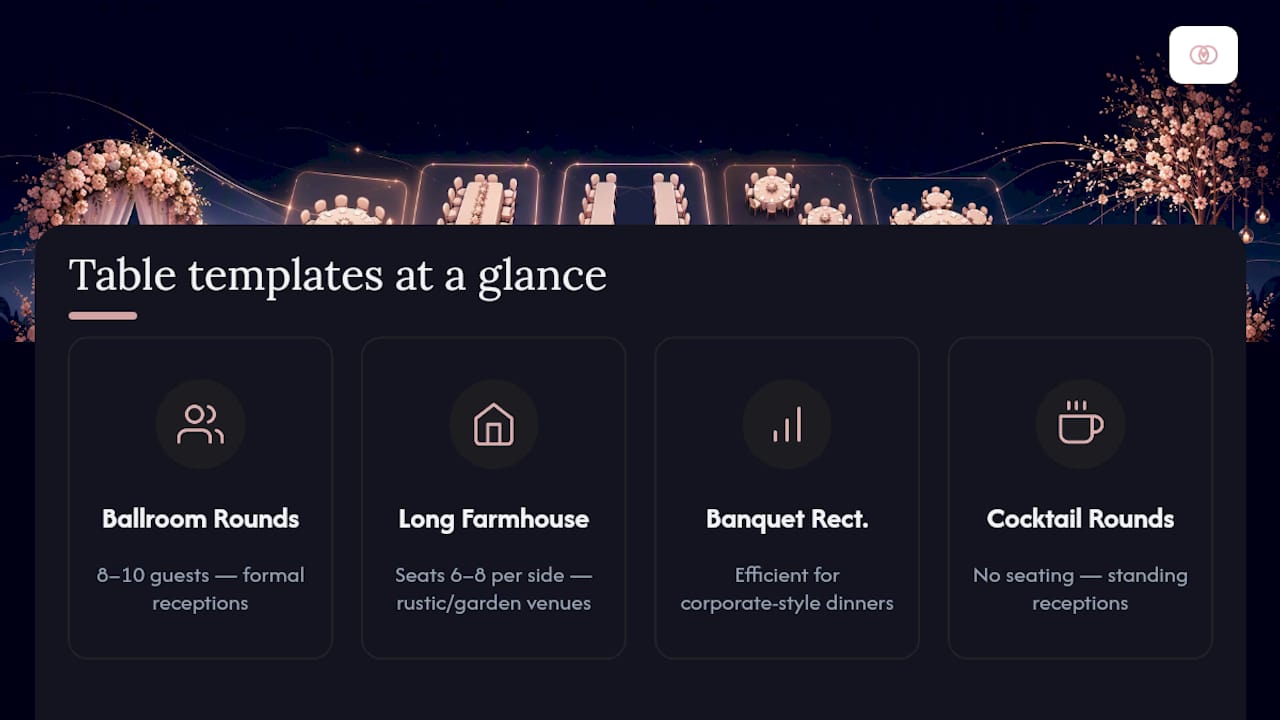
Ballroom rounds work for formal receptions with 8 to 10 guests per table. Long farmhouse-style tables suit rustic or garden venues and typically seat 6 to 8 per side. Banquet rectangles handle corporate-style dinners efficiently, while cocktail rounds with no seating fit standing receptions.

Canva’s seating chart templates show how a pre-built layout removes the blank-canvas problem entirely, letting you start from a proportioned floor plan instead of guessing table placement from scratch.
Once you pick a shape, import your venue’s photo or PDF floor plan and set the scale against a known measurement, like a doorway width. Standard planning guidance calls for 60 inches between table edges for comfortable guest movement, rising to 72 inches where wheelchair access or waiter service needs more clearance. Skipping this step is why so many charts look fine on screen and fail badly in the room.
How Do You Import and Manage Your Guest List?
A messy CSV import creates more seating headaches than any layout decision. Work through your guest data in this sequence:
- Map required columns first: full name, party size, and table assignment are non-negotiable. Add optional columns for meal choice, dietary restrictions, and accessibility notes.
- Tag guests by group: VIPs, family clusters, and dietary categories should show up as visual tags on the canvas, not buried in a spreadsheet you have to reopen constantly.
- Resolve duplicate names manually. Two “Sarah Johnsons” on one list will break auto-seat logic unless you rename fields to distinguish them.
- Consolidate plus-one fields into single rows rather than leaving blank placeholder entries the editor can’t process.
- Process late RSVPs as a batch, not one at a time, so you’re not renegotiating table balance every few days.
Solid guest management strategies upstream of your seating chart save far more time than any single editor feature.
What Export and Day-Of Tools Do You Actually Need?
Vendors rarely want the same file format you use for editing. Catering teams typically need an Excel headcount by table; venues want a high-resolution PDF floor plan; your entrance staff need something a guest can read from three feet away.
- PDF at print resolution for floor plans, plus PNG for quick digital sharing with clients.
- QR “find my seat” posters at the entrance, paired with a live mobile search mode so guests self-serve instead of lining up.
- Edit access limited to your core team, with view-only links for vendors and clients who only need to confirm details.
- Signage printed at least 18x24 inches for legibility across a room, at 300 DPI minimum.
Tools built for venue-scale accuracy, like Seatmap, support SVG floor plan import and production-ready exports, which is the standard planners should expect from any serious editor.
What Do Experienced Planners Do Differently?
Design the layout before you seat a single guest. That single habit separates planners who finish charts in an afternoon from those still shuffling names the night before the event. Grouping tags and auto-seat functions handle bulk assignments fast, and they make last-minute swaps painless because you’re moving a tag, not manually reassigning ten individual guests.

Resist the urge to pack tables tight for a fuller-looking room. Tight spacing blocks service lanes and makes wheelchair access impossible, and it shows the moment servers start working the floor.
Pro Tip: If you find yourself deleting and redrawing more than three tables to fix a spacing problem, stop patching and rebuild the layout from scratch. A patched floor plan usually hides a scale error you’ll rediscover at the worst possible moment.
Reviewing seating coordination tactics that other planners rely on can surface blind spots before they become day-of problems.
Why Does an Integrated Platform Change Your Seating Workflow?
Running your guest list in one app, your seating chart in another, and vendor communication over email creates duplicate data entry, and duplicate data entry creates errors. A planner managing four weddings in one month doesn’t have room for a guest count that disagrees between the caterer’s spreadsheet and the seating chart.
Thespecialwedding combines guest management, a seating editor, a vendor directory, and team collaboration in one workspace, so a guest tagged with a dietary restriction in your intake form shows up automatically on the seating canvas.
Combining guest lists, seating tools, and vendor directories into a single workspace cuts the duplicate data entry that eats hours across a busy planning season.
That structure matters more as your event volume grows. A guest management system built for planners handles:
- Centralized guest records shared across intake, seating, and vendor communication.
- A vendor directory linked directly to event details, cutting down on repeated back-and-forth.
- Team permissions so associate planners edit while clients only view.
The Seating Chart Is a Symptom, Not the Whole Problem
Most seating chart advice treats the chart as an isolated design task, something you knock out the week before the wedding with a template and a guest list. That framing misses what actually breaks seating plans: bad data flowing in from somewhere else. A guest count that doesn’t match the caterer’s invoice. A dietary tag that never made it from the intake form. A plus-one who RSVP’d twice under two spellings of their name.
The layout-first, seat-second workflow works because it forces you to solve spatial problems before data problems compound them. But the deeper lesson is that seating charts fail less often from bad drag and drop tools and more often from disconnected systems feeding them bad information.
Planners who treat guest management, vendor coordination, and seating as one continuous workflow spend less time firefighting during the final two weeks before an event. That’s the real argument for consolidating tools rather than stitching together five single-purpose apps. The chart itself is rarely the hard part. Keeping the data behind it clean is.
— JOATLABS
Get Your Seating Charts Out of Spreadsheets for Good
Thespecialwedding is built for planners juggling more than one wedding at a time, where a seating chart disconnected from your guest list and vendor contacts becomes another spreadsheet to babysit. Instead of exporting a guest list from one app to paste into a seating tool, then emailing a floor plan to your caterer separately, your guest data, seating editor, and vendor directory live in the same workspace.
That means a dietary tag entered during client intake appears automatically when you’re assigning tables, and a finalized floor plan exports straight to the format your venue and catering team need. If you’re coordinating multiple events per season, this removes the reconciliation work that eats your Tuesday afternoons. Start a free trial and build your next seating chart inside a workspace that already has your guest list and vendor contacts ready to go.
Key Takeaways
A drag and drop seating editor works best when you lock in table layout and venue scale before assigning a single guest name.
| Point | Details |
|---|---|
| Layout comes first | Set table shapes, spacing, and service lanes before importing any guest names. |
| Clean CSV data matters most | Map required fields and resolve duplicate names before running auto-seat features. |
| Spacing follows a standard | Leave 60 inches between table edges, or 72 inches where accessibility or service requires more room. |
| Export for vendors, not just yourself | Vendors need Excel headcounts and print-resolution PDFs, not your editing file. |
| Integrated platforms cut duplicate work | Thespecialwedding links guest data, seating, and vendor directories in one workspace for planners managing multiple events. |
Sources
Recommended
- Seating Chart Strategy: Beyond Drag-and-Drop | The Special Wedding Blog
- Role of Seating Arrangement Tools for Wedding Planners | The Special Wedding Blog
- Wedding Event Seating Coordination Tips That Work | The Special Wedding Blog
- Wedding Seating Arrangement Software Comparison for Agencies | The Special Wedding Blog
Free wedding planner templates
Skip the blank page — these templates ship with the form fields you actually need.
Browse all 9 free templates →