What to Include in a Wedding Post-Event Report
What to Include in a Wedding Post-Event Report
A wedding post-event report is a written summary of how the wedding went versus how it was planned, covering timeline execution, vendor performance, budget outcomes, and client satisfaction. You don’t need to build this from scratch after every event. Three deliverables cover most of what a client, a vendor partner, or your own files will ever need.
Send these within a few days after the wedding, while details are still sharp and before the couple moves fully into married life:
- Executive summary — one page covering objective, timeline adherence, and overall outcome
- Vendor performance and budget reconciliation — contracted vs. actual costs, plus notes on each vendor’s delivery
- Client feedback summary — survey results or a short conversational follow-up
Send the executive summary and feedback survey to the couple, and reserve the vendor scorecard and budget reconciliation for internal files or your agency’s leadership. A well-designed evaluation survey should capture overall experience, communication, vendor coordination, budget management, and creativity, plus a direct recommendation question.
Key Takeaways
A wedding post-event report works when it pairs an honest budget and vendor reconciliation with a short client survey sent within a week, then feeds both into KPIs tracked across every event.
| Point | Details |
|---|---|
| Send within a week | Deliver the executive summary and feedback survey within three to seven days of the wedding. |
| Cover eight core sections | Include overview, timeline, vendor notes, budget, guest metrics, feedback, incidents, and action items. |
| Keep surveys short | Limit client surveys to six questions or fewer to protect response rates. |
| Assign one report owner | Give one person responsibility for vendor sign-offs, invoices, and the summary deadline. |
| Centralize with TheSpecialWedding.io | Use shared timelines, vendor records, and client portals to build reports from real-time data instead of memory. |
Table of Contents
- Event Reporting for Wedding Planners: The Section-by-Section Checklist
- Templates You Can Copy: Survey, Summary, and Sample Report Language
- How to Capture Event Data Without Creating Chaos on the Day
- Turning Reports into Business Improvement: KPIs and Vendor Scorecards
- How TheSpecialWedding.io Maps to Every Report Deliverable
- Legal and Privacy Considerations in Client Feedback Collection
- Editorial Take: What Most Planners Get Wrong About Reporting
- Get Your Reporting Workflow Running With TheSpecialWedding.io
- Sources
Event Reporting for Wedding Planners: The Section-by-Section Checklist
A report that skips structure reads like a diary entry. A report built section by section reads like a business document your clients trust and your future self can search. Here’s the checklist worth copying into your own template.
1. Event overview and objective vs. outcome. State the wedding date, venue, guest count, and the couple’s original three top priorities (say, “seamless outdoor to indoor transition” or “budget under $45,000”). Then state plainly whether each was met.
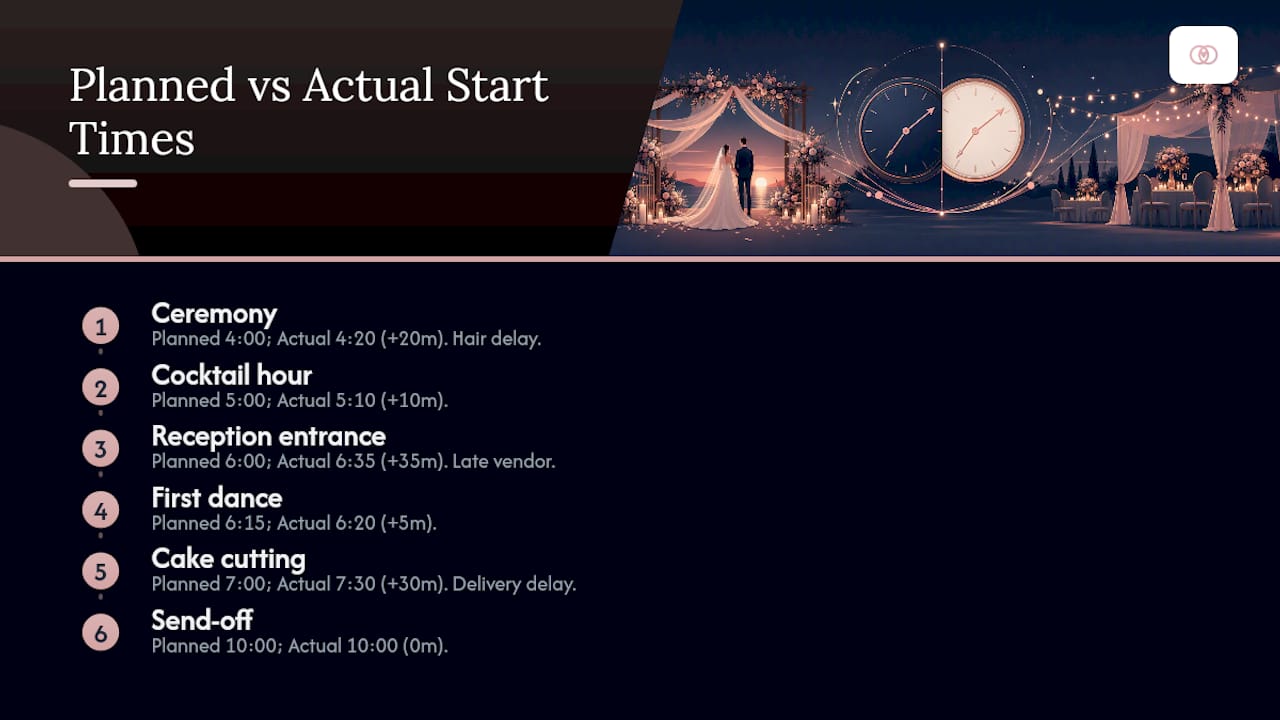
2. Timeline and runsheet highlights. Note the planned start time against the actual start time for each phase: ceremony, cocktail hour, reception entrance, first dance, cake cutting, send-off. Flag deviations over 15 minutes and explain the cause, whether it was a hair and makeup delay or a late-arriving delivery truck.
3. Vendor performance notes. List every contracted vendor with arrival time, setup completion time, and a short performance note. This becomes the raw material for your vendor scorecard later.
4. Budget reconciliation. Put contracted amount, final invoiced amount, and variance side by side for every line item: catering, florals, rentals, photography, day-of staffing.
5. Guest metrics and accessibility notes. RSVP count vs. actual attendance, any accessibility accommodations requested and whether they were delivered (wheelchair-accessible seating, dietary substitutions, sign language interpretation).
6. Client feedback summary. Pull the top three quotes or scores from your survey and summarize the overall sentiment in two or three sentences.
7. Incident log and insurance notes. Document anything that could matter for liability: a minor injury, weather damage, a vendor no-show, a broken rental item. Even a “no incidents to report” line has value, because it proves you tracked this deliberately.
8. Lessons learned and action items. This is the section most planners skip and the one that actually improves your business. Write down what you’d change next time and who owns fixing it.
Cover these eight sections and your report does double duty: it reassures the client their money was well spent, and it becomes internal documentation you can mine for KPIs across every wedding you run.
Templates You Can Copy: Survey, Summary, and Sample Report Language
You don’t need custom software to start reporting well. You need three artifacts, and here they are in a form you can adapt today.
The short post-wedding survey. Keep it under six questions. Response rates drop fast past that point, and smaller planners who send conversational, short surveys directly to the couple consistently see better completion than planners who send long forms. Recommended structure:
- Overall experience rating (1 to 10 scale)
- Communication and responsiveness rating (1 to 5 scale)
- Vendor coordination satisfaction (1 to 5 scale)
- Budget management satisfaction (1 to 5 scale)
- One open text field: “What’s one thing we could have done better?”
- “Would you recommend us to a friend planning a wedding?” (yes/no plus optional quote)
The one-page executive summary. Structure it around three KPIs: timeline adherence percentage, budget variance percentage, and client satisfaction score. Add a two-sentence narrative above the numbers and a signature line below.
A sample excerpt, written in the tone you’re aiming for:
That excerpt does three things at once: states a fact, states its impact, and quantifies the outcome. That’s the register your report should live in throughout.
Pro Tip: Add one sentence noting how you validated the numbers, such as “figures confirmed against signed vendor invoices and the final guest check-in count.” It costs nothing to write and it measurably increases client trust in the document.
How to Capture Event Data Without Creating Chaos on the Day
Good reports are built during the wedding, not after it. Waiting until Monday to reconstruct what happened means relying on memory, and memory is a bad source document.
1. Assign data roles before the event starts. Give one team member ownership of setup logging (vendor arrival times, delivery confirmations), one of ceremony and reception timing (actual start times against the runsheet), and one of teardown (damage, lost items, final headcount). On smaller weddings, one lead coordinator can hold all three roles as long as they know it’s their job going in.

2. Capture the data that actually matters in real time. Vendor arrival and departure times, guest check-in counts against the RSVP list, every timeline deviation over 10 minutes, and anything resembling an incident. A shared, client-facing timeline that vendors update themselves cuts this workload substantially, since timestamps get logged as they happen rather than reconstructed afterward.
3. Collect the file types you’ll need for reconciliation. Signed vendor arrival cards, final invoices, CSV exports of the guest list, and a folder of day-of photos for visual proof of setup quality.
4. Consolidate within 48 to 96 hours. Waiting longer risks losing detail; rushing same-day risks missing invoices that arrive a day or two later. A useful rule: designate one person as report owner whose only job is collecting vendor sign-offs and invoices and compiling the executive summary within seven days. That single point of ownership prevents the common failure mode of three people assuming someone else has the invoice.
Turning Reports into Business Improvement: KPIs and Vendor Scorecards
A report that gets filed and forgotten is wasted effort. The value shows up when you track the same metrics across every wedding and use the pattern to make decisions.
Four KPIs are worth tracking on every event:
- On-time rate — percentage of timeline milestones hit within 15 minutes of schedule
- Vendor issue rate — number of vendor problems per event, tracked by vendor and by category
- Budget variance — percentage difference between contracted and final cost
- Satisfaction score — your survey’s overall experience rating, tracked over time
Run a 30-minute post-mortem with your team within a week of the wedding. Walk through the incident log, assign an owner to each lesson learned, and set a deadline. “Fix the setup checklist” isn’t an action item; “Maria updates the setup checklist by Friday to add a florist arrival buffer” is.
Positive feedback deserves a second life beyond the file. A 9-out-of-10 rating with a specific compliment about floral execution becomes a testimonial with the client’s permission, and a wedding with strong budget adherence and a five-star review becomes a case study for your next sales pitch.
Pro Tip: Keep a running vendor scorecard across every wedding, not just a per-event note. A florist who’s late twice in six months is a pattern worth addressing before you rebook them, not after the third late arrival.
Given that the U.S. wedding planning industry has grown at roughly 13.1% annually in recent years, planners who systematize this kind of reporting are better positioned to scale, since a repeatable process handles volume that ad hoc reporting can’t.
How TheSpecialWedding.io Maps to Every Report Deliverable
Every deliverable above maps to a specific workflow, and building each one manually across a dozen weddings a year adds up fast. TheSpecialWedding.io was built around that exact problem: replacing scattered spreadsheets and email threads with one workspace where the report writes itself as the event unfolds.
- Survey and feedback collection run through branded client portals, so responses land in one place instead of scattered inboxes
- Runsheet and timeline capture happen in real time through shared, editable timelines vendors and planners both update
- Vendor logs get built automatically from onboarding records and day-of check-ins, feeding directly into performance notes
- Invoice and budget data stay attached to each vendor record, so reconciliation is a lookup instead of a hunt through email
Shared timelines and dashboards that centralize guest counts and vendor timestamps as they happen are exactly what planning software checklists recommend prioritizing, and it’s the same principle behind reducing reconciliation time from days to hours.
| Report deliverable | How the platform handles it |
|---|---|
| Client feedback | Branded portal survey delivery and response tracking |
| Vendor performance | Automated logs from onboarding and day-of check-ins |
| Budget reconciliation | Invoice data attached directly to vendor records |
| Timeline deviations | Shared, real-time runsheet updates from all vendors |
Legal and Privacy Considerations in Client Feedback Collection
Client feedback surveys collect personal opinions, contact details, and sometimes sensitive information about guests, such as dietary or accessibility needs. Treat that data with the same care you’d want applied to your own.
Get explicit permission before publishing any testimonial or photo tied to a client’s name. A verbal “thanks, that was great!” text message is not consent to post a quote on your website; ask directly, and keep a record that you asked.
State clearly in your survey or intake paperwork how feedback will be used, whether that’s internal quality tracking, marketing testimonials, or vendor performance reviews shared with those vendors. If you plan to share a couple’s satisfaction score with the florist or caterer, say so upfront, since some clients are candid about vendors internally but wouldn’t want that feedback forwarded verbatim.
Store guest accessibility notes, dietary restrictions, and any incident details involving named individuals separately from marketing materials, and limit access to your core team. This information has no business purpose beyond the operational report it supports.
If your survey tool or CRM stores client data digitally, check what that platform does with it: whether it’s sold, shared with third parties, or retained indefinitely after the relationship ends. Planners running multiple weddings a year accumulate a meaningful volume of client data over time, and that data deserves the same scrutiny you’d apply to any other business record.
Editorial Take: What Most Planners Get Wrong About Reporting
The conventional advice treats post-event reporting as a courtesy gesture, a nice closing note to make the client feel appreciated. That framing undersells it. The real value of a report isn’t in the sending, it’s in the pattern that emerges once you’ve sent thirty of them.
Most planners who skip reporting aren’t lazy. They’re exhausted after the wedding and treat the report as optional homework rather than the mechanism that turns one good wedding into a repeatable business. The KPIs matter more than the polish. A report with a plain-text executive summary and honest budget variance numbers beats a beautifully designed PDF that omits the vendor who showed up late.
Where the industry advice falls shortest is on ownership. Everyone agrees reporting matters; almost nobody assigns a single person to own it. Assign that role before the wedding day starts, not after. The report you write in the fog of a Monday morning, working from memory and a scattered photo folder, is never as useful as the one built from real-time notes a coordinator logged during setup.
— JOATLABS
Get Your Reporting Workflow Running With TheSpecialWedding.io
Building the checklist above by hand, spreadsheet by spreadsheet, works for one wedding. It breaks down fast once you’re running six or ten a season and trying to remember which vendor invoice matched which contracted line item. TheSpecialWedding.io replaces that scramble with a single workspace where survey responses, vendor logs, and budget reconciliation live in one place from the day you sign a client to the day you send the final report.

The platform suits solo planners who want their first repeatable reporting process as much as agencies coordinating multiple teams across a full wedding season. Client portals handle feedback collection automatically, vendor records carry invoice and performance history from booking through delivery, and shared timelines mean your runsheet deviations are already logged before the reception ends. If you’ve read this far because building reports manually is eating your week, that’s exactly the gap this closes.
Start a free trial at Thespecialwedding and set up your first client portal before your next wedding weekend.
Sources
- Wedding Planners in the US - Market Size 2006–2031 | IBISWorld
- Evaluation Survey Template for Wedding Planners | ISRP Group
- How to choose the best online wedding planner software for your business | PlanningPod
Recommended
- Client Reporting for Wedding Agencies: Prove Value Monthly | The Special Wedding Blog
- Wedding Planner Contract Essentials: What to Include in 2026 | The Special Wedding Blog
- How to Build a Wedding Planning Client Questionnaire | The Special Wedding Blog
- Wedding Event Setup Breakdown Checklist for Planners | The Special Wedding Blog
Free wedding planner templates
Skip the blank page — these templates ship with the form fields you actually need.
Browse all 9 free templates →