4 Offline Mode Practices That Save Multi Event Wedding Studios Time
4 Offline Mode Practices That Save Multi Event Wedding Studios Time
Offline-first mobile apps with local caching and queue-based sync let professional wedding planners run guest check-in, seating, and vendor tasks without a live connection, then reconcile everything once signal returns. That is the operational fix for dead zones at barns, ballrooms, and vineyard venues. Platforms like Thespecialwedding build this directly into their event-day tools, so a planner’s team never has to choose between “offline” and “organized.”
TL;DR:
- Every offline-capable app should cache the full guest list locally and support local guest search, even with typos or zero signal.
- Offline check-ins, seating, and vendor updates are queued locally and synchronized automatically once a reliable connection is reestablished.
- Conflict resolution must flag duplicate edits and log changes, avoiding silent overwrites and reducing reconciliation time after the event.
- Testing offline functionality should include device-specific load, conflict scenarios, and on-site validation before the event begins.
- Data security requires local encryption, tamper-evident audit logs, and remote wipe capabilities to protect sensitive client information offline.
Table of Contents
- What “offline-first” actually means for wedding planning software
- Core offline features planners must demand
- How offline sync and post-event reconciliation actually work
- On-site workflows a solid offline mode actually powers
- Building a pre-event testing routine for offline readiness
- Operational best practices that keep offline teams in sync
- Security, data integrity, and backups for offline workflows
- When offline mode isn’t enough: continuity planning
- Why we built offline capabilities into our platform
- Run your next event on offline-ready software, not hope
- Sources
What “offline-first” actually means for wedding planning software
Offline-first is not the same as “works when the Wi-Fi drops.” It means the app is built to run primarily off a local database on the device, then push and pull changes to the cloud whenever a connection exists. Every guest record, seating chart, and vendor task lives on the phone or tablet first. The server sync is a background job, not a requirement to function.
This matters because offline-first event platforms pre-sync attendee records and permissions to local devices, so a name lookup or seat change happens instantly on the device instead of waiting on a round trip to a server. Conflict resolution rules decide what happens when two staff tablets scan the same guest or edit the same seating table at once. Well-built systems flag the conflict, keep both edits in a log, and let one team member resolve it later rather than silently overwriting data. Staff logins by PIN rather than password matter here too. A four-digit code takes two seconds to hand off between coordinators; a forgotten password stalls the whole check-in line.
Core offline features planners must demand
Not every “works offline” claim holds up under real event conditions. Before you commit a team to a platform, confirm it handles these basics without a network:
- Local guest-list caching with fast, fuzzy search so a coordinator can find “Smith, table 12” even with a typo and zero bars.
- Queued check-ins that record a scan locally and hold it for sync, rather than freezing the app when it cannot reach a server.
- Offline seating map edits that let one device move a guest while another still shows the old layout, safely, until sync catches up.
- Vendor task updates (delivery confirmed, setup complete) that log offline and push once connectivity returns.
- Audit logs with timestamps on every offline action, so reconciliation has a clear record of who did what, and when.
Practical offline-first implementations cache a full attendee list locally and queue scans until connectivity returns, which is the baseline, not a premium feature, for any tool handling medium to large guest counts.
Pro Tip: Ask any vendor demo team to switch every device to airplane mode mid-pitch. If check-in, seating, and task logging still work smoothly, you’re looking at real offline architecture, not a marketing claim.
How offline sync and post-event reconciliation actually work
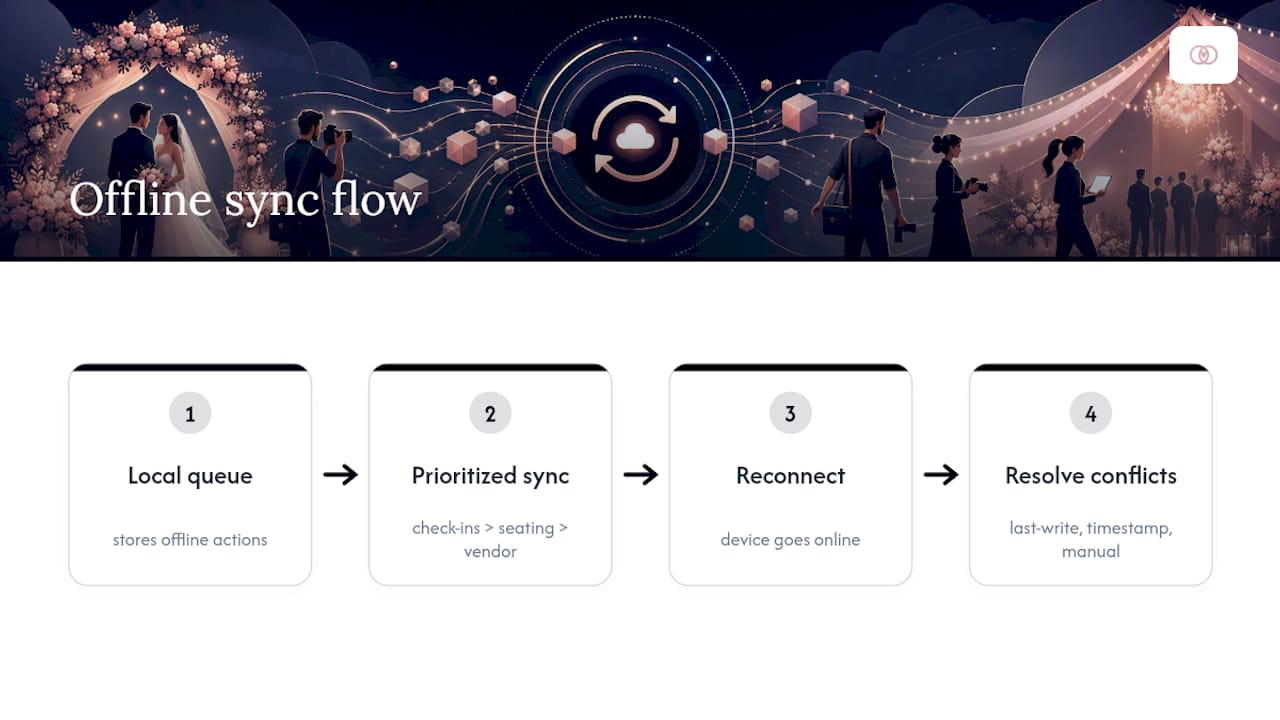
Every offline action, a check-in, a seating swap, a vendor note, sits in a local queue until the device reconnects. Good sync engines prioritize that queue by what breaks the event fastest if delayed: guest check-ins first, seating edits second, vendor notes last. Conflicts arise when two devices edit the same record while both were offline. The common resolution policies are “last write wins” (simple, but risky), timestamp-based merging, or a flagged manual review.
Skipping strong sync infrastructure has a real cost. A failure to use offline-capable, real-time sync systems can create a data reconciliation gap that takes several days to resolve, which for a studio running a few weddings per quarter means absorbing that cleanup burden multiple times a year. That’s staff hours spent untangling guest counts and vendor confirmations instead of booking the next client. Architecture built around normalized, deduplicated records closes that gap in hours, not days.
On-site workflows a solid offline mode actually powers
The real test of offline mode is the wedding day itself, not the sales demo. Here’s how it plays out on a well-run event:
- Morning of, before doors open: every staff tablet does a full sync, pulling the final guest list, seating chart, and vendor schedule so each device starts identical.
- At the entrance: coordinators scan or search guests locally; the app validates instantly against the cached list, no server call needed, which is exactly what keeps a check-in line moving instead of stalling.
- Mid-reception: a coordinator moves a late arrival to an open seat on one tablet; the seating map updates locally and queues for sync.
- Backstage: a vendor marks setup complete on their assigned task, offline, and it logs with a timestamp for the planner to confirm later.
Each device works independently until the network returns, then reconciles automatically.
Building a pre-event testing routine for offline readiness
Offline mode that hasn’t been tested under real conditions is a liability disguised as a feature. Build these checks into your pre-event routine:
- Airplane-mode test on every device model your team actually carries, not just the newest one. Older tablets often cache differently.
- Load test with the full expected guest count checking in within a short window, since concurrent scans strain local storage differently than a slow trickle.
- Rehearse a conflict scenario deliberately: two devices edit the same seat, then confirm the app flags it instead of quietly dropping one edit.
- Verify post-event sync completes fully before staff leave the venue, closing the loop instead of discovering gaps the next morning.
Testing offline behavior across device types and network conditions before doors open catches failures in a rehearsal, not in front of 200 guests.
Pro Tip: Run your airplane-mode test in the actual venue, not your office. Concrete walls, metal roofing, and rural cell towers behave nothing like your studio’s Wi-Fi.
Operational best practices that keep offline teams in sync
Software handles the data layer, but your team’s habits determine whether reconciliation takes ten minutes or ten days. A few standing rules make the difference:
- PIN-based logins for every staff device, so handing a tablet to a last-minute coordinator doesn’t require a password reset mid-event.
- One named person owns final reconciliation after every event, so no one assumes “someone else” is merging the queued edits.
- Written edit-priority rules (check-ins beat seating edits, seating edits beat vendor notes) so staff aren’t guessing during a conflict.
- A one-page troubleshooting script for the most common offline glitches, taped inside the day-of binder or pinned in the team chat.
This kind of structure scales cleanly whether you’re running a solo operation or coordinating multiple weddings in a single weekend.
Security, data integrity, and backups for offline workflows
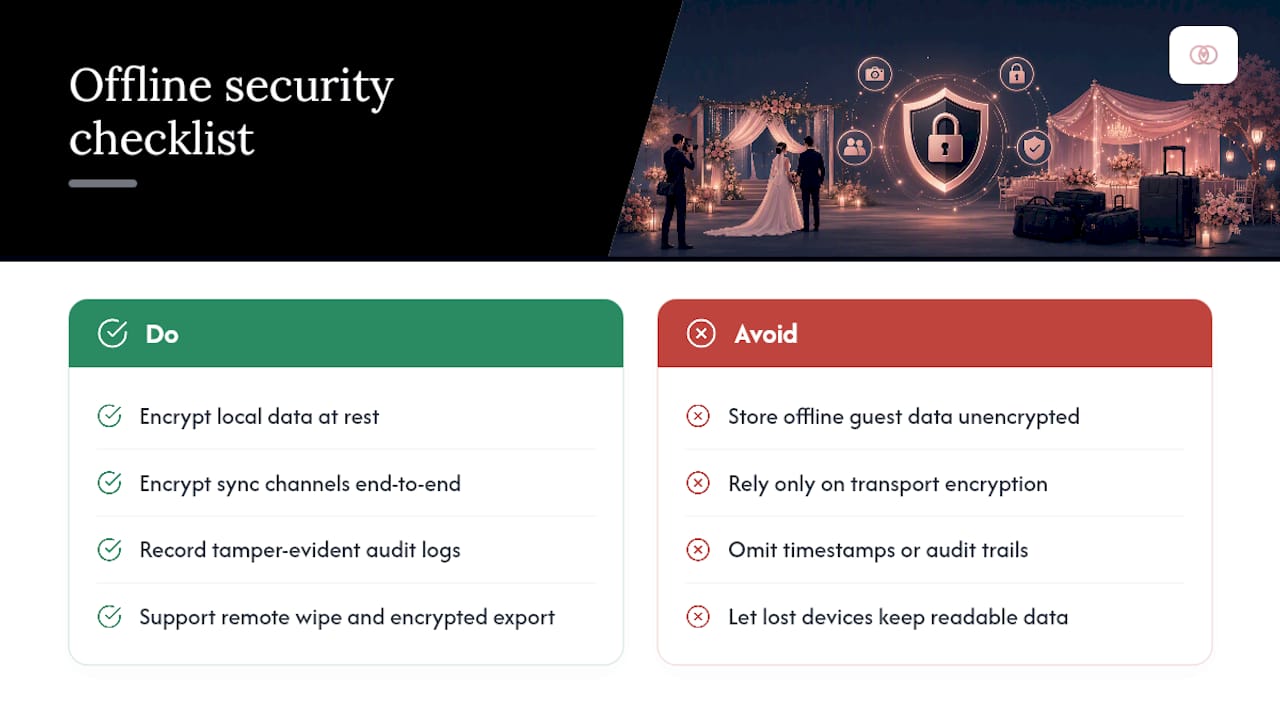
Offline capability without security is just a different way to lose client data. Any platform holding guest lists, contracts, or payment details offline needs local encryption at rest, not just encryption in transit once it reaches the cloud. Sync channels should be encrypted end to end, so a queued batch of guest edits isn’t sitting exposed on public event Wi-Fi.
Audit logs matter as much for security as for reconciliation. A tamper-evident timestamp on every action means you can prove who edited a seating chart or confirmed a vendor delivery, which protects both your studio and your client if a dispute comes up later. Ask any vendor whether devices support remote wipe and whether local data can export in an encrypted format for backup, since a lost or stolen tablet should never mean a lost guest list.
When offline mode isn’t enough: continuity planning
Offline mode covers dropped signal, not total device failure or persistent sync errors. Set clear escalation triggers: if a device shows repeated sync failures after three attempts, or local data looks corrupted, staff switch to a documented manual fallback immediately rather than troubleshooting mid-ceremony.
Continuity architectures that run an event locally and resync later are the model here. Designate one printed or single-device master list as the source of truth during an outage, and assign one person to update clients and vendors if the tech genuinely fails. Guests should never notice the difference.
Why we built offline capabilities into our platform
Planners kept telling us the same thing: check-in chaos happens the moment Wi-Fi drops and not before. That pattern shaped how Thespecialwedding built its guest check-in workflow, where studios using offline-ready QR kiosks cut check-in time by roughly 75%. Local caching, queued scans, and team PINs aren’t add-ons in our platform; they’re how the core workspace is built. Test it against your worst venue’s dead zone and see what happens.
— JOATLABS
Run your next event on offline-ready software, not hope
Most planning tools claim “offline mode” as a checkbox; few actually cache the full guest list, queue check-ins, and let your team keep working when a rural venue’s signal disappears mid-reception. TheSpecialWedding.io is built around that exact scenario, giving planners local guest-list caching, queued check-in scans, PIN-based staff logins, and automatic reconciliation tools once connectivity returns, instead of a spinning loading icon at the worst possible moment.

The platform’s vendor task management tools sync the same way, so a florist’s setup confirmation or a caterer’s delivery note logs offline and reconciles with everything else automatically. Real vendor profiles already live on the platform, including planners like Events By Suad and venues like V2 Events at Vast, showing exactly how the vendor side integrates with your event-day workflow. Start a free trial and run one live event through the offline check-in flow before your next wedding weekend.
Sources
- Astera - data synchronization tools (industry documentation)
- How offline-first event platforms handle 10,000+ attendee check-ins without network bottlenecks - DEV Community
- Maximizing mobile event apps in 2026: offline capabilities and engagement tactics - TicketFairy blog
Recommended
Free wedding planner templates
Skip the blank page — these templates ship with the form fields you actually need.
Browse all 9 free templates →