Payment Reminders for Wedding Clients: A Pro's Guide
Payment Reminders for Wedding Clients: A Pro’s Guide
Use a three-step automated cadence — 14 days, 7 days, and 2 days before each due date, followed by an overdue escalation sequence — and include a direct payment link in every message. That single system eliminates most late payments before they happen.
- Attach the invoice PDF to every email reminder, state the exact dollar amount, and write “Payment Reminder” in the subject line so the message clears inbox filters and gets opened.
- Automate the sequence in your planning tool so reminders pause the moment payment is recorded — The special wedding’s client portal handles this automatically, preventing the awkward follow-up after a client has already paid.
- For larger final balances, track each vendor payment milestone and add a 30-day reminder ahead of the standard cadence, since those payments often require partner coordination or a bank transfer.
Key Takeaways
A three-step automated reminder cadence (14 days, 7 days, 2 days) with pause-on-payment is the most reliable system for reducing late payments from wedding clients.
| Point | Details |
|---|---|
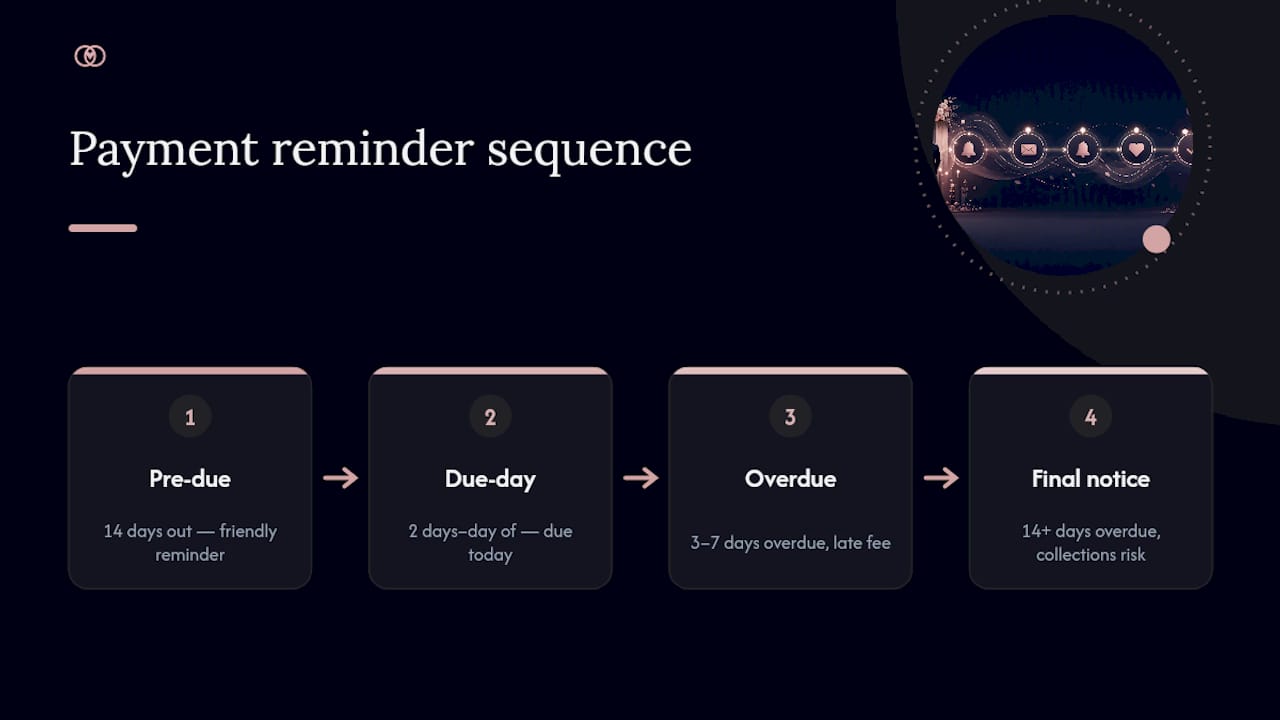
| Use a fixed cadence | Send reminders at 14, 7, and 2 days before each due date, plus an overdue sequence at 3, 7, and 14 days. |
| Every reminder needs five fields | Include invoice number, exact amount, due date, payment methods, and a direct payment link in every message. |
| Match channel to stage | Use email for all scheduled reminders, SMS for 2-day nudges (with opt-in), and phone only for overdue escalations. |
| Add escalation language to your contract | A late-fee clause and a clear retainer vs. deposit distinction reduce disputes before they start. |
| Thespecialwedding automates the full workflow | The platform handles scheduled reminders, pause-on-payment, branded templates, and a shared client portal in one workspace. |
Table of Contents
- What’s the right payment reminder cadence for wedding clients?
- Which channels work best for sending wedding payment notifications?
- How do you write a polite payment reminder that actually gets opened?
- Copyable email templates for every stage of the reminder sequence
- Short SMS and voicemail scripts you can use right now
- What every payment reminder and invoice must include
- How many reminders should you send, and what happens when clients don’t pay?
- What automation features actually matter for wedding payment workflows?
- A full automated workflow from contract signing to final payment
- Why a structured reminder system changed how I manage client payments
- Thespecialwedding makes this entire workflow ready to run
- Sources
What’s the right payment reminder cadence for wedding clients?
The most practical cadence for payment reminders to wedding clients follows a 3-step structure: retainer due at contract signing, a midpoint payment, and a final balance. According to OurVows, most vendors request final payment roughly 10–14 days before the wedding, while venues often require 30–60 days out. Build your reminder schedule backward from those deadlines.
Here is a ready-to-copy cadence table:
| Days Before Due Date | Tone | Message Type |
|---|---|---|
| 30 days (venue/large balance only) | Friendly heads-up | Email with invoice attached |
| 14 days | Friendly reminder | Email + payment link |
| 7 days | Warm but clear | Email + SMS nudge |
| 2 days | Direct | Short email + SMS |
| Due day | Neutral | Email only (no SMS unless opted in) |
| 3 days overdue | Firm | Email with late-fee notice |
| 7 days overdue | Firmer | Email + phone call |
| 14 days overdue | Final notice | Email + written escalation |
Sortra recommends setting reminders at least two weeks before each due date and adding a second reminder closer to the date for larger payments. Shared access matters too: when both partners can see the payment schedule, missed deadlines drop significantly.
Pro Tip: Set your automation to pause all reminders the moment a payment is marked received, and configure a staff notification so your team knows the invoice is cleared. This prevents the single most common awkward moment in client communication.

Which channels work best for sending wedding payment notifications?
Channel choice depends on the stage of the reminder and your client’s stated preferences. Email is your primary channel for every invoice-related message because it creates a paper trail, supports attachments, and carries a payment link cleanly. SMS works best as a short, high-urgency nudge for the 2-day and due-day reminders. Phone or voicemail is reserved for overdue escalations when prior messages have gone unanswered.
Here is how each channel performs in practice:
- Email: Best for all scheduled reminders. Supports invoice attachments, payment links, and full message history. Always your first channel. ShootDotEdit recommends email as the default channel, with text or phone added based on client preference and urgency.
- SMS: High open rates make it effective for short, time-sensitive nudges. Keep messages to 1–2 sentences. Use only when the client has explicitly opted in — U.S. regulations under the Telephone Consumer Protection Act (TCPA) require consent before sending commercial text messages.
- Phone/voicemail: Reserve for overdue situations or when two prior reminders received no response. A brief, calm voicemail is more personal than a third email and often prompts faster action.
- Client portal: The most underused channel. When couples have a shared workspace, the portal becomes the canonical source for invoices and payment status. Both partners see the same information, which removes the “my partner handles that” delay.
For couples who prefer a single workspace, sharing the payment timeline through a client portal keeps everyone aligned without requiring separate follow-ups to each partner.
How do you write a polite payment reminder that actually gets opened?
The subject line does most of the work. HubSpot’s research on email subject lines confirms that concise, specific, and personalized subject lines outperform vague ones. For payment reminders, that means including “Payment Reminder,” the invoice amount or number, and the due date in the subject.
Strong subject-line patterns:
Payment Reminder: $2,400 due March 14 — [Client Name]Invoice #1042 due in 7 days — action neededFinal balance reminder: [Event Date] wedding
Once the email is opened, the body structure should answer four questions in the first two sentences: who is writing, what is owed, when it is due, and how to pay. Stripe’s payment reminders guide is explicit on this: reminders should be brief, include the exact amount, state the payment terms, and provide a direct payment link. Anything beyond that is optional.
Keep the tone neutral and helpful. Avoid guilt language (“We’ve reached out several times…”) and long explanations. A client who owes money already knows it — your job is to make paying easy, not to make them feel bad.
Pro Tip: Use smart variables for client name, invoice number, and due date in every template. Platforms like Thespecialwedding and Bridebook support these variables natively, so personalization stays consistent even when you’re managing 20 weddings at once.
Copyable email templates for every stage of the reminder sequence
These four templates cover the full arc from friendly pre-due reminder to final notice. Copy, paste, and adjust the bracketed fields.
Template 1: Pre-due reminder (14 days out)
Subject: Payment Reminder: $[Amount] due [Date] — [Client Name]
Hi [Client Name],
A quick note that Invoice #[Number] for $[Amount] is due on [Date]. Please find the invoice attached.
You can pay directly here: [Payment Link]
Let me know if you have any questions. Looking forward to [Event Date]!
[Your Name], [Business Name]
Template 2: Due-day reminder (2 days to day-of)
Subject: Invoice #[Number] due today — $[Amount]
Hi [Client Name],
Your balance of $[Amount] is due today. Pay here: [Payment Link]
If you’ve already sent payment, please disregard this message.
[Your Name]
Template 3: Overdue reminder (3–7 days past due)
Subject: Overdue: Invoice #[Number] — $[Amount]
Hi [Client Name],
Invoice #[Number] for $[Amount] was due on [Date] and remains unpaid. Per our contract, a late fee of $[Amount] applies after [X] days.
Please pay here: [Payment Link] or reply to arrange payment.
[Your Name], [Business Name]
Template 4: Final notice (14+ days overdue)
Subject: Final Notice: Invoice #[Number] — $[Amount] overdue
Hi [Client Name],
This is a final notice for Invoice #[Number] totaling $[Amount], now [X] days overdue. Per our agreement, continued non-payment may result in a hold on services or referral to collections.
Please pay immediately: [Payment Link]
If there is a specific issue, reply to this email and we will work through it together.
[Your Name], [Business Name]
For invoice structure and real examples that wedding pros use, the Thespecialwedding blog covers formatting in detail.
Short SMS and voicemail scripts you can use right now
SMS reminders work because they land where clients already spend time. Keep them short, include the amount, and always offer an easy path to pay.
SMS scripts:
- 48-hour pre-due:
Hi [Name], just a reminder your $[Amount] balance is due [Date]. Pay here: [Short URL]. Reply with questions! - Due-day:
Hi [Name], your $[Amount] payment is due today. Pay now: [Short URL]. Thanks, [Your Name]. - Overdue (3 days):
Hi [Name], Invoice #[Number] for $[Amount] is now overdue. Please pay at [Short URL] or reply to discuss. [Your Name].
Voicemail script (under 30 seconds):
Pro Tip: Log every SMS and voicemail in the client’s file immediately after sending. If a payment dispute arises later, that documentation is your clearest evidence of good-faith outreach. Follow every voicemail with a brief email so there’s a written record.
What every payment reminder and invoice must include
Missing one field is often why clients delay. A complete reminder removes every excuse. Use this as your pre-send checklist.
Mandatory fields:
- Invoice number
- Exact amount due (not a range, not “balance remaining” without a figure)
- Due date
- Payment methods accepted (credit card, ACH, check, etc.)
- Direct payment link or button
- Short description of what the payment covers (e.g., “Final balance: photography services for [Event Date]”)
Helpful additions:
- Last payment received and date
- Remaining balance after this payment
- Contact name and direct phone number
- Late fee policy (one sentence, referenced from the contract)
Photobug’s invoicing guide for wedding photographers recommends using the invoice notes field for payment reminders and policy references, keeping the main invoice body clean and scannable.
Always attach the invoice PDF when emailing. For clients not using a portal, include the payment link in the SMS so they can pay without opening a laptop.
How many reminders should you send, and what happens when clients don’t pay?
A defensible escalation policy protects your business and keeps client relationships intact. Here is a five-step flow you can reference in your contract:
- Friendly reminder (14 days before due): standard email with invoice and payment link.
- Firm reminder (2 days before due): brief email and SMS; restate the due date and amount.
- Overdue notice (3 days past due): email with late-fee notice per contract terms.
- Final notice (14 days past due): written demand; state consequences clearly (hold on deliverables, service pause).
- Escalation (21+ days past due): referral to collections or small claims court if your contract permits.
For contract wording that supports this escalation, include a late-fee clause and distinguish between a retainer (typically non-refundable, secures the date) and a deposit (may be partially refundable). A simple late-fee clause reads: “Balances unpaid after [X] days of the due date will incur a late fee of [X]% per [month/week], as permitted by applicable law.”
When a client has a genuine hardship or a bank error caused the delay, document the agreed exception in writing — a short email confirmation works. This protects both parties and keeps the relationship professional.
Pro Tip: Add the escalation timeline to your welcome packet so clients see it before they sign. Clients who know the policy upfront pay faster than those who encounter it for the first time in an overdue notice.
What automation features actually matter for wedding payment workflows?
Not all reminder tools are built for wedding workflows. The features below are the ones that produce real time savings and fewer missed payments. Evaluate any tool against this list before committing.
Must-have features:
- Scheduled reminders relative to the due date (not a fixed calendar date)
- Pause-on-payment: reminders stop automatically when payment is recorded
- Branded templates with smart variables (client name, invoice number, amount)
- Multi-channel delivery (email + SMS from the same workflow)
- Direct payment links embedded in the message
- Shared client access so both partners see the same invoice status
- Outstanding balance reporting and an unpaid dashboard
Why each feature matters in a wedding workflow:
- Relative scheduling means you set the cadence once and it applies to every client, regardless of their event date.
- Pause-on-payment prevents the single most damaging scenario: a reminder landing after the client already paid.
- Branded templates keep your voice consistent. Payable.at’s approach for wedding planners demonstrates how automated reminders can read as if the planner wrote them personally.
- Shared access addresses the two-partner problem. Per Sortra’s vendor payment tracking guide, recording who is responsible for each payment and ensuring both partners have access reduces missed payments when two people share financial responsibility.
- An unpaid dashboard surfaces overdue and upcoming payments at a glance, so you can prioritize follow-ups without digging through individual client files.
Red flags to avoid: tools that can’t pause reminders on payment, tools with no direct payment link in the message body, and tools that don’t notify your team when a payment status changes.
For tools that also support payment reconciliation, QuickBooks Payments offers direct payment links on invoices and integrates with accounting workflows, which is useful if you need reminders tied to your bookkeeping.
A full automated workflow from contract signing to final payment
Here is a step-by-step workflow you can build inside Thespecialwedding or adapt to any planning tool that supports scheduled automations.
- Contract signed: Send retainer invoice immediately. Trigger the first automated reminder sequence (14 days, 7 days, 2 days before retainer due date).
- Retainer received: Pause retainer reminders. Log payment. Send a brief confirmation email.
- 60 days before the wedding: Send midpoint invoice if your payment structure includes one. Trigger mid-balance reminder sequence. For large balances, add a 30-day lead reminder.
- 30 days before the wedding: Send final balance invoice (or earlier if your venue contract requires it). Trigger the final balance reminder sequence: 14 days, 7 days, 2 days.
- Final balance received: Pause all reminders. Send a confirmation and a brief “we’re all set” note.
- 2 days before the wedding: Send a day-of logistics email that includes gratuity guidance if applicable. This is a human touchpoint, not an automated reminder.
- Post-event: Send final invoice for any add-ons. Trigger a short 7-day reminder sequence if unpaid.
Human touchpoints belong at steps 2, 5, and 6. Everything else can run on automation. Assign one team member to review the unpaid dashboard and vendor task list weekly and document a one-paragraph exception protocol so any team member can handle a flagged payment.
Pro Tip: Run one complete test of your automated workflow on a dummy client before going live. Check that reminders pause correctly on payment, that smart variables populate accurately, and that the email sender name matches your business name, not the software platform’s.
Why a structured reminder system changed how I manage client payments
Switching to a structured, automated cadence was the single change that stopped the cycle of chasing late payments. Before that, every reminder was a manual decision: when to send it, how to phrase it, whether to call or email. That friction meant reminders went out late or not at all, and cash flow suffered.
The practical results were immediate. Fewer missed deadlines, less awkwardness in client conversations, and vendor relationships that stayed clean because payments arrived on time. The automation handled the routine follow-ups, which freed up the mental space to focus on the weddings themselves.
The honest caveat: setting up the system took real time upfront. Testing the cadence, adjusting the tone of each template, and confirming that pause-on-payment worked correctly required a few hours and a couple of test runs. That investment paid back within the first billing cycle, but it is not a five-minute setup. Wedding pros who expect automation to work perfectly out of the box without customization will be disappointed. The ones who treat it as a system to build, test, and refine will find it genuinely changes how their business runs.
Thespecialwedding makes this entire workflow ready to run
Fewer late payments start with a system that runs itself. Thespecialwedding is built specifically for wedding planners who manage multiple clients and need payment reminders that are consistent, branded, and automatic without feeling generic.

The platform includes every feature on the checklist above: scheduled reminders relative to due dates, pause-on-payment behavior, branded email templates with smart variables, a shared client portal so both partners see the same invoice status, and an outstanding balance dashboard your team can review at a glance. Setting up the recommended 14/7/2-day cadence takes minutes inside the workflow builder. Vendors listed on the platform, from V2 Events at Vast to specialty rental and stationery vendors, can be connected directly to your payment tracking so nothing falls through the gaps.
Start your 30-day free trial at Thespecialwedding and have your first automated reminder sequence running before your next client signs a contract.
Sources
- How To Track Wedding Vendor Payments in 2026: A Practical System for Staying Organized — Sortra
- Mastering Your Budget: The Ultimate Wedding Vendor Payment Schedule Template | OurVows Blog
- Using Payment Reminders — Bridebook support
- How to write better email subject lines — HubSpot Blog
Recommended
- Payment Tracking for Wedding Planners: 2026 Guide | The Special Wedding Blog
- Wedding planner invoice management examples for pros | The Special Wedding Blog
- Client Reporting for Wedding Agencies: Prove Value Monthly | The Special Wedding Blog
- Solo Wedding Planner Organization Tips That Work | The Special Wedding Blog
Free wedding planner templates
Skip the blank page — these templates ship with the form fields you actually need.
Browse all 9 free templates →