Project Profitability Tracking: 3 Trackers Every Wedding Planner Needs
Project Profitability Tracking: 3 Trackers Every Wedding Planner Needs
The best way to track wedding project profitability is a per-wedding budget vs actual sheet paired with a live dashboard fed by three sources: costed staff hours, vendor contracts, and client payment milestones. Keep three trackers running at all times: planner fee versus vendor pass-throughs, staff hours against estimate, and accounts receivable. Your action for the next 72 hours: build one per-event budget file and turn on daily timesheets before your next contract signs.
TL;DR:
- Tracking wedding profitability requires real-time data on staff hours, vendor costs, and client payments, updated weekly instead of after the event.
- A separate budget vs actual file for each wedding helps identify margin erosion early and prevents misclassification of revenue and profit.
- Enforcing daily timesheets, logging vendor contracts promptly, and syncing accounts receivable with payment milestones improve data accuracy for meaningful KPIs.
- A live dashboard with four key metrics—gross margin, budget variance, hours logged, and outstanding receivables—enables early problem detection.
- Using dedicated wedding planning software becomes essential for managing five or more simultaneous events, as it ensures data accuracy and reduces errors compared to spreadsheets.
Thespecialwedding Keep Wedding Profitability Visible
TheSpecialWedding brings timelines, vendors, clients, payments, and team collaboration into one workspace for wedding planning businesses.Explore TheSpecialWedding
Table of Contents
- What Metrics Actually Measure Wedding Profitability?
- How Do You Set Up a Per-Wedding Budget vs Actual File?
- Which Tools Capture Time, Vendor Costs, and Payments?
- How Do You Build a Dashboard That Catches Problems Early?
- What Are the Most Common Margin Leaks?
- How Do Professional Planners Put This Into Practice?
- How Should You Talk to Clients About Budget and Profitability?
- A Planner’s Quick Profitability Checklist
- How Thespecialwedding Keeps Profitability Visible on Every Wedding
- Templates and Guides Worth Bookmarking
- Sources
- FAQ
What Metrics Actually Measure Wedding Profitability?
Most planners track revenue and call it a day. That number tells you almost nothing about whether a wedding made money.
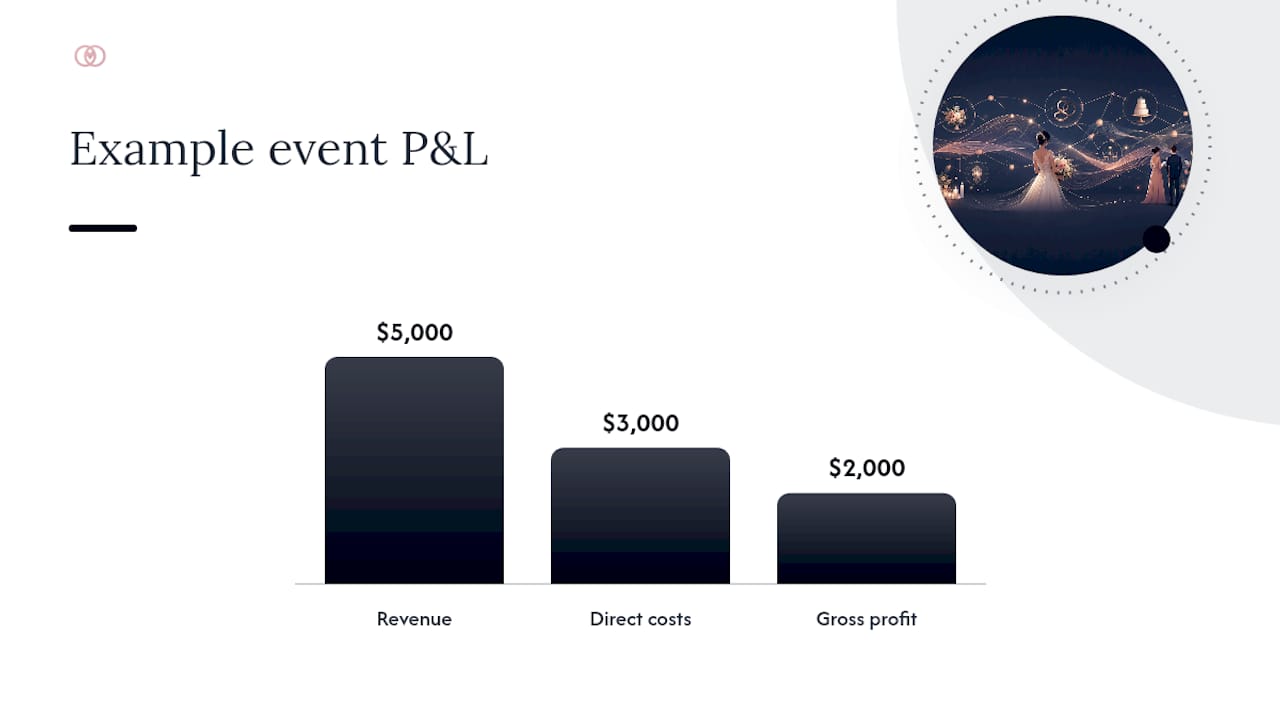
Gross margin per event is your planner fee minus direct costs (staff hours at a costed rate, plus any markup you keep on vendor coordination) divided by total service revenue. Net margin subtracts overhead, from software subscriptions to your own salary draw, giving you the number that actually funds your business. Effective hourly rate divides your planner fee by total hours logged on that wedding, revealing whether a $6,000 flat fee that ate 120 hours actually paid you $50 an hour. Utilization measures the percentage of your team’s paid hours spent on billable client work versus admin, sales calls, and unbilled coordination.
Here’s a simple example. A planner charges a $5,000 flat fee, logs 80 hours of costed staff time at $35/hour ($2,800), and spends $200 on incidental supplies. Gross margin: ($5,000 minus $3,000) divided by $5,000, or 40%.
Statistic Callout: Project profitability tracking depends on assigning cost rates to tasks and recording time against them so margins calculate automatically rather than at quarter’s end, according to ProWorkflow’s profitability tracking research.
Your data sources for these four KPIs:
- Timesheets for hours worked and effective hourly rate
- Vendor contracts for pass-through costs and markup terms
- Invoices for planner fee revenue recognition
- Expense receipts for incidentals that erode gross margin
Profitability tracking also depends on capacity planning and expense markup, which is why Freshbooks’ guidance on project profitability treats cost rates and profitability graphs as inseparable from the underlying financial picture, not an afterthought bolted on at invoicing.
How Do You Set Up a Per-Wedding Budget vs Actual File?
Every wedding needs its own budget vs actual file the moment the contract is signed, not when the invoice goes out.
Build these tabs into your template:
- Project summary — client names, wedding date, total contract value, planner fee isolated from pass-throughs
- Budget vs actual — line items for every vendor category with budgeted cost, actual cost, and variance
- Vendor payments — deposit dates, balance due dates, payment method, confirmation status
- Client payment schedule — milestone dates, amounts, invoice numbers, paid/outstanding status
- Time log summary — hours by team member, rolled up weekly
Update the file weekly at minimum, and immediately after any vendor change or client-requested addition. Waiting until the week of the wedding to reconcile actuals against budget means you find out about margin erosion when it’s too late to fix it.
Pro Tip: Separate the planner fee tab from vendor pass-throughs from day one. Planners who lump the two together routinely mistake gross revenue for margin, and that’s how a $30,000 wedding with $2,000 of actual profit gets mentally logged as a “big win.”
A spreadsheet works fine for solo planners running two or three weddings a quarter. Once you’re juggling five or more simultaneous events, spreadsheets start failing quietly, wrong tab open, stale version emailed to an assistant, formula broken by a copy-paste error. That’s the point where a dedicated wedding planner software platform earns its subscription cost by keeping every event’s budget vs actual synced in one place instead of scattered across your laptop and three email threads.
Which Tools Capture Time, Vendor Costs, and Payments?
Data quality determines whether your profitability numbers mean anything. Sloppy capture produces confident-looking dashboards built on guesses.
For staff time, enforce same-day logging and explore how AI tools for small businesses can save time and improve operational efficiency. Hours reconstructed from memory on Friday are wrong more often than they’re right, and they’re always wrong in the direction that flatters the planner. Cost each hour at a real rate (salary plus overhead, divided by available hours) rather than a round number pulled from nowhere. Time-tracking data mapped directly to project costs is what turns a timesheet from an HR formality into a profitability instrument.
For vendors:
- Log every contract the day it’s signed, including deposit amount and balance due date
- Map each vendor cost to its exact budget line, not a general “miscellaneous” bucket
- Document change orders in writing with a signed client approval before work proceeds
- Flag any vendor cost increase over 5% for immediate client conversation, not a quiet absorption into your margin
For payments, sync accounts receivable against your vendor payment calendar so you never front a vendor deposit before the matching client milestone clears. Planners who lose sleep over cash flow are usually missing this one habit. A structured payment milestone tracking system closes that gap before it becomes a real cash crunch.
How Do You Build a Dashboard That Catches Problems Early?
A live dashboard beats a retrospective report because it lets you intervene while there’s still margin left to save. Checking profitability after the wedding is closer to an autopsy than a diagnosis.
Keep the dashboard to four tiles:
- Gross margin per event — your core profitability signal, updated weekly
- Budget variance — actual cost against budgeted cost, by category, flagged when variance exceeds 10%
- Hours vs estimate — costed time logged against the hours you quoted for
- AR outstanding — client payments due versus received, by milestone date
Statistic Callout: Profitability should function as an ongoing operational signal, not a quarterly report, according to Rocketlane’s project profitability guide, which lists utilization, margin, budget vs actual, and estimate accuracy as the metrics worth monitoring in real time.
Run a full profitability check weekly on active events within 60 days of their date, and monthly on everything further out. A minimal dashboard with four honest numbers gives more usable signal than a crowded report full of charts nobody reads before the invoice is already overdue.
What Are the Most Common Margin Leaks?
Margin doesn’t usually disappear in one dramatic moment. It leaks out through small, repeated decisions that feel harmless individually.
- Scope creep without documentation. A client asks for “just one more” vendor call or a redesign of the seating chart three weeks out. Require a written change order and signed approval before any added scope proceeds, even for long-term clients.
- Fronting vendor deposits before client payment clears. Sync your accounts receivable calendar against vendor payment due dates, and use payment holdbacks on your side where contracts allow it.
- Untracked labor hours. Coordination calls, vendor texts, and “quick” site visits add up fast when nobody logs them. Enforce daily timesheets, not end-of-week reconstruction.
- Stale markup assumptions. A subcontractor markup that made sense two years ago may not cover today’s costs. Review package pricing and markup percentages at least twice a year against actual vendor invoices.
That’s early enough to renegotiate scope or vendor terms, and late enough that you have real budget vs actual data to act on.*
How Do Professional Planners Put This Into Practice?
An integrated workspace centralizes what usually lives in six different places: the per-event budget, the vendor contract log, the client payment schedule, and the team’s time entries. When those four data sets sit in one system instead of scattered spreadsheets and email threads, your gross margin number updates itself instead of waiting for a manual reconciliation.
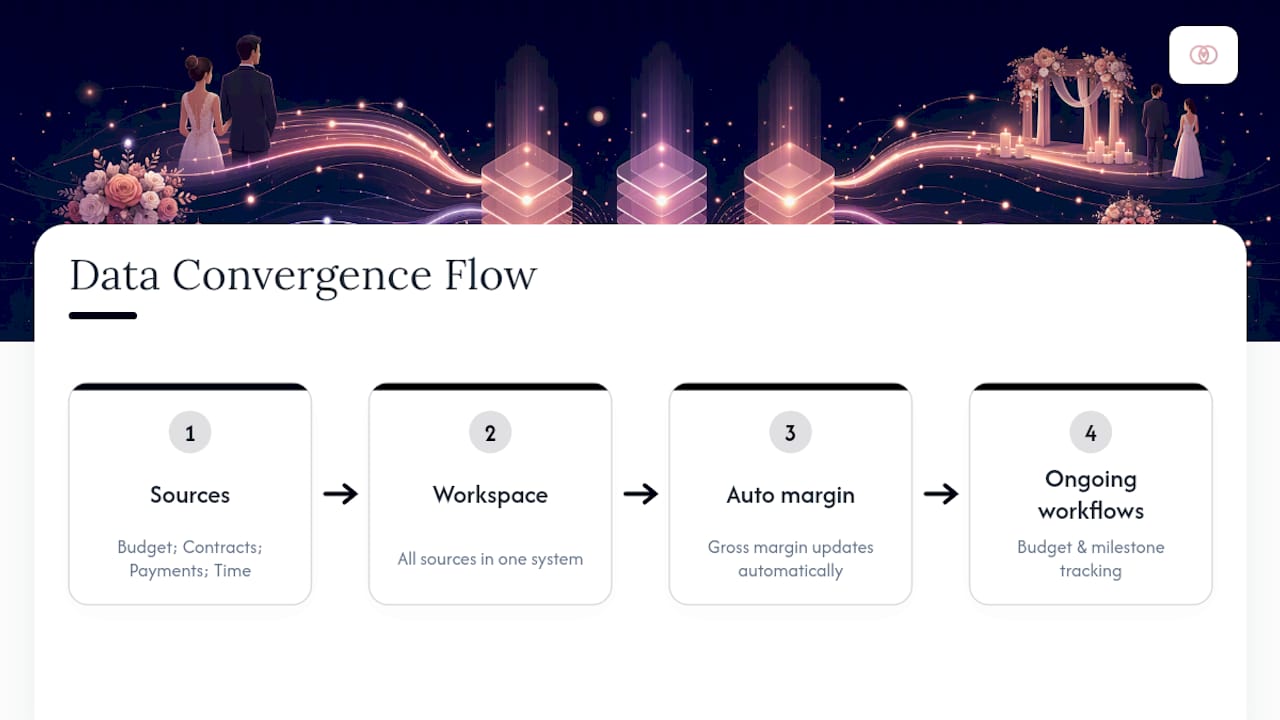
Planners setting this up for the first time typically start with three moves inside a platform: create the project and its budget lines from a template, attach payment milestones to the contract, and turn on time capture for every team member touching the event. From there, budget management workflows and progress tracking tied to milestones do the ongoing work of keeping numbers current without a weekly spreadsheet audit.
How Should You Talk to Clients About Budget and Profitability?
Clients don’t need to see your margin. They do need to understand, in plain terms, what’s driving any cost change, because silence on budget shifts is what turns a manageable variance into a trust problem.
Set the expectation at contract signing: explain that your planner fee is fixed, but vendor costs are pass-throughes subject to their own contracts, and any change to scope gets a written estimate before it’s approved. This single distinction, planner fee versus pass-through, prevents the most common client dispute in the industry: a couple assuming their planner is marking up every vendor invoice by an invisible amount.
When a real cost increase happens (a florist raises pricing, a rental company adds a delivery surcharge), bring it to the client within 48 hours with the exact number and two options: absorb a small increase within existing budget flexibility, or approve a documented change order. Planners who wait until the final invoice to reveal cost creep lose repeat business and referrals even when the wedding itself went well.
Build a standing monthly touchpoint into contracts for weddings booked more than six months out. A five-minute budget check-in every month keeps small variances small and gives clients confidence that nothing is being hidden until the bill arrives. That confidence is worth more to your referral pipeline than any single line-item savings.
A Planner’s Quick Profitability Checklist
Five things to check on every wedding, every week: gross margin against your target, hours logged against estimate, vendor payments against your AR calendar, any open change orders needing signed approval, and one client budget touchpoint if it’s been over 30 days. Start tonight by opening your most active file and running through all five.
— JOATLABS
How Thespecialwedding Keeps Profitability Visible on Every Wedding
This platform replaces the six-tab spreadsheet habit with one workspace where your budget lines, vendor contracts, payment milestones, and team time entries update the same profitability picture automatically. Instead of reconciling numbers by hand every Friday night, you open one dashboard and see gross margin, hours against estimate, and outstanding client payments in real time.

Before committing to any platform for this, run it through a short checklist: does it separate planner fee from vendor pass-throughs by default, does it let you log time without leaving the client record, and does it sync payment milestones to a visible AR view? If a tool can’t answer yes to all three, you might end up back in a spreadsheet within a quarter.
You can see how the workspace handles a real vendor relationship on a listing like V2 Events at Vast, then consider starting your own trial to set up your next wedding’s budget lines, payment milestones, and time tracking before your next contract signs.
Templates and Guides Worth Bookmarking
- Wedding planning project budget template for structuring planner fee versus vendor pass-throughs
- Wedding planner KPI dashboard template for building your four-tile margin view
- Wedding planner P&L template for rolling per-event numbers into annual reporting
- Payment tracking guide for wedding planners for AR and milestone scheduling setup
Sources
- Project Profitability & Cost Tracking Software
- How does project profitability work?
- Project Profitability: Metrics, Strategies & Guide (2026)
- How to calculate project profitability using time tracking data
FAQ
What Is the Best Way to Track Wedding Project Profitability?
Use a per-wedding budget vs actual file combined with a live dashboard fed by costed staff hours, vendor contracts, and client payment milestones, checked weekly rather than only after the event.
How Do You Calculate Gross Margin on a Wedding?
Subtract direct costs, primarily costed staff hours and vendor markup, from your planner fee, then divide by total service revenue; a $5,000 fee with $3,000 in direct costs yields a 40% gross margin.
Should Vendor Pass-Throughs Count as Revenue?
No. Counting vendor pass-throughs as revenue inflates your top line while hiding true service margin, which is why separating planner fee from pass-throughs on a dedicated budget tab matters from the first contract.
Can Wedding Planning Software Replace a Spreadsheet for Profitability Tracking?
Once a planner manages five or more simultaneous weddings, a dedicated platform like Thespecialwedding typically outperforms spreadsheets by syncing budget, vendor payments, and time tracking automatically instead of requiring manual reconciliation.
Recommended
Free wedding planner templates
Skip the blank page — these templates ship with the form fields you actually need.
Browse all 9 free templates →