Replace Five Chats: Cascade Push Notifications for Wedding Studios
Replace Five Chats: Cascade Push Notifications for Wedding Studios
Planner-grade push notifications are targeted, dependency-aware alerts sent from a planning dashboard or client and vendor portal, not generic reminders. The single capability worth insisting on is a cascade engine: mark one block delayed, and the system recalculates every downstream task and pings only the vendors and team members actually affected. Platforms like TheSpecialWedding.io build this into their workflow layer, which is why studios using it report faster vendor confirmations and far less day-of group messaging.
TL;DR:
- Effective push notifications should include a cascade engine that recalculates downstream tasks and notifies only affected vendors and team members during delays.
- Notifications must be role-based, structured with templates, and delivered through multiple channels to prevent confusion and ensure critical alerts are seen.
- Building workflows with pre-scheduled sequences and testing them before events significantly improves communication reliability and reduces day-of chaos.
- Vendor and staff opt-in, encryption, and strict access controls are essential for data security and to maintain trust in notification systems.
- Using a platform like TheSpecialWedding.io allows studios to automate cascading updates and reduce manual re-texting, especially when managing multiple weddings simultaneously.
Table of Contents
- Why Push Notifications Matter for Professional Planners
- Core Features a Planner-Grade Push System Must Include
- Designing Notification Workflows: Sequencing and Rate Limits
- Day-of Operations and Cascading Updates
- Implementation Checklist and Launch Rehearsal for Planner Teams
- Privacy and Data Security Considerations
- Publisher Perspective: How TheSpecialWedding.io Builds Push Notifications for Studios
- The Fastest Path to Fewer Day-Of Fire Drills
- Sources
Why Push Notifications Matter for Professional Planners
Push alerts inside planner SaaS do three jobs at once: they remind clients about decisions or payments, confirm vendor logistics, and keep an internal team synced without a group chat spiral. Each job has a different urgency and a different audience, which is exactly why generic mass texts fail studios juggling multiple events.
The payoff shows up in the numbers planners actually care about: fewer phone calls, shorter WhatsApp threads, and vendors who confirm significantly faster than before. Event operations research backs this up directly. Real-time dashboards should surface the decision to make, not raw data, which is precisely what a well-built push does when it says “confirm delivery window” instead of dumping a status report on a coordinator’s phone. During live, multi-vendor events, instant data has repeatedly enabled mid-event corrections that would have been impossible with next-day reporting.
For a studio running multiple weddings on the same Saturday, that translates into:
- Vendor confirmations that land before the coordinator has to chase them down
- One centralized feed for incidents instead of five separate group chats
- Team members getting only the alerts relevant to their assigned event
Core Features a Planner-Grade Push System Must Include
Not every notification tool built for consumer apps translates to wedding operations. A system built for professional studios needs to handle role complexity, timing dependencies, and multiple communication channels at once — exactly the kind of operational design central to professional services operations.
Here is what belongs on the requirements list:
- Segmentation and role-based targeting. Alerts should route by role (lead planner, assistant, florist, caterer) and by relationship (client contact versus vendor contact), not by a single broadcast list.
- Scheduled sequences and templates. Confirmations, payment reminders, and countdown milestones should run as pre-built templates, not one-off messages typed under pressure. This is the same logic behind structured payment reminder sequences that studios use to keep client cash flow on schedule.
- A dependency-aware cascade engine. When one timeline block shifts, the system needs to recalculate every dependent block and notify only the stakeholders those changes actually touch.
- A layered delivery stack. Native push, browser push through a progressive web app, and SMS or email fallback all need to work together so no critical alert dies in a channel someone forgot to check.
- Permission management and analytics. Delivery rate, acknowledgment rate, and opt-out tracking tell you whether your notification design is working or just generating noise.
Pro Tip: Audit your notification templates the same way you audit your contracts. If a message can’t be understood and acted on in under five seconds, rewrite it before your next event, not during it.
Branded portal messaging matters more than it looks. A vendor who sees an alert inside a recognizable studio portal responds faster than one who gets an anonymous text from an unfamiliar number.
Designing Notification Workflows: Sequencing and Rate Limits
Treat notifications as programming, not improvisation. Every recurring moment in a wedding timeline, from the final headcount deadline to the vendor load-in window, should already have a segmented sequence built before the event, not a message someone types in a panic.
Mosaic Apps’ analysis of event communication makes the case plainly: structured, scheduled, and segmented notifications outperform reactive ones because they arrive when the recipient can actually act on them. Rate limits matter just as much as content. Aloompa recommends low-frequency push notifications to avoid overwhelming users as a benchmark during active event windows, which keeps vendors from muting your app the moment things get busy.
By the numbers: Average push engagement across event apps sits around 1.5%. That low baseline is exactly why every push needs to carry one decision, not a status update nobody has time to parse.
Build your workflows around these principles:
- One decision per push. “Confirm arrival” beats a paragraph explaining why arrival matters.
- Escalate only after a defined wait. If a vendor hasn’t acknowledged a critical alert within your SLA window, trigger a retry, then a call.
- Test before you need it. Run a rehearsal with simulated delays and watch where acknowledgments stall.
- Track opt-outs as a signal, not an annoyance. A spike usually means your cadence outpaced your content’s relevance.
Day-of Operations and Cascading Updates
The clearest test of a push system is what happens when the florist is running twenty minutes behind. A well-built platform lets a coordinator tap that block, mark it delayed, and let the cascade engine recalculate every dependent task automatically. Only the vendors and team members actually affected get pushed, which is the mechanism behind significant reductions in day-of WhatsApp traffic that coordinator apps report.
Common day-of scenarios follow predictable patterns:
- Vendor running late: trigger a soft alert to downstream vendors, no acknowledgment required yet.
- Vendor no-show: trigger an immediate SMS or call, since a push alone isn’t reliable enough for a failure this severe.
- Weather contingency: push the full team simultaneously, since a venue change affects nearly every dependency at once.
Pro Tip: Require a one-tap “handshake” acknowledgment for anything mission-critical, like vendor arrival confirmation. If the tap doesn’t happen inside your SLA window, the system should escalate automatically instead of waiting for someone to notice the silence.
Progressive web apps solve a real adoption problem here. A florist or a rented-linen vendor working three other events that weekend isn’t installing a new native app for your studio, but they will tap a browser push link. That single difference is often what separates a notification system vendors actually use from one they quietly ignore.
Implementation Checklist and Launch Rehearsal for Planner Teams
Rolling out push notifications without a rehearsal is how studios end up debugging their alert system live, mid-ceremony. Run through this sequence before your first real event:
- Map roles and segments. Decide who gets which alert type before you write a single template.
- Build templates and rate limits. Draft your confirmation, reminder, and escalation messages, and set your hourly push ceiling in advance.
- Onboard vendors properly. Walk vendors through opt-in and PWA setup, and agree on response SLAs before the wedding week, not during it. This pairs well with structured vendor portal onboarding practices.
- Rehearse with injected delays. Simulate a late vendor and a weather trigger, then watch how the cascade behaves.
- Review after the event. Pull delivery and acknowledgment metrics, note opt-out reasons, and adjust cadence before your next wedding.
| Checklist stage | What to confirm before moving on |
|---|---|
| Pre-launch | Roles mapped, templates written, rate limits set |
| Onboarding | Vendors opted in, PWA access tested, SLAs agreed |
| Rehearsal | Simulated delay run completed, escalation paths tested |
| Post-event | Delivery data reviewed, templates updated |
Privacy and Data Security Considerations
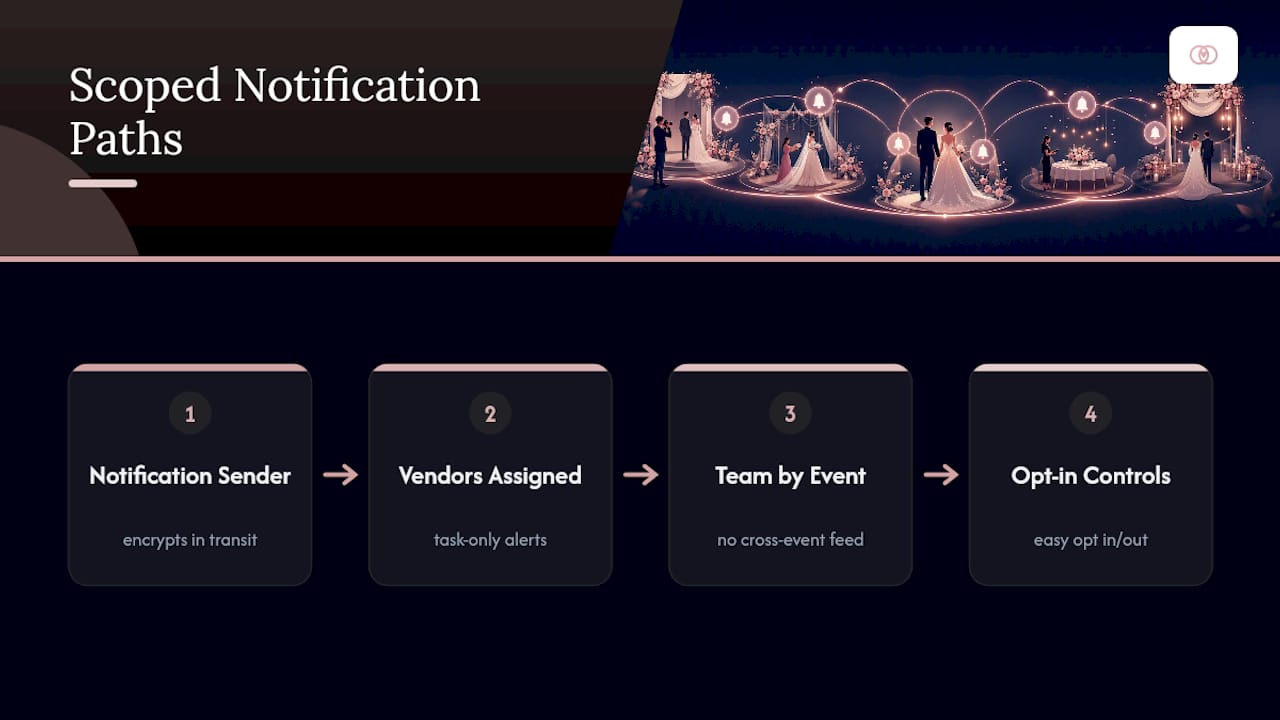
Push notifications carry client names, vendor contact details, and sometimes payment status, which makes them a data-handling responsibility, not just a messaging feature. Studios should confirm that any platform sending these alerts encrypts data in transit and limits what appears in a notification preview, since a lock-screen glimpse of a payment reminder or a guest count shouldn’t expose more than necessary.
Permission architecture matters just as much as encryption. Vendors should only see alerts tied to their own assignment, not a feed showing every task across a client’s wedding. Team members should be scoped the same way, particularly at agencies where assistants rotate between events. Opt-in and opt-out controls need to be genuinely accessible, not buried three menus deep, both because it builds trust with vendors and because unclear consent flows create liability.
Retention policy deserves a plain answer too: how long does a delivered notification’s content stay stored, and who can pull that history later if a dispute over a missed confirmation comes up? A platform that can show a timestamped acknowledgment log protects the studio as much as it protects the client relationship. None of this requires a legal team to sort out on your own, but it does require asking your software provider directly how notification data is stored, scoped, and eventually purged.
Publisher Perspective: How TheSpecialWedding.io Builds Push Notifications for Studios
TheSpecialWedding.io treats push notifications as infrastructure, not an add-on feature. The platform’s templates, automated workflows, and real-time dashboards exist specifically so a studio can pre-build its confirmation and escalation sequences once, then reuse them across dozens of weddings without rebuilding logic every time.
Studios running this workflow report the same pattern repeatedly: fewer inbound calls, vendor confirmations that land faster, and a single dashboard replacing five scattered group chats. We’d rather show you that directly than describe it. Run your next event’s notification sequence through a trial and watch your own message volume before and after.
The Fastest Path to Fewer Day-Of Fire Drills
Spreadsheets and group texts can’t cascade a delay automatically, and that gap is exactly where TheSpecialWedding.io was built to sit. Instead of manually re-texting six vendors when the ceremony slips twenty minutes, you mark one block delayed and the platform pushes targeted alerts only to the people that change actually affect.

That single shift, from broadcasting to everyone toward alerting only who’s impacted, is what studios notice first when they move off manual coordination. The platform’s vendor directory also gives you a faster way to onboard new vendors into your notification workflows instead of collecting contact details in a spreadsheet nobody updates.
If you’re managing more than one wedding on a given weekend, the math favors testing this now rather than after your next fire drill. Start a 30-day free trial, build your first cascade sequence around an upcoming event, and rehearse it before the vendors ever see a live alert. Onboarding support walks your team through segmentation and template setup so your first real event isn’t also your first real test.
Sources
- Push Notifications: Best Practices - Aloompa Knowledge Base
- Push Notifications Done Right: The Science Behind Effective Event Communication. - mosaic apps
- The Role of Real-Time Data in Scalable Event Growth
- Real-Time Event Analytics in 2026: How Instant Data is Transforming Live Event Decisions | Ticket Fairy Promoter Blog
— JOATLABS
Recommended
Free wedding planner templates
Skip the blank page — these templates ship with the form fields you actually need.
Browse all 9 free templates →