Role of Seating Arrangement Tools for Wedding Planners
Role of Seating Arrangement Tools for Wedding Planners
Seating arrangement tools convert a raw guest list and venue constraints into an executable, safety-aware seating plan in a fraction of the time manual methods require. For professional wedding planners, that means fewer day-of errors, faster vendor handoffs, and a guest experience that feels intentional rather than accidental. Without a digital seating tool, planning seating for large events can consume several workdays and remains highly error-prone. Thespecialwedding.io is built to eliminate exactly that friction, integrating seating directly into your studio’s planning workspace.
Table of Contents
- Why seating tools are central to wedding planning success
- What features must a professional seating tool include?
- How to fit seating tools into your planning workflow
- Security and collaboration practices every studio must enforce
- How Thespecialwedding.io applies seating tools inside studio workflows
- What should you do next to adopt a seating tool?
- Key Takeaways
- The part most planners underestimate about seating tools
- Thespecialwedding.io puts studio-grade seating in your planning workspace
Why seating tools are central to wedding planning success
The role of seating arrangement tools goes well beyond placing names on a chart. They replace paper diagrams and disconnected spreadsheets with a drag-and-drop visual workspace that keeps guest lists, dietary restrictions, and table layouts in one place, accessible to everyone who needs them.
Time savings and accuracy are the most immediate gains. Manually reconciling RSVPs, dietary tags, and last-minute guest swaps across multiple documents is where errors compound. A digital tool with live guest-list sync catches those changes before they become a day-of crisis.

Guest experience is the second payoff. A well-planned seating chart accounts for VIP proximity, family dynamics, and conversation flow, turning the reception into something guests remember for the right reasons. Placing a bride’s grandmother next to the speaker stack is the kind of mistake a good seating tool flags before it happens.
Operational safety and vendor execution round out the picture. Catering teams need exact chair counts per table. Venue staff need ADA-compliant pathways marked on the floor plan. Seating considerations overlap directly with accessibility requirements, and planners who skip that step risk day-of safety issues that no apology can fix. Exporting a scaled floor plan with exit aisles and accessible routes labeled is a deliverable every professional studio should produce as standard.
Key benefits at a glance:
- Centralized guest data: dietary tags, VIP flags, and RSVP status in one view
- Drag-and-drop editors that reflect actual venue dimensions
- Real-time sync so last-minute RSVP changes update seat assignments automatically
- Exportable floor plans and seat lists for caterers, venue staff, and on-site coordinators
- ADA pathway documentation built into the layout from the start
What features must a professional seating tool include?
Not every seating tool is built for studio-grade work. Here is the checklist that separates professional platforms from basic diagramming apps.
- Visual editor with exact-scale floor plans. Upload a PDF or image of the venue and build directly on top of it. AI-assisted floor-plan import can convert a photo or PDF into an editable map, which is a genuine time-saver when venues send hand-drawn diagrams.
- Guest-list integration. CSV import and export, live sync with your RSVP tool, and dietary tagging are non-negotiable. Guest lists stay dynamic right up to the morning of the event.
- Real-time team collaboration. Role-based access, version history, and change notifications keep your team, the client, and the venue on the same version without email chains.
- On-day features. QR check-in links, live occupancy updates, and printable seating maps for vendors and name cards are what separate a planning tool from an execution tool.
- Security and data controls. Encrypted cloud storage, role-based permissions, and audit logs protect VIP guest data and satisfy client confidentiality expectations.
Pro Tip: Ask any vendor for a demo that starts with a CSV import of a real guest list, not a preloaded sample. How a tool handles messy, real-world data tells you more than any feature list.
For a deeper look at seating chart strategy beyond the basics, Thespecialwedding’s blog covers how layout decisions affect team coordination and guest experience together.
How to fit seating tools into your planning workflow
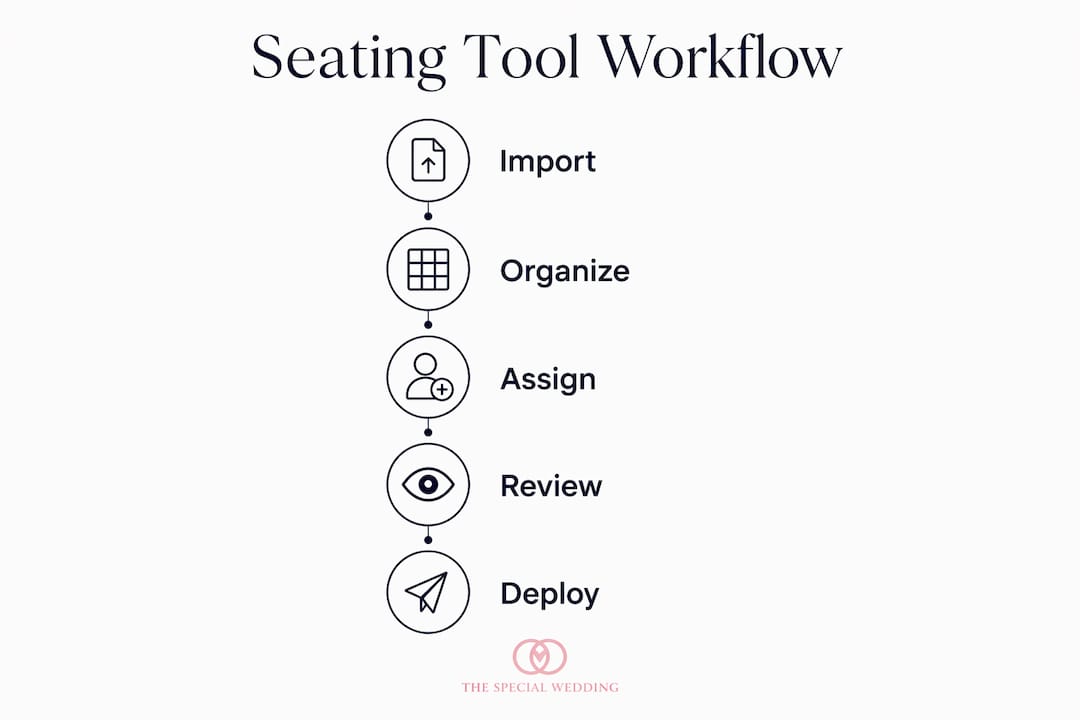
Seating tools work best when they slot into a defined workflow, not when they are bolted on at the last minute. Here is a practical timeline for multi-event studios.
- Import the guest list immediately after RSVPs open. Connect your RSVP source to the seating tool via CSV or direct sync. Tag dietary needs and VIP status at this stage, not later.
- Draft the initial layout against the venue floor plan. Upload the venue’s PDF or use AI floor-plan import to set exact table positions. Account for fixed constraints: pillars, stages, fire exits, and ADA routes.
- Run a client and stakeholder review. Share a live link so clients see updates in real time and can suggest changes you approve. This eliminates the “which version is current?” problem entirely.
- Finalize seating no later than 72 hours before the event. Leave two to three contingency seats per section for late additions. After finalization, lock the layout and notify all stakeholders of the version.
- Generate vendor deliverables. Export a scaled floor plan for the venue, a seat list (Excel or PDF) for catering, ADA-route diagrams for venue staff, and QR check-in links for the door team.
- Execute on the day with live access. Give on-site coordinators tablet access or a QR check-in link. Live occupancy updates mean the team knows immediately if a table is short a guest.
For studios managing back-to-back weddings, a multi-event workspace keeps each event’s seating plan isolated but accessible from the same dashboard, which prevents the cross-contamination of guest data that happens when planners work across shared spreadsheets.
Security and collaboration practices every studio must enforce
Professional seating platforms use encrypted cloud storage and role-based access to protect sensitive attendee information. That is the baseline. What studios often overlook is the internal discipline around those controls.
- Least-privilege sharing. Caterers need the seat list. They do not need the full guest notes, which may include medical conditions or personal details the client shared in confidence.
- Single source of truth. Designate one platform as the authoritative seating record. When changes happen, they happen there, and notifications go out automatically. Parallel spreadsheets are where errors are born.
- Audit logs. Know who changed what and when. If a seating conflict surfaces on the day, an audit log tells you exactly where the breakdown happened.
- Secure exports for legal requests. Clients occasionally need guest-data exports for insurance or legal purposes. A platform with structured export keeps that process clean and documented.
- On-site access methods. Tablets with role-limited views or QR check-in links give door staff what they need without exposing the full guest list to everyone with a phone.
Communicating your data-handling practices to clients builds trust. A one-paragraph summary of how guest data is stored, who can access it, and when it is deleted after the event is a professional touch that most studios skip. For guidance on managing guest lists securely, Thespecialwedding’s resources cover automation and data protection together.
How Thespecialwedding.io applies seating tools inside studio workflows
A multi-event studio running four to six weddings per month faces a specific problem: seating plans for different events can blur together when the team works across shared documents. Thespecialwedding.io addresses this by keeping each event’s guest list, floor plan, and seating assignments inside a dedicated workspace, with role-based access that lets the right people in and keeps everyone else out.
The platform’s integrated guest management means dietary tags and VIP flags set during client intake carry through directly to the seating module. No re-entry, no transcription errors. On-day QR check-in updates occupancy in real time, so the coordinator at the door and the planner managing the room see the same picture simultaneously.
Studios using this approach report fewer seating conflicts at the door and faster vendor briefings, because the deliverables, scaled floor plans, seat lists, and ADA diagrams, are generated from the same data source rather than assembled manually from multiple files.
What should you do next to adopt a seating tool?
The verdict is straightforward: studio-grade seating tools integrated into a broader planning workspace are not optional for planners managing multiple events. They are the difference between controlled execution and reactive firefighting.
- Run a focused demo. Ask the vendor to walk through a CSV import with a real guest list, a floor-plan upload, and a QR check-in setup. Thirty minutes tells you whether the tool fits your workflow.
- Test the CSV import and update cycle. Import a guest list, make ten changes, and re-import. If the tool handles that cleanly, it will handle the real thing.
- Set your on-day access plan before the event. Decide who gets tablet access, who gets a QR link, and what each role can see. Document it. Do not figure it out at 8 AM on the wedding day.
Measure impact with three metrics: hours spent on seating per event (before and after), number of seating errors or conflicts on the day, and client satisfaction scores related to reception flow. Those three numbers tell you whether the tool is earning its place in your workflow.
Key Takeaways
Seating arrangement tools give professional wedding planners a single, collaborative workspace that replaces manual spreadsheets, reduces day-of errors, and produces vendor-ready deliverables from one data source.
| Point | Details |
|---|---|
| Replace manual methods | Drag-and-drop editors with live guest-list sync eliminate transcription errors and version confusion. |
| Prioritize on-day features | QR check-in and live occupancy updates are what separate a planning tool from an execution tool. |
| Enforce data security | Role-based access and least-privilege sharing protect VIP guest data and client confidentiality. |
| Finalize 72 hours out | Lock the layout with contingency seats reserved, then generate all vendor deliverables from one source. |
| Thespecialwedding.io | Integrates seating, guest management, and vendor handoffs inside one studio workspace for multi-event planners. |
The part most planners underestimate about seating tools
The conversation around seating software tends to focus on the visual editor, and that is the least interesting part. Drag-and-drop is table stakes. What actually changes studio operations is the data continuity: the moment a guest’s dietary restriction, entered at intake, flows automatically into the seating module and then into the caterer’s export without anyone retyping it.
Studios that treat seating tools as standalone chart-makers miss that entirely. They still manually reconcile guest data across platforms, which means they still carry the same error risk they had with spreadsheets, just with a prettier output. The real value is in the integration: one record, multiple outputs, zero re-entry. That is where the hours are recovered and where the day-of conflicts stop happening.
Thespecialwedding.io puts studio-grade seating in your planning workspace
Thespecialwedding.io gives professional planners something most seating tools cannot: a workspace where guest management, seating, vendor coordination, and client communication live together. That means dietary tags set at intake appear in your seating module automatically, and the floor plan you finalize becomes the same document your caterer and venue coordinator receive.

A demo covers the features that matter most for studio operations: guest-list sync, floor-plan upload, QR check-in setup, and role-based access for your team and vendors. Planners in the Thespecialwedding.io ecosystem can also connect directly with vetted local vendors, from event rental partners to full-service coordinators listed in the vendor directory. Book a demo at thespecialwedding.io and see how the platform handles a real guest list from import to on-day execution.
Recommended
- Wedding Event Seating Coordination Tips That Work | The Special Wedding Blog
- Wedding planner workspace explained: boost multi-event ops | The Special Wedding Blog
- Seating Chart Strategy: Beyond Drag-and-Drop | The Special Wedding Blog
- Solo Wedding Planner Organization Tips That Work | The Special Wedding Blog
Free wedding planner templates
Skip the blank page — these templates ship with the form fields you actually need.
Browse all 9 free templates →