Brand Identity Tools for Wedding Planners: Scale With Confidence
Brand Identity Tools for Wedding Planners: Scale With Confidence
Brand identity tools give professional wedding planners a repeatable system for every client-facing asset, turning visual and verbal consistency into a direct driver of booking quality, average contract value, and operational efficiency. If you’re managing multiple weddings at once, these tools aren’t a design luxury — they’re an operations requirement.
The short version:
- Consistent visual assets raise perceived value before a single consultation happens
- Clear positioning filters out misaligned inquiries, so your pipeline fills with qualified leads
- Templated proposals, portals, and timelines cut asset production from hours to minutes
- Cloud-based brand kits can save roughly 40 hours of design labor over a typical three-month period.
- Thespecialwedding.io is the integrated platform example throughout this guide
The brain processes imagery 60,000 times faster than text. That single fact explains why the role of wedding planner brand identity tools is operational, not cosmetic.
Table of Contents
- Why brand identity is an operations asset, not just design
- What belongs in every planner’s brand identity toolkit
- How identity tools fit into your everyday planning workflow
- How to roll out consistent branding across many weddings
- What to track and how to calculate ROI
- Common mistakes that break brand trust
- How to configure an integrated platform for multi-event brand ops
- Key Takeaways
- The case for treating brand identity as infrastructure
- Your next step: put your brand kit inside your operations platform
- Useful sources
Why brand identity is an operations asset, not just design
Your brand speaks before you do. The moment a prospective couple lands on your proposal, your client portal, or your inquiry form, they’re forming a judgment about your professionalism and your price point. Visual and verbal coherence across those touchpoints materially affects whether they book — and at what rate.
Branding strategist Desiree Adams frames high-end wedding branding as three inseparable layers: language, imagery, and positioning. When all three align, planners can command premium fees. When even one is off, the whole impression weakens.
“Brand identity acts as an anchor of stability. The clearer your identity, the more confidently you can adjust services or pricing as the market shifts.” — Emily Foster Creative
The operational payoff is concrete. A well-defined identity reduces misaligned inquiries and raises lead-to-book conversion quality, which means your team spends less time on consultations that never convert.
Direct operational benefits:
- Faster proposal approvals because clients recognize and trust the brand immediately
- Predictable vendor communications through standardized, on-brand templates
- Simpler team onboarding when every asset lives in one documented kit
- Stronger price positioning because visual quality signals service quality
What belongs in every planner’s brand identity toolkit
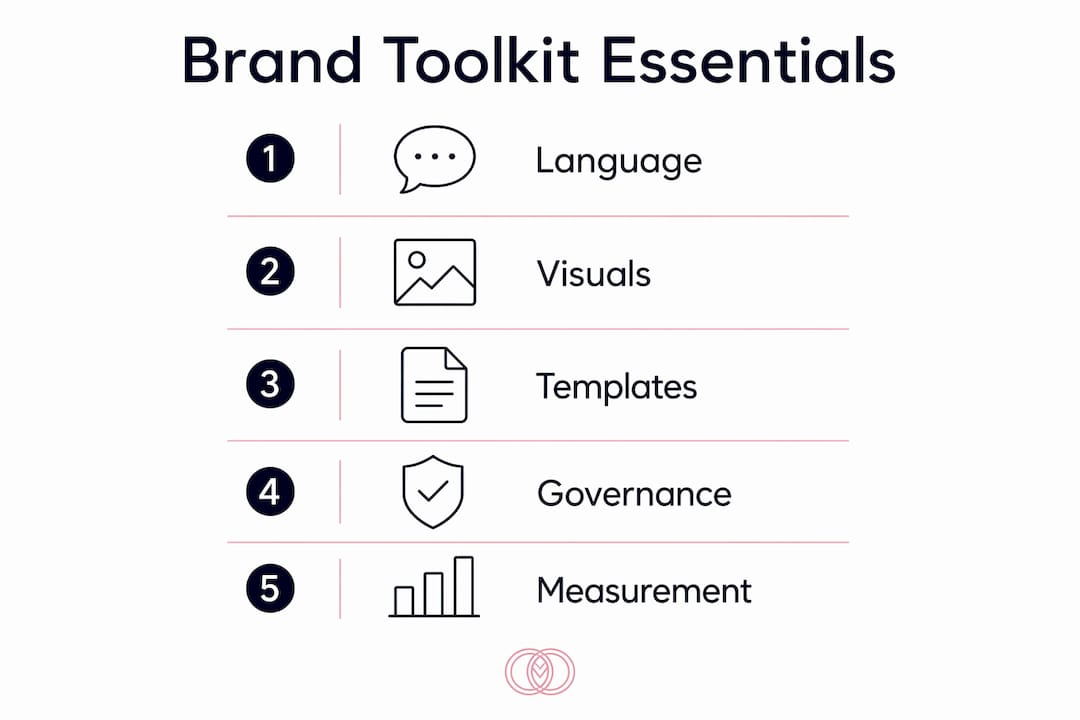
Branding strategist Desiree Adams’ language, imagery, and positioning framework maps directly to reusable operational assets. Here’s how each layer translates:
| Strategic Layer | Reusable Asset | File Format |
|---|---|---|
| Language | Brand voice guide, email tone standards, inquiry scripts | PDF, Google Doc |
| Imagery | Photo style guide, portfolio curation rules, mood board | PDF, PNG |
| Positioning | Position statement, niche definition, pricing rationale | PDF, Google Doc |
| Visual system | Logo suite, HEX/Pantone palette, typography pairs | SVG, PNG, PDF |
| Templates | Proposals, invoices, timelines, runsheets, signage | DOCX, PDF, Canva |
| Client-facing | Portal theme, email signature, gallery cover | HTML, PNG |
Small touchpoints get left unbranded more often than planners realize. Email signatures, inquiry forms, and admin templates are where the gap between your marketing and your operations becomes visible to clients.
Asset inventory checklist:
- Master logo files (full color, reversed, monochrome) in SVG and PNG
- Color palette with HEX codes and Pantone references
- Typography pair with licensed font files
- Photo style guide (lighting, composition, color grading standards)
- Proposal and contract templates with locked brand elements
- Branded client portal theme and welcome email
- On-site signage templates in print-ready PDF
Store master production files in a centralized brand kit folder, named with a consistent convention (e.g., TSW_Logo_Primary_v2.svg). Using cloud-based brand kits cuts template production from hours to minutes and saves roughly 40 hours of design labor over three months.
How identity tools fit into your everyday planning workflow
Every client interaction is a brand touchpoint. The goal is to embed your identity assets into the event workspace so that on-brand output happens automatically, not by memory.
Use-case map by touchpoint:
- Inquiry form: Branded header, tone-matched auto-response
- Proposal: Locked template with logo, palette, and voice guide applied
- Contract: Consistent footer, signature block, and typography
- Client portal: Custom theme, branded welcome message, gallery cover
- Vendor sign-offs: On-brand cover sheet and communication tone
- Timeline and runsheet: Branded header, consistent formatting
- On-site signage: Print-ready templates exported from the brand kit
Event lifecycle checklist (where the kit is applied):
- Intake — branded inquiry form and auto-response trigger
- Proposal — locked proposal template populated with event fields
- Onboarding — branded client portal activated, welcome email sent
- Vendor comms — on-brand cover sheets and timeline shared
- On-site — signage and printed materials exported from templates
- Post-event — branded gallery delivered, feedback form sent
Pro Tip: Set two permission levels in your template library: “edit” for senior planners who can update master templates, and “use” for coordinators who can only instantiate them for a specific event. This prevents accidental brand drift across your team.
For solo planners managing multiple events, this governance structure is especially critical because there’s no second set of eyes on every deliverable.
How to roll out consistent branding across many weddings
Follow a repeatable sequence: audit → kit build → template creation → platform configuration → pilot → scale. Six to eight weeks is realistic for most agencies.
- Week 0–1: Audit — inventory all existing assets, flag inconsistencies, and identify gaps (unbranded admin docs, outdated logos, mismatched fonts)
- Week 1–3: Build the brand kit — finalize logo suite, palette, typography, voice guide, and position statement; store masters in a centralized folder
- Week 3–4: Create templates — build locked proposal, contract, timeline, and portal templates using the kit; set up automation rules to populate event fields
- Week 4–6: Configure the platform — assign permission roles, connect the brand kit to template outputs, and set up automated email signatures and portal themes
- Week 6: Run a pilot — apply the full kit to one event type; track time-to-delivery and approval speed
- Week 7–8: Refine and scale — gather team feedback, fix friction points, then roll out to all active events
Implementation checklist:
- Version control on all master files (v1, v2 naming convention)
- Template locking so event-level edits don’t overwrite masters
- Approval workflow for any template changes
- Training doc for new team members covering kit location and usage rules
- Rollback copy of all pre-migration assets
Use wedding questionnaire templates as a quick pilot asset — they’re client-facing, easy to brand, and give you immediate feedback on how the kit performs in practice.
What to track and how to calculate ROI
Track four metrics from day one: inquiry-to-booking conversion rate, average booking value, time saved on asset creation, and client-fit score (percentage of qualified leads or NPS).
| Metric | How to Measure | Target Signal |
|---|---|---|
| Inquiry-to-book rate | Booked ÷ total inquiries | Rising after kit launch |
| Average booking value | Total revenue ÷ bookings | Increases with clearer positioning |
| Asset production time | Time-tracked template tasks | Drops vs. pre-kit baseline |
| Client-fit score | % of leads matching niche criteria | Rises as messaging sharpens |
A simple ROI example: if manual asset updates cost two hours per change and you make 20 changes over three months, that’s 40 hours recovered. At a $75 billable rate, that’s $3,000 in recovered capacity — before counting any revenue lift from better conversion.
Practical tracking methods: UTM-tagged asset downloads, template usage logs inside your platform, time-tracking on template tasks, and pre/post-pilot comparisons. A planning dashboard that surfaces these metrics in real time makes the ROI case visible to your whole team.
Common mistakes that break brand trust
Small inconsistencies quietly erode perceived value. A mismatched font on a proposal or an unbranded invoice tells a client that your back-end doesn’t match your front-end — and that makes premium pricing harder to justify.
- Inconsistent fonts across proposals: Lock typography in every template; never allow free-form font selection at the event level
- Out-of-date logos: Centralize the logo suite in the brand kit and remove local copies from team machines
- Unbranded admin documents: Apply the brand kit to invoices, receipts, and internal runsheets, not just client-facing materials
- Conflicting social imagery: Maintain a photo style guide and apply it to every portfolio post and styled shoot
Any mismatch between your website, proposals, and social media weakens credibility in ways clients can feel but rarely articulate.
Pro Tip: Schedule a quarterly brand consistency audit. Pull one proposal, one vendor email, and one client portal from the previous quarter and check them against the master brand kit. Log findings in an approvals doc and assign fixes before the next event season.
How to configure an integrated platform for multi-event brand ops
The most effective setup treats the brand kit as the single source of truth inside your operations platform, so every output — proposals, portals, vendor docs, printables — pulls from the same master assets automatically.
| Asset Type | Platform Feature | Configuration Action |
|---|---|---|
| Logo suite | Brand kit library | Upload SVG/PNG masters; set as default header |
| Color palette | Template theme settings | Enter HEX codes; lock from event-level editing |
| Typography | Font settings | Upload licensed files; restrict to brand pairs |
| Proposal template | Locked template library | Apply brand kit; enable event-field auto-population |
| Client portal | Portal theme editor | Set colors, logo, and welcome copy from kit |
| Email signature | Automated signature settings | Pull logo and contact info from brand kit |
| On-site printables | Export presets | Set bleed, resolution, and color profile |
Configuration checklist:
- Store master files in a dedicated brand kit folder with version naming
- Assign “template admin” and “template user” roles separately
- Set automation rules to populate planner name, event date, and client name into templates
- Keep a rollback copy of all pre-migration assets before importing
For agencies scaling multi-event operations, Thespecialwedding.io provides branded client portals, a template library, automated workflows, and team permission controls in one workspace. The vendor directory inside the platform also lets you present partner vendors consistently within the same branded environment your clients already trust.
Key Takeaways
Brand identity tools work only when they’re embedded into operations — not stored in a folder no one opens.
| Point | Details |
|---|---|
| Brand kit is an ops tool | Store logo, palette, fonts, and templates in one centralized kit all team members access. |
| 40-hour labor savings | Cloud-based brand kits can save roughly 40 hours of design labor over a typical three-month period. |
| Audit before you build | Inventory all existing assets in Week 0–1 to catch inconsistencies before they’re baked into new templates. |
| Track four KPIs | Measure conversion rate, average booking value, asset production time, and client-fit score from day one. |
| Thespecialwedding.io | Provides branded portals, locked templates, and team permissions in one workspace built for multi-event agencies. |
The case for treating brand identity as infrastructure
Most planners treat branding as something you do once and revisit when business slows. That framing costs real money. When your brand kit isn’t embedded in your operations platform, every new event becomes a small design project — and those hours compound fast across a full season.
The planners who scale past five or six simultaneous events without burning out aren’t necessarily more talented. They’ve built governance into their brand: locked templates, clear permission roles, and a quarterly audit habit. The identity work becomes invisible because it runs in the background of every client interaction.
Thespecialwedding.io is the kind of platform that makes this infrastructure practical. Branded portals, template libraries, and automated workflows mean your brand kit propagates to every deliverable without manual intervention. That’s not a design benefit — it’s an operations advantage.
Your next step: put your brand kit inside your operations platform
Thespecialwedding.io gives you a single workspace where your brand kit, client portals, vendor communications, and event templates live together. No more hunting for the right logo file or rebuilding a proposal from scratch for every new client.

Start with three actions: build your brand kit inside the platform, import your top three templates, and run one pilot event end-to-end. You’ll see exactly where the kit saves time and where it needs refinement before you scale.
Explore the vendor directory to see how partner vendors appear inside the same branded environment your clients experience. Then start your 30-day free trial at Thespecialwedding.io and configure your first branded workspace today.
Useful sources
- Branding 101: How to Build a Visual Brand That Attracts Your Ideal Couples — WeddingPro: Best for the visual processing statistic and foundational brand-building principles.
- Wedding Branding: Words, Imagery, & Positioning for High-End Clients — Desiree Adams: Primary framework for the language/imagery/positioning model; essential reading for premium positioning strategy.
- Wedding Business Branding: What It Really Takes to Build a Brand That Lasts — Emily Foster Creative: Best for the anchor-of-stability concept and client filtering through clear messaging.
- Branding for Wedding Planners: What Separates Good From Extraordinary — Avelã White: Practitioner-level guidance on touchpoint coherence and the hidden cost of small inconsistencies.
- Wedding Planner Brand Assets Design Guide — DesignLumo: Operations-focused playbook covering brand kit setup, AI-assisted workflows, and the 40-hour labor savings estimate.
- Thespecialwedding.io — Platform landing page: Full feature documentation for branded portals, template libraries, team permissions, and multi-event management.
- Personal Brand & Positioning — CROWD: Deeper strategy resource on audience positioning and personal brand architecture for service businesses.
Recommended
- Why Wedding Studios Scale with Software: 2026 Guide | The Special Wedding Blog
- Wedding Planner Software & CRM for Pros — The Special Wedding
- Wedding planner workspace explained: boost multi-event ops | The Special Wedding Blog
- Wedding Agency Capacity Planning: A 2026 Guide | The Special Wedding Blog
Free wedding planner templates
Skip the blank page — these templates ship with the form fields you actually need.
Browse all 9 free templates →