3 SMS RSVP Setups That Lock Final Headcounts for Couples & Planners
3 SMS RSVP Setups That Lock Final Headcounts for Couples & Planners
Use SMS RSVPs, whether a direct text reply or a short-link form, to get the fastest, most complete guest count for your wedding. Text messages get read within minutes, not days, so you spend less time chasing replies and more time finalizing headcounts. Success looks like this: most invited guests responding well before your deadline, with a clean, vendor-ready list exported and ready to hand to your caterer.
TL;DR:
- SMS open rates are near 98%, with most responses received within minutes, making it ideal for quick and reliable guest confirmation.
- For guest lists over 150 people or multiple weddings, dedicated SMS services save time by automating reminders and tracking responses.
- Use clear, concise templates for initial asks and reminders, and explicitly communicate plus-one policies and response deadlines.
- Map all RSVPs to a single shared tracking system to prevent double counts, and set the final deadline about four weeks before the wedding.
- Automated tools like Thespecialwedding streamline RSVP management, reducing manual work and helping planners handle multiple events efficiently.
Table of Contents
- Why SMS Works for Wedding RSVPs
- How to Set Up SMS RSVPs
- SMS Wording, Templates, and Etiquette
- Tracking RSVPs and Running the Follow-Up Workflow
- What Actually Changes When Couples Switch to Text
- Let Thespecialwedding Handle the SMS Workflow for You
- Sources
Why SMS Works for Wedding RSVPs
Email gets ignored. Websites get bookmarked and forgotten. A text message gets read almost immediately, which is why couples who switch to SMS RSVPs stop refreshing their inbox every hour.
The gap in engagement isn’t subtle. SMS open rates run near 98%, compared to roughly 20% for email, and text replies often land within minutes of being sent instead of sitting unread for days. When you’re trying to lock a final headcount for your caterer, that speed difference is the whole game.
By the numbers: Text messages see close to 98% open rates versus about 20% for email, according to wedding RSVP tracking data, and most replies come back within minutes rather than days.
SMS tends to work best for:
- Guest lists over 75 people, where chasing paper cards eats your evenings
- Mixed-age groups, since even older relatives text more reliably than they check email
- Destination weddings, where guests need quick, low-friction ways to confirm travel plans
It has limits, too. A one-line text can feel too casual for a black-tie or highly traditional wedding, and it doesn’t carry the same weight as a formal reply card for guests who expect one. Pairing a wedding website for full details with SMS for the actual RSVP action solves that: formality where it matters, speed where you need it.
Send your initial ask 6 to 8 weeks before the wedding, then follow with reminders as the deadline approaches.
How to Set Up SMS RSVPs
You’ve got three real paths here, and the right one depends on your guest list size and how much manual work you’re willing to do.
- Manual texts plus a spreadsheet. You text each guest individually and log YES/NO replies into a shared sheet. This works fine for smaller weddings, under 60 guests, where you know everyone personally and don’t mind the typing.
- A short-link form sent by SMS. You build a brief RSVP form (name, attending yes/no, headcount, meal choice) and text guests a short link instead of asking for a typed reply. This scales better for 100+ guest lists without losing the SMS open-rate advantage.
- A dedicated RSVP/SMS service. These platforms send the initial ask, run automated reminders to non-responders, and log every reply to a real-time dashboard. Dedicated services also handle meal tracking and spreadsheet exports, which saves real hours compared to manual tracking once you pass 100 guests.
A few setup notes that matter regardless of which path you pick:
- Use a brandable short link rather than a raw tracking URL. Guests click more readily on links that look trustworthy instead of generic shortened ones, and a service like rdyrct lets you carry your own branding into that link.
- Keep your guest list, phone numbers, and RSVP statuses in one shared Google Sheet so nothing lives in three different places.
- Gmail labels and scheduled send can organize the email side of vendor communication if you’re running a low-tech setup alongside your SMS RSVPs.
Pro Tip: If your list crosses 100 guests, skip the manual spreadsheet entirely. The time you save on reminders alone usually justifies a dedicated service by the second week of replies.
To choose fast: under 60 guests and comfortable texting one by one, go manual. Between 60 and 150, use a short-link form. Above 150, or if you’re a planner juggling multiple weddings, a dedicated service pays for itself.

SMS Wording, Templates, and Etiquette
Every RSVP text needs five things: the guest’s name, a reference to which event, clear reply instructions, a deadline, and headcount rules if plus-ones apply. Skip any of those and you’ll spend the next two weeks answering “wait, what was this for?” texts.
Short, direct wording that asks for a YES/NO reply or a one-tap link removes friction and consistently produces faster completion than a website link alone. Here are five templates you can copy right now:
- Initial ask: “Hi Sarah! Mike and I are getting married June 14th and would love for you to be there. Can you RSVP by May 3rd? Reply YES or NO, or tap here for details: [link]”
- Friendly reminder (2 weeks out): “Hey! Just a friendly nudge, we haven’t heard back on our June 14th wedding yet. Can you let us know by May 3rd? [link]”
- Urgent reminder (3 to 5 days out): “Hi! Our RSVP deadline is this Friday and we’re finalizing headcounts for the caterer. Can you confirm today? [link]”
- Final nudge (post-deadline): “We’re locking in final numbers tomorrow morning. If you’re still planning to come, please text YES now so we don’t miss you!”
- Plus-one and meal follow-up: “Great, so glad you’re coming! Quick question: will you be bringing a guest, and does either of you have dietary restrictions?”
On etiquette: casual wording fits most modern weddings, but formal weddings should lean on slightly more traditional phrasing, even in a text (“We would be honored to have you join us”). State your plus-one policy explicitly rather than letting guests assume, and tell people how to update a response if their plans change, usually just “reply again anytime before the deadline.” Tuesday through Thursday, between 10 AM and 7 PM, tends to get the fastest replies, since weekends get buried under other messages.
Tracking RSVPs and Running the Follow-Up Workflow
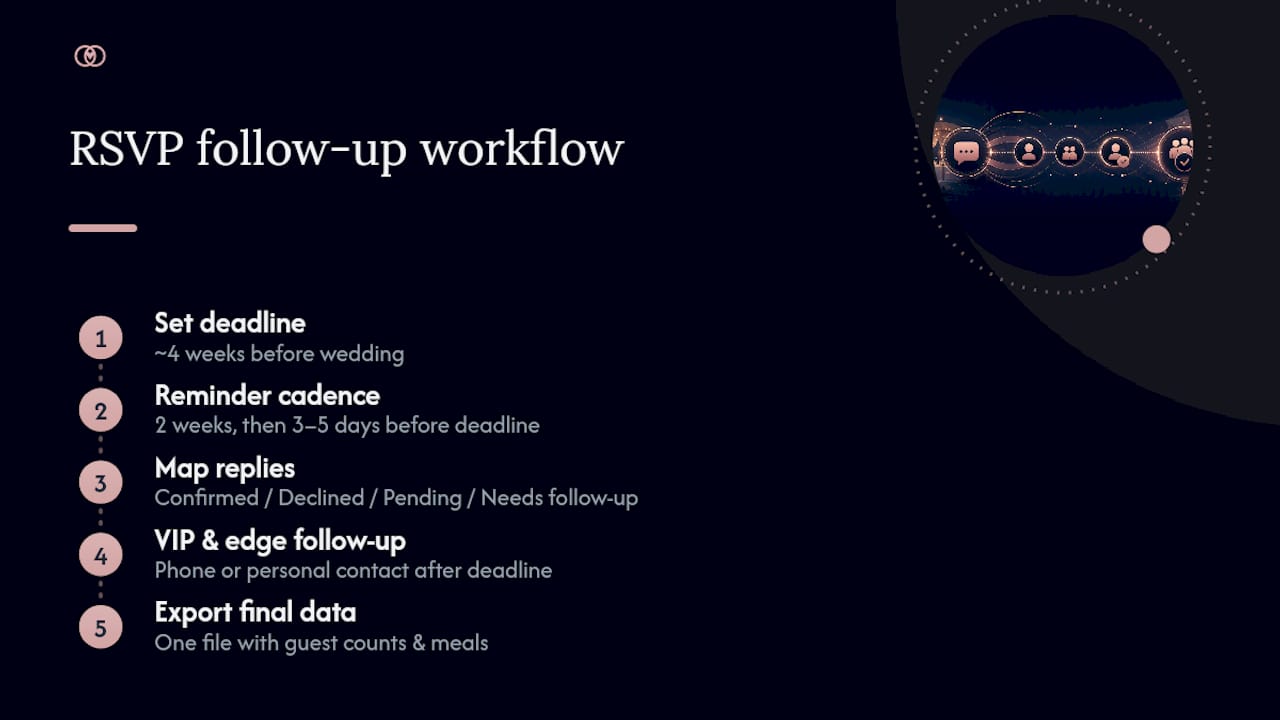
A tiered reminder cadence keeps response rates high without turning you into a nag. Send a friendly nudge two weeks before your deadline, follow with an urgent reminder 3 to 5 days out, and reserve personal phone calls for VIPs or key guests who still haven’t responded after the deadline passes.
Map every reply to a status field the moment it comes in: Confirmed, Declined, Pending, or Needs Follow-Up. One shared source of truth, whether a Google Sheet or a dedicated dashboard, prevents the classic wedding-planning disaster of two different guest counts floating around between you and your fiancé.
VIPs and edge cases deserve extra attention. Grandparents who don’t text back, guests who reply with a question instead of a yes/no, or someone who confirmed and then needs to change their answer two weeks later, all need a human follow-up rather than an automated nudge.
Set your RSVP deadline around four weeks before the wedding so you have breathing room to finalize counts and seating with your caterer and venue. When the deadline passes, export your final list, headcounts, and meal choices in one file your vendors can use directly, rather than a screenshot of a text thread.
Pro Tip: Only send reminders to non-responders, never to guests who already confirmed. It sounds obvious, but this single filter is what separates a smooth RSVP process from an inbox full of “I already said yes!” replies.
For workflows built entirely inside Google’s tools, scheduled send and shared Sheets can handle a lot of this manually. For anything with real complexity, an RSVP tracking system removes the guesswork of building that automation yourself.
What Actually Changes When Couples Switch to Text
Couples who move their RSVPs from paper cards or email to SMS almost always report the same thing: the chasing stops. Instead of wondering who’s coming for three weeks straight, they get a real-time count that updates itself.
That shift matters more for planners managing several weddings at once, where five different guest lists in five different formats becomes its own part-time job. Guidance on maintaining guest lists without dedicated staff reflects a pattern seen across the wedding industry: the couples and planners who avoid burnout are the ones who consolidate tracking into one place early, rather than trying to unify five spreadsheets the week before the wedding.
If you want copy-ready wording beyond the templates above, RSVP question wording for couples covers meal choices, plus-one language, and how to phrase awkward asks (like declining a plus-one) without sounding cold.
— JOATLABS
Let Thespecialwedding Handle the SMS Workflow for You
Thespecialwedding replaces the spreadsheet-and-text-thread juggling act with one dashboard that tracks every RSVP the moment it comes in. Instead of manually logging replies, cross-checking meal choices, and remembering who still owes you an answer, you get a real-time guest list that updates itself and exports cleanly for your caterer or venue.

For planners handling multiple weddings, this matters even more. Thespecialwedding’s guest management tools replace the scattered mix of texts, sheets, and sticky notes with scheduled reminders, plus-one tracking, and one export your vendors can actually use. Couples get the same benefit without needing planner-level tech skills.
If your guest list is starting to feel unmanageable, or you’re a planner juggling several RSVP deadlines at once, the fastest next step is checking out the vendor directory to see how Thespecialwedding fits into your current planning setup, and how much time it saves once your RSVPs run through one system instead of five.
Sources
- RSVP Reminder Text Messages: Templates, Wording & Tracking (2026)
- Wedding planning tips using Google Workspace | Google Blog
Recommended
Free wedding planner templates
Skip the blank page — these templates ship with the form fields you actually need.
Browse all 9 free templates →