The Role of Wedding Planner Email Templates
The Role of Wedding Planner Email Templates

You have eight vendors to confirm, three clients waiting on responses, and a wedding in five days. Without a system, something gets missed. That is exactly where the role of wedding planner email templates becomes one of the most practical tools in your business. Templates are not shortcuts that sacrifice quality. They are communication frameworks that protect your clients, your vendors, and your reputation by making sure the right information reaches the right people at the right time, every single time.
Table of Contents
- Key takeaways
- The role of email templates in wedding planning workflows
- Essential types of wedding planner email templates
- How templates improve vendor coordination
- Communicating with guests and clients via templates
- Best practices for customizing your templates
- My honest take on templates as a planning tool
- Take your planning communication further
- FAQ
Key takeaways
| Point | Details |
|---|---|
| Templates are stage-based frameworks | Structured emails map to each phase of the client journey, from inquiry through post-wedding referrals. |
| Vendor details prevent day-of mistakes | Including venue address, load-in info, and coordinator contact in every vendor email eliminates costly confusion. |
| Guest templates drive timely RSVPs | Save-the-date and reminder emails with clear deadlines keep your headcount accurate and planning on track. |
| Personalization keeps templates warm | Adapting greetings and key details stops your emails from sounding like mass broadcasts. |
| One source reduces version confusion | A single comprehensive pre-wedding email referencing one attached timeline protects against conflicting information. |
The role of email templates in wedding planning workflows
Think of wedding planner email templates as reusable, stage-based communication frameworks. A well-organized template library covers every major touchpoint: inquiry response, follow-up, booking confirmation, planning check-ins, wedding week logistics, post-event delivery, and referral requests. That is seven distinct email types, each with a specific job to do.
The consistency that templates create is worth more than the time they save. When every client gets the same booking confirmation structure, you stop forgetting to include the deposit deadline. When every vendor gets the same timeline format, your day-of coordinator is not fielding calls from a florist who did not know where to load in.
Here is what structured wedding planner client emails do for your business:
- Reduce repeated questions by proactively including the answers in every outbound message
- Build client confidence because clients who receive organized, professional communication trust you more and stress less
- Speed up vendor coordination by removing the need to compose logistics-heavy emails from scratch each time
- Prevent overlooked details that commonly cause day-of problems, like forgotten parking instructions or missing contact numbers
- Create a paper trail that protects you legally and operationally if a dispute arises
Pro Tip: Keep your template library in a shared folder organized by stage. Label each template with a trigger, such as “Send 2 weeks before” or “Send within 24 hours of inquiry.” You will spend less time searching and more time personalizing.
Essential types of wedding planner email templates
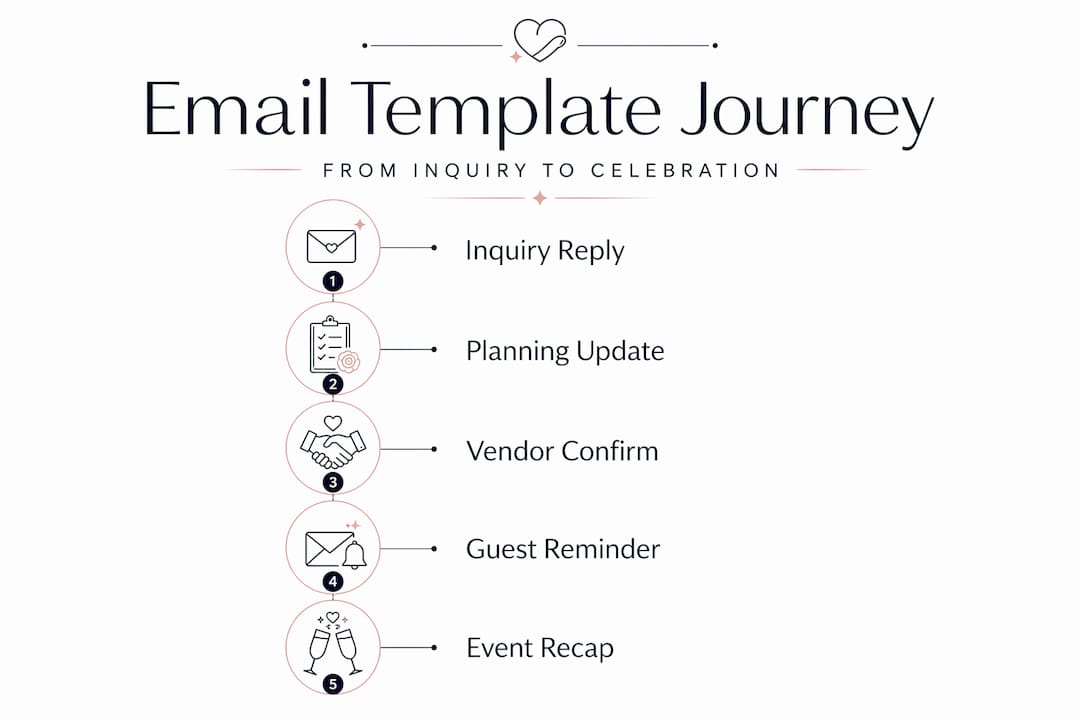
Not all templates serve the same purpose. The most effective wedding coordinator templates are designed around the specific decisions a client or vendor needs to make at each stage of the planning process.
| Template Type | Primary Purpose | When to Send |
|---|---|---|
| Inquiry response | Engage prospect, establish credibility | Within 24 hours of contact |
| Follow-up | Revive interest, address hesitation | 3-5 days after no response |
| Booking confirmation | Lock in commitment, confirm details | Immediately after signing |
| Pre-wedding planning email | Gather logistics, finalize timeline | 4-6 weeks before the date |
| Wedding week vendor confirmation | Reconfirm all operational details | 7-14 days before the wedding |
| Post-wedding delivery | Notify client of deliverables | Day of or day after |
| Referral request | Encourage reviews and introductions | 2-4 weeks post-event |
Each of these templates serves a different audience need. Inquiry responses need to be warm and fast. Booking confirmations need to be precise and reassuring. Referral requests need to feel personal, not transactional.
A few notes on building out each type:
- Your inquiry response should acknowledge the couple’s specific wedding date and one detail from their message to prove you actually read it
- Booking confirmation emails should include a summary of what was agreed, the next steps, and a payment schedule so there is zero ambiguity
- Pre-wedding planning emails work best as a structured questionnaire combined with a timeline preview so clients feel informed, not overwhelmed
- Final vendor confirmation emails should reconfirm date, time, venue, and timeline, while also expressing appreciation to strengthen working relationships
- Post-wedding delivery emails close the loop professionally and set the stage for requesting a review
The best wedding planner emails are not impressive because of their writing. They are impressive because they arrive at exactly the right moment with exactly the right information.
How templates improve vendor coordination
Vendor communication is where weak email habits create the biggest day-of problems. A caterer who did not know the venue’s load-in entrance or a DJ who had an outdated timeline can derail an otherwise perfectly planned event. That risk drops significantly when you use standardized logistics fields in every vendor-facing template.
The fields that matter most are not obvious ones like date and time. They are the operational specifics:
- Venue address and load-in entrance (not just the front door address)
- Parking and loading zone instructions because venues rarely communicate this to vendors directly
- Your cell number and the on-site coordinator’s cell number, since email becomes useless after setup begins
- Timeline attachment referenced explicitly, not just forwarded as a separate message
- Floor plan or room layout so vendors can visualize their setup before arrival
- AV and power requirements if relevant to the vendor’s service
Professional planners rely on a comprehensive two-weeks-before email that references one attached master timeline. This replaces the habit of sending incremental updates that create timeline version drift. When a vendor has three different emails with three slightly different timelines, they choose the wrong one. One email. One attachment. No confusion.
Pro Tip: Add a line at the bottom of every vendor confirmation email that says: “Please reply to confirm you have received this and reviewed the timeline.” This creates accountability and flags problems before the wedding day.
Organizing your inbox also matters. Folders labeled by vendor type and wedding event prevent institutional knowledge from disappearing when you are managing multiple events simultaneously. When a vendor calls with a question, you can pull up their thread in ten seconds instead of thirty minutes.
Communicating with guests and clients via templates
Guest communication gets underestimated. Planners focus on vendor coordination and client check-ins, but the emails sent to wedding guests directly affect RSVP accuracy, venue headcount, and accommodation logistics. These are numbers that cascade through every other planning decision.

Save-the-date emails should include the wedding date, city, and wedding website URL at minimum. Guests need enough information to block their calendars and start making travel plans, but not so much that the formal invitation loses its impact.
Invitation emails carry more weight and need more detail:
- RSVP deadline stated clearly and prominently, not buried in the third paragraph
- Meal choice options if applicable, with a direct link or form embedded in the email
- Accommodation block information with the booking deadline and room block code
- Transportation details if the planner has arranged shuttles between venues
RSVP reminder emails are often overlooked but operationally critical. A reminder sent one week before the RSVP deadline consistently improves response rates. Keep the reminder short. State the deadline, include the RSVP link, and thank guests for responding. That is all it needs to do.
Balancing clarity with warmth in guest-facing emails takes practice. The goal is to sound like a knowledgeable host, not a logistics coordinator sending a memo. Use the couple’s names often. Match the tone of the wedding. A black-tie formal event deserves a different email voice than a relaxed garden party.
Best practices for customizing your templates
Templates stop working when they start sounding like templates. The wedding planner client emails that perform best are the ones that feel written for the specific recipient, even when 80% of the content is reused.
Here is how to keep your templates fresh without rebuilding them from scratch:
- Personalize the opening line by referencing the client’s venue, wedding date, or a detail from your last conversation
- Review every template annually to update language, pricing references, or process changes that no longer reflect how you work
- Limit each email to one clear purpose. An email asking for final headcount should not also introduce the seating chart process. Clarity beats efficiency when it comes to client comprehension.
- Use templates as adaptable frameworks that allow quick personalization, not rigid scripts where every word is fixed
Pro Tip: After each wedding season, note which emails generated the most confused follow-up questions from clients or vendors. Those are your weakest templates. Rewrite them before the next busy season starts.
One of the most common mistakes planners make is over-customizing high-volume emails, like RSVP reminders or vendor check-ins, which wastes time, and under-customizing high-stakes emails, like booking confirmations and inquiry responses, which costs clients. Know where personalization earns its time investment and where the template should simply do its job.
My honest take on templates as a planning tool
I have seen planners treat templates as a sign of laziness, as if reaching for a pre-written email means you care less about your client. That thinking costs them hours every week and leads to more mistakes, not fewer.
The best email frameworks I have come across are not impressive because of polished writing. They are impressive because of what they include: the venue address, the cell phone number, the floor plan attachment, the single master timeline. The text is almost irrelevant. The payload of standardized logistics data is what prevents vendor mistakes.
What I have also learned is that a single source of truth changes the entire energy of a planning process. When your vendors all hold the same timeline, when your clients can see what to expect at each stage, and when your emails are consistent and detailed, the wedding day feels calmer. Not because nothing goes wrong, but because everyone had the information they needed.
Templates do not replace your expertise. They protect it.
— JOATLABS
Take your planning communication further
If you are spending hours composing vendor confirmations from scratch or tracking client follow-ups across three different apps, structured templates are only half the solution. Thespecialwedding brings your entire planning workflow into one place, with built-in communication templates, client portals, vendor management tools, and real-time dashboards that track RSVPs, timelines, and task progress all at once.
AI-assisted inquiries have shown response rates as high as 85% when combined with personalized, structured templates. Thespecialwedding pairs that kind of automation with the organization your business actually needs. You can explore the full vendor directory to connect with vetted professionals or visit Thespecialwedding to see how the platform replaces scattered spreadsheets and scattered emails with a system built specifically for professional planners.
FAQ
What is the role of wedding planner email templates?
Wedding planner email templates are stage-based communication frameworks that cover every touchpoint from inquiry through post-wedding follow-up. They reduce errors, speed up coordination, and keep clients and vendors consistently informed.
What should a vendor confirmation email include?
A vendor confirmation email should include the wedding date, venue address with load-in details, parking instructions, coordinator contact numbers, timeline attachment, and floor plan. Standardized logistics fields prevent day-of vendor mistakes more than any other single communication practice.
How do you personalize templates without sounding generic?
Personalize the opening line with a client-specific detail, limit each email to one clear purpose, and review your templates at least once a year. Templates work best as adaptable frameworks that allow quick personalization rather than rigid scripts.
When should planners send the comprehensive vendor confirmation email?
Send a single comprehensive vendor confirmation email two weeks before the wedding, referencing one attached master timeline. This prevents timeline version drift and gives vendors enough lead time to flag any conflicts.
How do guest email templates improve RSVP response rates?
Save-the-date emails, formal invitations with embedded RSVP links, and reminder emails sent one week before the deadline consistently improve guest response rates. RSVP reminders are short and direct, stating the deadline and providing an immediate link to respond.
Recommended
Free wedding planner templates
Skip the blank page — these templates ship with the form fields you actually need.
Browse all 9 free templates →