Wedding Budget Management for Professional Planners
Wedding Budget Management for Professional Planners
Wedding budget management for professional planners means running an integrated system that tracks client-facing budgets, vendor pass-through payments, and earned revenue as three distinct streams. Software like TheSpecialWedding.io that combines client portals, per-event ledgers, vendor payment schedules, and post-event reconciliation cuts payment disputes and gives you real-time visibility into cash flow across every wedding on your books at once.
TL;DR:
- Wedding planners need software that manages multiple concurrent events with separate budgets, vendor payments, and client trust funds to avoid liability and errors.
- Key features include live, client-facing budgets, per-event profit and loss statements, vendor record attachments, milestone invoicing, and comprehensive multi-event dashboards.
- Structuring invoices separately for planning fees and vendor pass-throughs, along with strict vendor payment workflows, ensures clearer bookkeeping and reduces reconciliation errors.
- Effective cash flow management requires rolling 12-month forecasts, reserve planning for peak months, and rigorous analysis of margin benchmarks across multiple weddings.
- Piloting new budget software on active events, exporting historical data, and verifying security before full rollout optimize adoption and data integrity.
Table of Contents
- What Does Wedding Budget Management Mean for Planners?
- Must-Have Features in Planner-Grade Budget Software
- How Should Planners Structure Invoices and Vendor Payments?
- How Do You Manage Cash Flow Across Multiple Weddings?
- How Do You Choose and Roll Out Budget Software?
- Why We Built Budget Tools for Working Planners, Not Couples
- Try TheSpecialWedding.io for Budget and Vendor Management
- Sources
What Does Wedding Budget Management Mean for Planners?
Wedding budget management for planners is not the same task as helping a couple track their own spending. That version, the one most search results assume, involves a single household allocating a fixed sum across categories like catering and photography. What you need is different: a system that manages multiple concurrent events, each with its own client trust obligations, vendor contracts, and payment milestones.
The distinction matters for accounting reasons, not just workflow ones. When a client pays you $30,000 and $22,000 of that is earmarked for a florist, a caterer, and a band, only your planning fee counts as earned revenue. The rest is client money you’re holding in trust until vendors get paid. Commingling those funds, even briefly in a general operating account, creates liability if a vendor payment is disputed or a client requests a refund mid-planning.
Planner-grade budget management has to handle patterns that never show up in personal budgeting apps:
- Multiple vendor deposits due on staggered timelines across a single event
- Partial payments and change orders after a contract is signed
- Client-facing budget views that update in real time as vendors are booked
- Per-event profit and loss separate from your firm’s overall revenue
- Multi-event dashboards showing exposure across every wedding in progress
That last point is where most planners get burned. A spreadsheet tells you about one wedding. It says nothing about the fact that four other clients have vendor deposits due the same week.
Must-Have Features in Planner-Grade Budget Software
A vendor demo will show you a polished interface. What you actually need is a specific set of capabilities that hold up under the pressure of running fifteen weddings at once. Use this as a baseline checklist for any software evaluation or RFP:
- Live, client-facing budgets with permission controls. Clients should see an always-current budget view, not a PDF from three weeks ago, with visibility limited to what you choose to share.
- Per-event ledgers and job codes with clean exports. Every wedding needs its own P&L, and your bookkeeper needs QuickBooks-compatible exports without manual re-entry.
- Vendor records with attached contracts and payment schedules. Vendor terms, deposit dates, and final balances should live next to the vendor’s contact record, not in a separate email thread.
- Milestone invoicing with automated reminders. Payment due dates should trigger reminders automatically, tied to a payment provider that reconciles on its own.
- A multi-event dashboard with cash-flow forecasting and audit trails. You need one screen that shows outstanding deposits, upcoming vendor payments, and reserve levels across your entire active roster.
Integrated platforms that connect proposals, vendor tracking, and invoicing in one system eliminate the manual syncing that eats hours every week, and case examples from all-in-one planning platforms point to five or more hours of staff time recovered weekly once milestone payments and client portals run on autopilot. Planners consistently rank client-facing live budgets and aggregated multi-event dashboards among the features that matter most, according to feature research on planner software stacks, ahead of flashier extras like design mood boards.
Pro Tip: Before signing a software contract, ask for a sandbox account and try building one full event, from vendor onboarding through a mock final invoice, before you commit a team to the migration.
For a deeper feature comparison, Thespecialwedding’s own guide to wedding planner software walks through the trade-offs between entry-level tools and full agency platforms.
How Should Planners Structure Invoices and Vendor Payments?
Two invoicing models dominate the pass-through decision, and each carries different cash-flow consequences. In the first, you bill the client, collect payment, and then pay the vendor. This keeps your cash flow clean since you’re never fronting money. In the second, you pay the vendor first and invoice the client afterward, which is more cash-intensive and only makes sense if you have reserves to absorb the float. Most invoicing guidance for event planners recommends the first model unless a vendor relationship requires upfront payment.
Structure every invoice so the planning fee and vendor pass-throughs sit in separate, clearly labeled sections. Blending them into one lump sum invites confusion when a client questions a total, and it makes your own bookkeeping harder come tax season.
A reliable vendor payment workflow includes:
- A signed contract on file for every vendor before any deposit moves
- A payment schedule with deposit, midpoint, and final balance dates documented per vendor
- A collected W-9 for every vendor you pay directly, per vendor contracting best practices
- A rule against contracting vendors on the client’s behalf unless your agreement explicitly authorizes it
Post-event reconciliation is where sloppy systems get exposed. A complete reconciliation should document the total planning fee charged and received, estimated versus actual vendor costs, and any adjustments resulting in a net due or refund. Send it within five to seven business days of the event while details are still fresh for both you and the client.
On the bookkeeping side, best practice calls for a dedicated client trust account with a sub-ledger per client, per-event job codes for tracking profitability, and a monthly reconciliation of deferred revenue. Skipping this step is how planners end up unable to explain, six months later, why a specific wedding’s margin looked thin.

For a closer look at building this into your regular cadence, Thespecialwedding’s payment tracking guide breaks down milestone scheduling in more detail.
How Do You Manage Cash Flow Across Multiple Weddings?
A single wedding’s budget tells you almost nothing about your firm’s financial health. What matters is the aggregate view: every confirmed deposit, every pending vendor payment, and every seasonal swing layered on top of each other across your full roster.
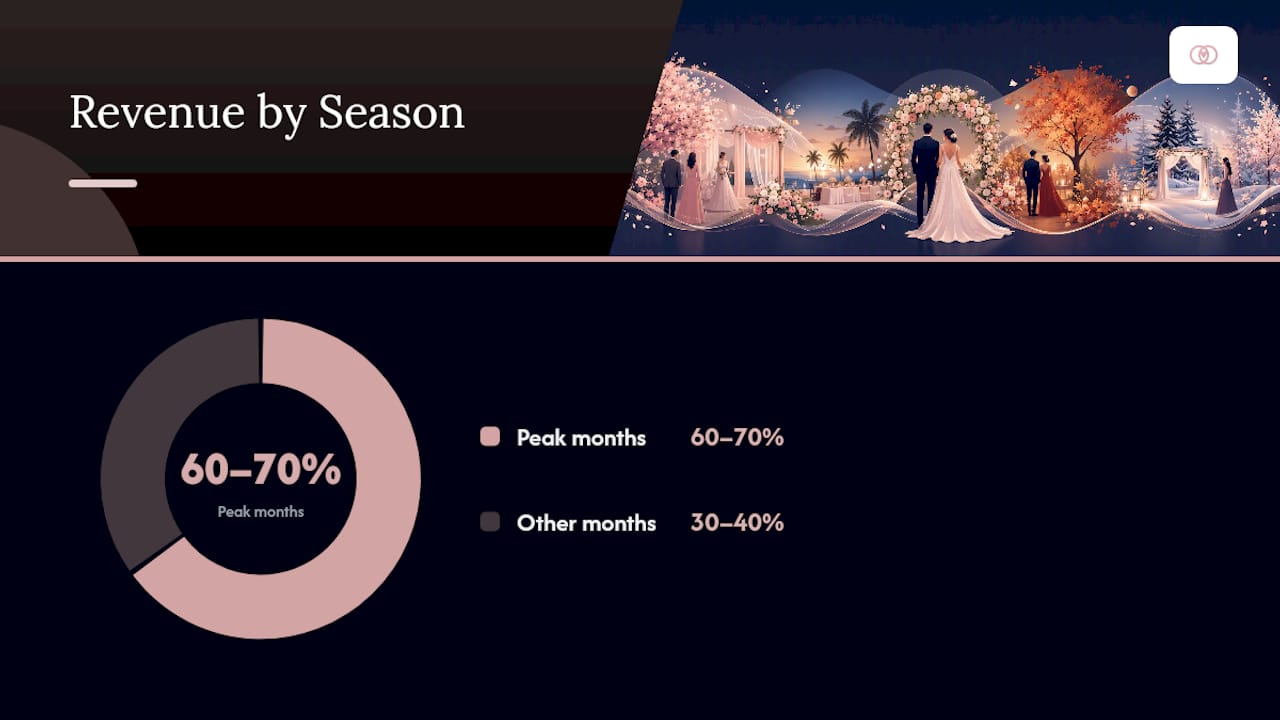
Build a rolling 12-month cash-flow projection using confirmed bookings plus a discounted estimate for probable ones still in the pipeline. Planners typically manage 15 to 30 vendors per event, and seasonal concentration is real: many planning businesses collect 60 to 70% of annual revenue during peak wedding months, which means a slow winter can look like a crisis if you haven’t planned reserves around it.
Watch these dashboard signals closely:
- Which months show the heaviest concentration of vendor deposit deadlines
- Whether your cash reserve covers at least one full peak month of vendor obligations
- How far out you’re booking relative to your historical pipeline average
- Which events show the thinnest per-event margin once actual costs come in
Set operational rules around what you see. Keep a reserve sized to your largest single month of vendor pass-throughs, time any major equipment or software purchases for your slowest season, and only consider a line of credit if your reserve consistently falls short during ramp-up months. Per-event P&L data also lets you stress-test your markup assumptions. If your pricing structure assumes a 15% margin but your actuals keep landing closer to 8%, that’s a pricing problem, not a bad-luck problem. Reviewing event planner cost structures alongside your own numbers helps you spot where the gap is coming from. A multi-event dashboard makes this kind of pattern visible in a way a folder of individual spreadsheets never will.
How Do You Choose and Roll Out Budget Software?
Evaluate any platform against the feature checklist above, but don’t stop at a features list. Run a real pilot before committing your whole team.
- Select two or three active events as pilot cases, ideally ones at different stages of planning so you can test intake, mid-planning changes, and final reconciliation.
- Run parallel spreadsheets for one full cycle. Don’t retire your old system until the new one has proven it produces matching numbers on a completed event.
- Migrate historical data carefully. Export vendor contacts, open invoices, deposit records, and past P&L history, and map old job codes to the new system before import so profitability comparisons stay intact.
- Set role permissions and client-portal access before rollout, along with templates for common event types and automated payment reminder rules.
- Confirm payment security. Check that the platform’s payment provider is PCI-compliant, and review contract language to make sure client funds and firm revenue are never commingled in a single account.
Pro Tip: Keep your original job codes visible during migration, even temporarily, so a sudden gap in your P&L trend doesn’t get mistaken for a real revenue problem.
If you’re still running the business on spreadsheets and email threads, Thespecialwedding’s piece on why planners are replacing spreadsheets covers the specific failure points worth planning around before you migrate.
Why We Built Budget Tools for Working Planners, Not Couples
JOATLABS built TheSpecialWedding.io’s budget features because most software in this space was designed for individual couples, then awkwardly retrofitted for agencies. That approach misses the actual pain points: reconciling fifteen vendor pass-throughs at once, giving a client a live budget view without exposing your margin, and knowing at a glance which of your twenty active weddings has a payment gap this week.
The platform’s integrated ledgers, per-event dashboards, and client portals exist because planners kept describing the same problem in different words: too many disconnected tools, not enough visibility. If you’re weighing a pilot, the operational playbook above is the exact standard we built against.
— JOATLABS
Try TheSpecialWedding.io for Budget and Vendor Management
Thespecialwedding gives you the exact system this article describes already built, instead of asking you to stitch it together from a spreadsheet, a separate invoicing tool, and a shared inbox. Per-event ledgers, client-facing live budgets, vendor payment schedules, and milestone reminders all run in one workspace, so reconciliation stops being a end-of-event scramble.

If you manage vendor relationships as part of your budget workflow, the platform’s vendor directory is a practical place to see how vendor records, contracts, and payment tracking connect inside the same system you’d use for client budgets. Start a free trial to build out one active event with real vendor data and see whether your reconciliation time actually drops before you commit your full roster to the switch.
Sources
- How to Invoice Event Planning Clients — Clearmargin | ClientCasa
- Bookkeeping for Event Planners: Deposits, Vendors & Seasonal Cash Flow | Ledger Bee LLC
- How to Handle Vendor Contracts and Payments
- Best All-in-One Software for Wedding Planners in 2026 - Plutio
Recommended
- Wedding planning time management: a pro guide for planners | The Special Wedding Blog
- Wedding planner invoice management examples for pros | The Special Wedding Blog
- Wedding Planner Software for Pros: The 2026 Agency Guide | The Special Wedding Blog
- Event Planner Costs: A Practical Guide for Pros | The Special Wedding Blog
Free wedding planner templates
Skip the blank page — these templates ship with the form fields you actually need.
Browse all 9 free templates →