Centralize Wedding Client Feedback: Auto Tasks for Multi Event Studios
Centralize Wedding Client Feedback: Auto Tasks for Multi Event Studios
Treat wedding client feedback as structured operational data, not a courtesy survey. Centralize every response inside your planning workspace and automate the follow-up so nothing negative sits unresolved. TheSpecialWedding.io is built around exactly this workflow, giving planners one place to capture, tag, and act on what couples tell them.
TL;DR:
- Sending post-wedding surveys within two weeks balances fresh memories and reflection, increasing the likelihood of detailed, actionable feedback.
- A single, consolidated system for all feedback responses enables automation of follow-up tasks and tracks trends across multiple weddings.
- Tagging feedback themes by severity and impact allows for prioritizing urgent fixes for high-impact, high-frequency issues.
- Maintaining a consistent survey structure with core questions over time helps identify patterns and measure improvements across multiple clients.
- Automating feedback collection and follow-up reduces manual effort and ensures that concerns are addressed promptly, improving client retention and vendor management.
Table of Contents
- Why wedding client feedback drives growth, not just satisfaction scores
- What should your wedding feedback survey actually ask?
- When should you send feedback surveys after a wedding?
- Building a single source of truth for feedback
- How do you turn feedback into real process changes?
- Sample questions, closing-the-loop messaging, and metrics to track
- A planner’s take on scaling feedback without losing the personal touch
- Put your feedback program on autopilot with TheSpecialWedding.io
- Sources
Why wedding client feedback drives growth, not just satisfaction scores
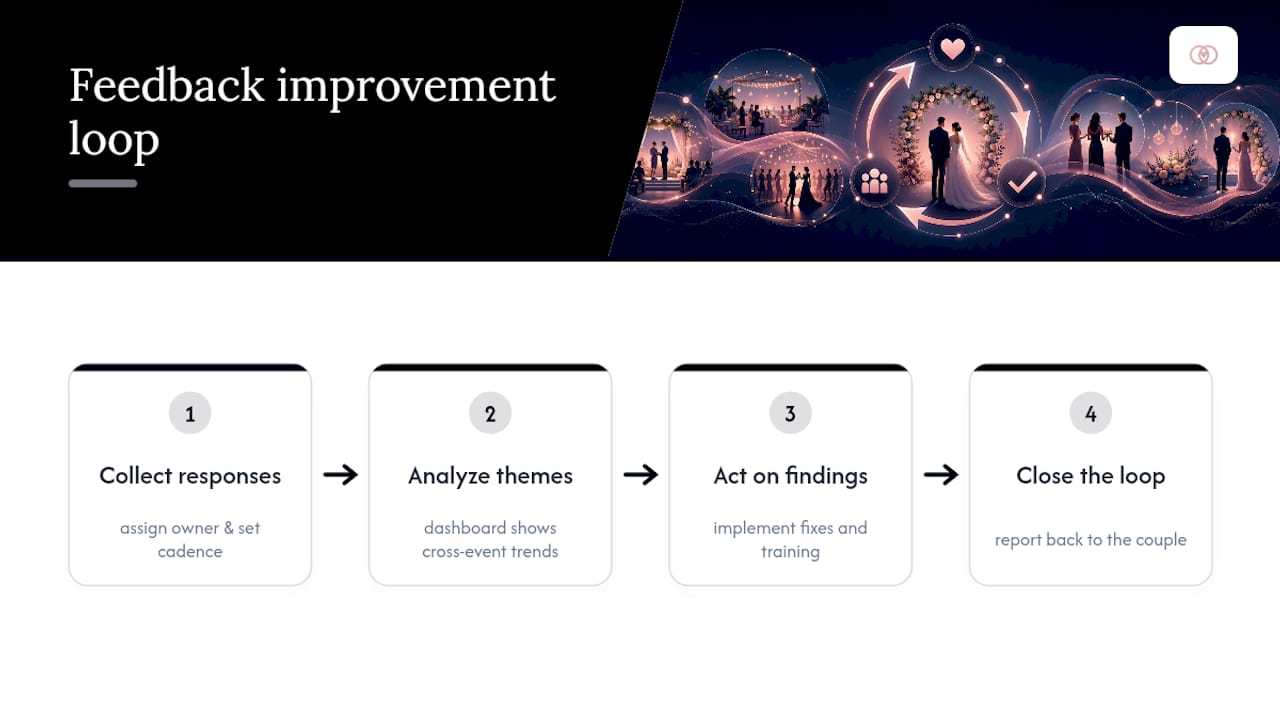
Most studios treat feedback like a formality: send a survey, glance at the average score, move on. That habit wastes the single richest dataset a planning business has. Firms that build a real loop, collecting responses, analyzing them, acting on the findings, and closing that loop with the couple, retain clients longer and surface real business development opportunities that a one-off satisfaction check never reveals.
A rehearsal-dinner complaint about vendor lateness is a training signal. A recurring comment about unclear payment timelines is a process fix. A repeated compliment about your day-of coordinator is a referral asset you can use in sales conversations.
None of that happens without a consistent cadence. Assign someone ownership of the program, set a rhythm for when surveys go out, and build a dashboard that shows trends across weddings rather than isolated scores. Without that structure, feedback becomes noise instead of a growth lever.
What should your wedding feedback survey actually ask?
A useful survey balances two things: scores you can track over time and comments that explain why the score landed where it did. Rating scales alone tell you something dropped; open prompts tell you what to fix. A well-designed evaluation survey built around this mix consistently surfaces operational issues, like slow weekend response times, that a single number would bury.
Structure your survey around categories that map to your actual service delivery, not generic satisfaction language:
- Communication and responsiveness — how quickly and clearly you answered questions throughout planning
- Vendor coordination — how smoothly outside vendors were briefed and managed
- Day-of execution — timeline accuracy, setup, and problem handling on the wedding day
- Budget transparency — clarity around costs, changes, and final reconciliation
- Creative delivery — how well the design vision matched what the couple imagined
- Overall satisfaction and likelihood to recommend — your headline retention indicator
Keep the survey between 5 and 12 questions. Shorter surveys with two or three targeted open prompts consistently produce clearer, more usable responses than long forms couples abandon halfway through. A client questionnaire template built at intake gives you a natural mirror to compare against post-event answers.
Pro Tip: Ask the same three core questions on every survey, no matter how much the rest evolves. Consistency is what lets you track trend lines across dozens of weddings instead of comparing apples to oranges.
When should you send feedback surveys after a wedding?
Timing determines whether you get a thoughtful answer or a rushed one. Send too early and couples are still in the post-wedding fog; send too late and details fade.
- In-event quick captures. QR codes at the reception or a text prompt to the wedding party catch reactions while they’re fresh, letting your team fix small issues on the spot rather than reading about them weeks later.
- The one-to-two-week post-event window. This is the sweet spot for the full survey. Evaluation research on wedding planning points to this window as the balance between fresh memory and reflective distance.
- Milestone check-ins. A short pulse survey after the rehearsal and again after the final walk-through catches problems before the wedding day, not after.
Vary the channel by client type. A branded email through your client portal works for most couples; SMS often gets faster responses from time-pressed grooms or out-of-town family. Integrating feedback collection with your event management system lets you trigger these automatically when an event status changes to complete, so no couple slips through because someone forgot to send the link.
Cap your reminder cadence at two nudges. VIP or repeat-client segments deserve a lighter touch, maybe a personal note instead of an automated reminder, since survey fatigue kills response rates faster than almost anything else.
Building a single source of truth for feedback
Scattered feedback, some in a shared inbox, some in a spreadsheet, some only in a planner’s memory, is the reason most studios never act on what couples tell them. A single source of truth consolidates every response against the specific event record, so a comment about a vendor is instantly attached to that vendor’s file, not buried in a generic folder.
That structure is what makes automation possible. Once feedback lives in one system tied to your event data, you can build workflows like:
- Trigger: couple submits a rating of 3 or below on any category → Task: service recovery ticket auto-assigned to the lead planner, due within 48 hours
- Trigger: open comment mentions a specific vendor by name → Task: flagged on that vendor’s profile for review before the next booking
- Trigger: survey goes unanswered after two reminders → Task: personal outreach task assigned to the feedback champion
Even small studios benefit from a single automation rule. A task created automatically the moment negative feedback comes in prevents the most common failure in feedback programs: asking the question and then doing nothing with the answer.
Dashboards close the loop on measurement. Track response rate, the most frequent themes across events, and time-to-resolution on flagged issues. A reporting dashboard built for cross-event visibility turns dozens of individual surveys into a pattern you can act on, rather than forty isolated PDFs nobody rereads.
How do you turn feedback into real process changes?
Collecting feedback is only half the job. The other half is coding it into something your team can act on without re-reading every response by hand.
Tag each comment by theme (communication, vendor, budget, day-of logistics) and by severity. Frequency tells you what’s systemic; severity tells you what’s urgent. A comment about a slow email reply that shows up once is noise. The same comment showing up on six weddings is a process failure.
Run tagged themes through a simple impact times frequency matrix to decide what to do next:
- High impact, high frequency — fix immediately. If multiple couples flag confusing final-payment timelines, rewrite the payment schedule template this month.
- High impact, low frequency — monitor closely. A single sharp complaint about a specific vendor’s day-of behavior deserves a direct conversation with that vendor before their next booking.
- Low impact, high frequency — process update. Minor recurring gripes about response time on weekends might justify a rotating on-call schedule rather than a full policy overhaul.
Feed the resolved themes straight back into your operations: update your vendor onboarding checklist, revise your client questionnaire template, and adjust your team’s day-of checklist for the next event.
Pro Tip: Review your tagged themes quarterly, not just after each wedding. A single bad review is an incident; three similar ones in a quarter are a pattern worth rebuilding a process around.
Sample questions, closing-the-loop messaging, and metrics to track
Borrow these directly rather than reinventing your survey from scratch:
- On a scale of 1 to 5, how would you rate our communication throughout planning?
- How well did we coordinate with your vendors on the wedding day?
- Did the day run according to the timeline we agreed on?
- Was pricing and budget guidance clear at every stage?
- What’s one thing we could have done better?
- What’s one thing you’d want us to keep doing exactly the same way?
- How likely are you to recommend us to another couple?
Close the loop with a short message, not silence: “Thank you for the honest feedback. We’ve already made [specific change] based on what you shared, and we wanted you to be the first to know.”
Track four numbers to judge whether the program is working: survey response rate, the percentage of couples who’d recommend you, average time between a flagged issue and its resolution, and the count of recurring themes you’ve actually closed out this year.
A planner’s take on scaling feedback without losing the personal touch
The studios that get this right usually start the same way: one person, a feedback champion, owns the process end to end. They send the surveys, tag the themes, and make sure flagged issues actually get worked, not just filed. Skip that step and the whole thing quietly dies. Surveys go out ad hoc, nobody reviews the answers, and couples notice when they’ve raised a concern and heard nothing back.
The fix isn’t more effort, it’s less improvisation. A repeatable trigger, a clear owner, and a template for the follow-up message do more for retention than any amount of good intentions. TheSpecialWedding.io’s blog resources and templates exist because this pattern repeats across nearly every studio that scales past a handful of weddings a year.
— JOATLABS
Put your feedback program on autopilot with TheSpecialWedding.io
TheSpecialWedding.io replaces the spreadsheet-and-email chaos most studios use to track client sentiment with one workspace built around exactly the workflow this article describes: client intake tied to event records, surveys triggered automatically when a wedding wraps, and negative responses converted into assigned tasks instead of forgotten inbox threads.

Every survey response lands on the couple’s event file next to their vendor list, timeline, and budget, so a flagged complaint routes straight to the person who can fix it, whether that’s a coordinator, a vendor relationship, or your own follow-up on payment terms. Studios coordinating vendors like Events By Suad inside the platform use the same feedback loop to flag vendor performance before the next booking, turning client comments into a screening tool rather than a filing exercise.
Start a free trial and import your next post-event survey into a workspace where the follow-up task creates itself.
Sources
- Single source of truth (Amplitude)
- Client Feedback Systems: Building Systematic Approaches to Gather, Analyze, and Act on Client Input
- Evaluation survey template for wedding planners (ISRP Group)
- Integrating feedback with event management systems (Hotel News Resource)
Recommended
Free wedding planner templates
Skip the blank page — these templates ship with the form fields you actually need.
Browse all 9 free templates →