3 Steps to Fix Wedding Inquiry Management in 30 Days for Planners
3 Steps to Fix Wedding Inquiry Management in 30 Days for Planners
The fastest fix for wedding inquiry management is a short qualifying intake form paired with an instant auto-reply and a simple point-based scoring rule. That combination solves the three real causes of lost leads: slow response, weak qualification, and inconsistent follow-up. Everything else, from templates to dashboards, exists to support that one system. The full setup lives in the workflow section below.
TL;DR:
- Automating response times within five minutes significantly increases booking and tour rates, especially for inquiries within the next 90 days.
- A concise, mobile-friendly inquiry form capturing wedding date, event type, guest count, budget tier, and decision-maker contact improves lead qualification.
- Personalized auto-replies and a structured nurture sequence boost contact rates and sustain prospects’ interest during the inquiry process.
- Scoring leads based on budget, timeline, guest count, and decision-maker status helps prioritize high-potential clients and reduce wasted follow-up.
- Using a unified platform that integrates forms, automation, scoring, and analytics minimizes lead management fragmentation and enhances overall conversion efficiency.
Thespecialwedding Bring Wedding Inquiries Together
TheSpecialWedding brings client intake, automated workflows, communication, and dashboards into one collaborative workspace for wedding planners.Explore TheSpecialWedding
Table of Contents
- What Is the Full Wedding Inquiry Management Workflow?
- What Fields Belong on a High-Converting Wedding Inquiry Form?
- What Should Your Auto-Reply and Nurture Emails Actually Say?
- How Do You Score and Prioritize Wedding Leads?
- Which Metrics Actually Predict Booking Success?
- How Does TheSpecialWedding.io Put This System in One Place?
- What Do Working Planners Actually Change First?
- Start Managing Wedding Inquiries in One Place
- Sources
What Is the Full Wedding Inquiry Management Workflow?
Every inquiry deserves the same sequence, whether it lands at 9 a.m. or 11 p.m. on a Saturday. Build the workflow once, automate the timing, and let your team focus on the conversations that actually move a booking forward.
Here’s the sequence that works for planners juggling multiple events at once:
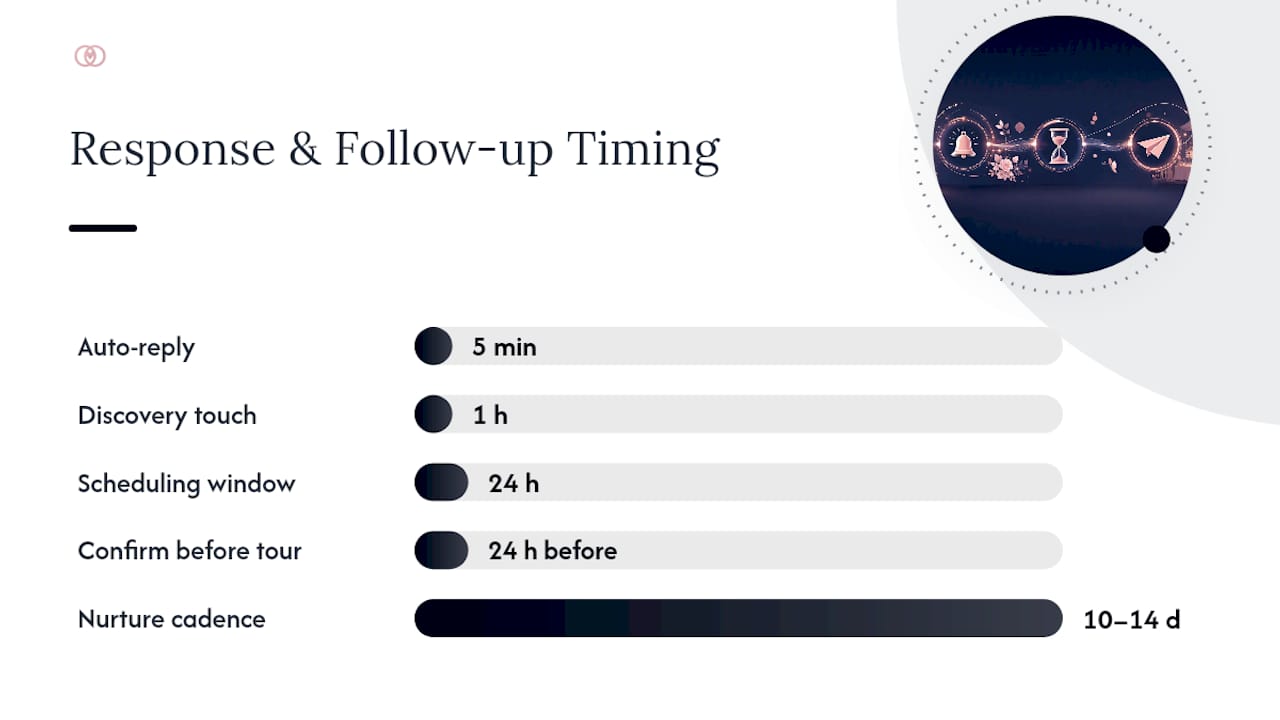
- Auto-reply within 5 minutes. Confirm the inquiry landed, set expectations for a human response, and include one clear next step (usually a booking link).
- One-hour discovery touch. A team member sends a short, personal message that references the couple’s specific date and venue interest, then asks two or three qualifying questions.
- Scheduling within 24 hours. Offer a self-serve booking link for a call or tour instead of a back-and-forth email thread.
- Tour or consult. Confirm details 24 hours ahead by text, and bring pricing ranges to avoid a second round of “what’s this going to cost” emails.
- Nurture cadence for silence. If a lead goes quiet after the first touch, send three follow-ups over 10 to 14 days, then pause outreach and mark the lead cold rather than deleting it.
- Hand-off to contracts. Once a lead confirms budget, date, and decision-making authority, move them into your contract and payment workflow immediately, before enthusiasm cools.
The one-hour window matters more than most planners assume. A faster first response consistently tracks with higher tour and booking rates in the events industry, and couples shopping three or four planners at once tend to book with whoever answers first with a specific, personal message rather than a generic template.
Pro Tip: Set a hard internal rule that no inquiry sits untouched for more than one hour during business hours. If you can’t guarantee that with your current team size, automate the discovery message so a human isn’t the bottleneck.
What Fields Belong on a High-Converting Wedding Inquiry Form?
A form that asks too much up front kills completion rates. A form that asks too little wastes your team’s time chasing basic facts before a real conversation can start. The fix is progressive disclosure: capture just enough to qualify and personalize, then save deeper questions for the consult.
Fields your intake form should require:
- Wedding date or date range (a firm date, a season, or “flexible” all change your routing).
- Event type (full wedding, elopement, micro-wedding, vow renewal).
- Estimated guest count, ideally as a range rather than an exact figure.
- Ballpark budget, presented as tiers so couples don’t feel judged for guessing low.
- Decision-maker contact info, including a direct phone number for the person actually signing the contract.
Fields to save for the consult instead of the first form:
- Vision boards, color palettes, or Pinterest links.
- Specific vendor preferences.
- Detailed guest list logistics.
Keep the form mobile-first. Use date pickers and guest-count sliders instead of open text fields, since most inquiries now start on a phone between other tasks. A detailed client questionnaire explains why each qualifying question matters, and Jotform’s wedding inquiry form template shows one common field structure you can adapt. Add a short privacy line near the submit button. Something as simple as “We never share your information with outside vendors without your permission” measurably improves trust and completion.
What Should Your Auto-Reply and Nurture Emails Actually Say?
Copy the following patterns instead of writing from scratch every time. Consistency in your response templates protects your brand voice even when three different team members are handling inbound leads.
- The instant auto-reply. Confirm receipt, state your typical response window (“You’ll hear from a real person within one business hour”), and link directly to your booking calendar. Keep it under 80 words.
- The one-hour discovery message. Reference their date and venue by name, ask one or two qualifying questions (“Do you have a guest count range in mind?”), and close with a specific call to book a 15-minute call. Sending this by both email and SMS raises contact rates, especially for couples working on a short timeline.
- The nurture sequence. Three messages spaced across 10 to 14 days: a gentle check-in on day 3, a value-add message on day 7 (a planning tip or portfolio link), and a final “still interested?” message on day 14 before the lead moves to cold status.
Automation rules should tie directly to form answers. A lead who selects a date inside the next 90 days should route to a “hot” queue with a same-day call task. A lead with no firm date can flow into a slower, automated nurture track without pulling a planner’s attention away from active bookings. Automation like this keeps prospects warm even on days your team is buried in tours and site visits, which is exactly where most manual follow-up breaks down.
How Do You Score and Prioritize Wedding Leads?
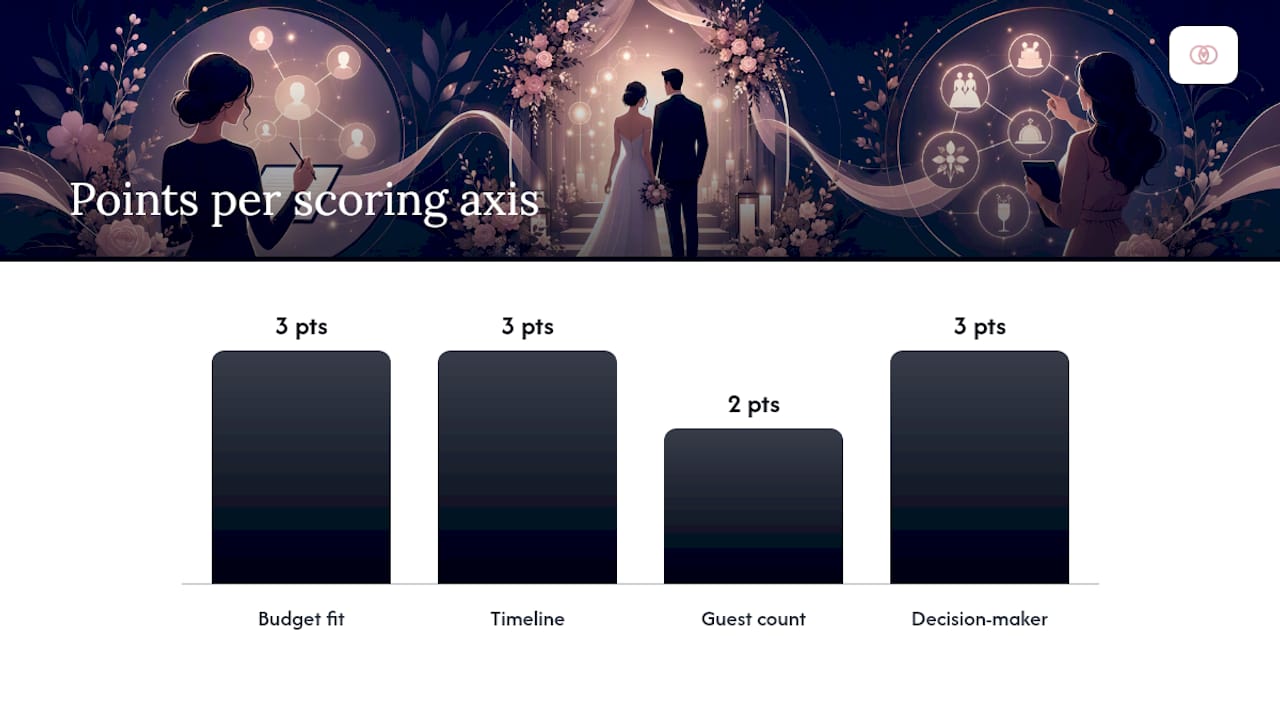
A simple point system turns gut instinct into a repeatable process. Score each inquiry on four axes and let the total decide what happens next.
- Budget fit: 0 points if far below your minimum, 2 points if within range, 3 points if above average.
- Timeline: 3 points for a date within a year, 1 point for “someday” inquiries.
- Guest count: 2 points if it matches your ideal event size, 0 if it’s far outside your typical range.
- Decision-maker status: 3 points if the inquiry comes directly from the couple, 1 point if it’s a parent or friend gathering information.
Totals of 8 or higher route to “hot,” triggering an automated invitation to book a tour immediately. Scores of 4 to 7 land in “warm,” entering the standard nurture sequence. Anything below 4 goes “cold” and gets a lighter, less frequent touch. This kind of budget, timeline, and decision-maker scoring is exactly what separates planners who spend their week chasing dead ends from those chasing real bookings.
Pro Tip: Watch for the biggest red flag: a lead who won’t share a budget range even loosely and won’t name a decision maker. That combination predicts a long, unproductive email thread more often than a booking.
Which Metrics Actually Predict Booking Success?
Most planners track too many numbers and act on none of them. Three metrics tell you almost everything about the health of your pipeline, and planner-focused analytics consistently point to these same three for weekly review.
- Response time. The gap between inquiry submission and first human contact. Anything over four hours should trigger an alert.
- Inquiry-to-tour rate. The percentage of inquiries that convert to a booked consult or tour.
- Tour-to-book rate. The percentage of tours that convert to signed contracts.
- Inquiry volume by source. Instagram, your website form, a venue referral, and a wedding directory each perform differently, and this number tells you where to spend your marketing budget.
Build a dashboard with four tiles matching those metrics, segmented by lead source where possible. A source generating high volume but a low tour-to-book rate is usually a targeting problem, not a follow-up problem. Review the numbers weekly, not monthly. A four-week lag between a broken template and the fix costs you real bookings during peak inquiry season.
How Does TheSpecialWedding.io Put This System in One Place?
Running this workflow across spreadsheets, a separate email tool, and a texting app is exactly the fragmentation that causes missed follow-ups in the first place. Thespecialwedding maps every piece of the system described above into a single workspace built specifically for planners running multiple events at once.
- Intake forms with the qualifying fields covered in the checklist above, built in rather than bolted on.
- Automated replies tied to form submission, so the five-minute response window happens without a human touching a keyboard.
- Scoring rules that route hot leads into a priority queue automatically.
- Dashboard tiles tracking response time, inquiry-to-tour, and tour-to-book in one view.
- Client portals that keep every message, contract, and timeline update in a single thread instead of scattered across inboxes.
Prebuilt templates cut setup time significantly, since you’re customizing existing structures instead of building forms and email sequences from a blank page. That mirrors what most planner tools in this category recommend: downloadable workflow examples and importable layouts exist specifically to shorten the path from signup to a working system.
| First 30 days | What success looks like |
|---|---|
| Week 1 | Intake form live, auto-reply active, one scoring rule set |
| Week 2 | Nurture sequence built, dashboard tiles configured |
| Week 3 | First weekly metrics review, templates adjusted |
| Week 4 | Response time under 1 hour, tour-to-book rate tracked by source |
For planners managing several weddings in parallel, a single workspace threading intake, contracts, and timelines cuts down the context switching that quietly loses leads between tools.
What Do Working Planners Actually Change First?
Assign one person as the “first response owner” for each shift, even if it’s a rotating duty across a small team. The moment response time depends on whoever happens to check email first, it becomes inconsistent, and inconsistency is what kills conversion.
Shortcuts help more than perfectionism does. A discovery message template with two blank fields for the couple’s name and venue takes 30 seconds to personalize and still feels human. Save fully custom messages for after you’ve qualified the lead as serious.
For your first week rolling this out, keep the changes small: turn on the auto-reply, add one scoring rule, and set a single alert for response times over four hours. Adding all of it at once usually means none of it gets used correctly.
— JOATLABS
Start Managing Wedding Inquiries in One Place
Thespecialwedding is the alternative to juggling a form tool, a separate email platform, and a spreadsheet for tracking leads. Instead of stitching those pieces together yourself, you get intake forms, auto-replies, and scoring rules built into one workspace from day one.

Start by setting up three things: your qualifying intake form, an instant auto-reply confirming your response window, and one scoring rule that flags leads with a date inside 12 months. Those three pieces alone close most of the gap between a slow, manual process and one that catches leads before a competitor does. You can test whether faster speed-to-lead actually moves your booking rate before committing to a paid tier by exploring available plans on the platform’s website. If you plant, cater, or coordinate events around Oklahoma City, you can also see how vendor profiles like V2 Events at Vast connect directly into an inquiry workflow. Start your free trial and get your first inquiry form live today.
Recommended
Free wedding planner templates
Skip the blank page — these templates ship with the form fields you actually need.
Browse all 9 free templates →