Wedding Planning Dashboard Benefits for Pros in 2026
Wedding Planning Dashboard Benefits for Pros in 2026

Managing a wedding involves hundreds of moving parts: vendor contracts, client approvals, payment schedules, seating charts, and day-of timelines, all happening at once. The wedding planning dashboard benefits professionals gain from centralizing these workflows go far beyond simple organization. You get faster decisions, fewer errors, and clients who actually feel informed. This article breaks down what to look for in a dashboard, the specific gains you can expect, and how to implement one without disrupting your active bookings.
Table of Contents
- Key takeaways
- 1. What wedding planning dashboard benefits actually look like
- 2. Time savings through centralized task automation
- 3. Real-time visibility and faster decision-making
- 4. Cost reductions from consolidating your tool stack
- 5. Improved client experience through branded portals
- 6. Scalability without sacrificing quality
- 7. Streamlined vendor and payment management
- 8. Comparing top real-time wedding dashboard solutions
- 9. Practical tips for implementing your dashboard smoothly
- My honest take on wedding planning dashboards
- See how Thespecialwedding brings these benefits together
- FAQ
Key takeaways
| Point | Details |
|---|---|
| Centralized workflows save time | Dashboards consolidate vendors, timelines, and client data, cutting hours of manual coordination each week. |
| Real-time visibility reduces risk | Live status updates let planners catch vendor or budget issues weeks before the wedding day. |
| Cost savings arrive within months | Consolidating tools can save $60 to $160 monthly, with ROI typically realized within 3 to 6 months. |
| Client portals reduce check-in messages | Branded portals with live timelines give couples visibility that cuts repetitive communication. |
| Off-season migration works best | Moving data to a new platform during slower months prevents disruption to active client events. |
1. What wedding planning dashboard benefits actually look like
Before you evaluate any platform, you need to know what capabilities genuinely move the needle for a professional planning business. Not every feature list translates into real operational gains.
The most important criteria center on these areas:
- Centralized vendor and client management: Every vendor contact, contract status, and client preference should live in one place. Jumping between email threads, spreadsheets, and text messages costs you time and creates gaps.
- Integrated timeline and milestone tracking: Your dashboard should connect task deadlines to specific weddings, with automatic alerts when something falls behind.
- Financial tracking and invoicing: The most effective dashboards integrate financial data with project milestones to eliminate double billing and budget confusion.
- Real-time collaboration tools: Team members and vendors should be able to see updates without you forwarding emails manually.
- Offline access and mobile usability: Venue Wi-Fi is notoriously unreliable. A dashboard that only works online will fail you on the day you need it most.
- Custom branding and client portals: Your clients should interact with a portal that looks like your business, not a generic software product.
Pro Tip: Before committing to any platform, run a single active wedding through it as a test. You will discover workflow gaps faster in a real scenario than in any demo.
2. Time savings through centralized task automation
Time is the resource you can never recover. When your workflows live across multiple apps, you spend significant portions of your week on coordination tasks that a dashboard can handle automatically.
Think about how many times per week you manually update a vendor on a timeline change, or copy a payment date from your spreadsheet into a client email. A wedding operations dashboard handles these updates in one action, pushing changes to every connected party simultaneously.
68% of planners report that dashboards end the endless back-and-forth communication cycle. That translates directly into hours reclaimed per event, which you can redirect toward client relationships and business development.
3. Real-time visibility and faster decision-making
One of the clearest benefits of real-time wedding event dashboards is the ability to see problems before they become crises. When a vendor misses a confirmation deadline, you want to know three weeks out, not three days out.

Veteran event organizers confirm that real-time dashboard visibility allows proactive risk identification weeks before events. That kind of lead time changes your options entirely. You can source a backup vendor, adjust a timeline, or communicate a change to your client calmly rather than reactively.
71% of planners report faster decision-making after adopting a centralized dashboard. The reason is simple: when all your data is visible in one place, you spend less time gathering information and more time acting on it.
4. Cost reductions from consolidating your tool stack
Most wedding planners are paying for more software than they realize. A project management tool, a separate invoicing app, a CRM, a file storage service, and a communication platform can easily cost $200 or more per month combined.
Wedding planning firms typically see ROI within 3 to 6 months by replacing multiple subscriptions with a single platform. The monthly savings from consolidation alone range from $60 to $160, depending on what you are currently paying.
Beyond subscription costs, the reduction in manual errors adds financial value. Integrated platforms that connect vendor management, budgeting, timelines, and invoicing prevent data drift and duplicate billing errors that can quietly cost you money and client trust.
5. Improved client experience through branded portals
Your clients are spending tens of thousands of dollars and trusting you with one of the most significant days of their lives. They deserve more than a PDF update every few weeks.
Client portals with branded timelines and payment schedules reduce the volume of “just checking in” messages planners receive. When couples can log in and see exactly where their wedding stands, they feel informed rather than anxious. That confidence translates into referrals.
A well-designed portal also positions your business as a professional operation, not a freelancer managing things from a personal inbox. That perception matters when couples are comparing planners and deciding who to trust with their event.
6. Scalability without sacrificing quality
Growing your planning business means taking on more weddings per year. Without a system that scales, adding clients means adding chaos. With a wedding planning business dashboard, you can manage more events without proportionally increasing your administrative workload.
Expert planners note that dashboards enable operational standardization, transforming scattered notes into predictable, data-driven workflows. When every wedding follows the same intake process, milestone structure, and communication cadence, you can onboard a new team member in days instead of weeks.
Dashboards create a single rhythm for your team, standardizing workflows and terminology so that data filters and reports work consistently across all your projects. That is the foundation of a scalable business model.
7. Streamlined vendor and payment management
Vendor coordination is one of the most time-consuming parts of wedding planning. You are tracking confirmations, following up on contracts, managing payment milestones, and resolving conflicts, often for six to twelve vendors per event.
A dashboard that centralizes your vendor management workflows gives you a single view of every vendor’s status across all active weddings. You can see at a glance who has confirmed, who has an outstanding invoice, and who needs a follow-up call.
Payment tracking within a dashboard also reduces the risk of missed or duplicate payments. When your invoicing connects directly to your event timeline and vendor records, the financial picture stays accurate without manual reconciliation.
8. Comparing top real-time wedding dashboard solutions
Not every platform fits every planning business. Here is a practical comparison to help you match a solution to your operation size and priorities.
| Platform type | Best for | Key strengths | Estimated monthly cost |
|---|---|---|---|
| All-in-one wedding CRM | Solo planners and small firms | Client portals, contracts, invoicing, timelines | $30 to $80 |
| Project management adapted | Teams needing task flexibility | Custom workflows, team collaboration, reporting | $20 to $60 |
| Specialized wedding software | Mid-size agencies and studios | Multi-event dashboards, vendor directories, branding | $60 to $150 |
| Enterprise event platforms | Large agencies with high volume | Advanced reporting, API integrations, white-labeling | $150 and above |
The wedding agency reporting dashboard benefits differ significantly based on your volume. A solo planner managing eight weddings per year needs different features than a studio coordinating forty. Prioritize platforms that match your current scale with room to grow.
Pro Tip: Ask any vendor for a 30-day trial on a real event, not a sandbox demo. Real usage reveals whether the mobile experience, offline access, and client portal actually perform under working conditions.
9. Practical tips for implementing your dashboard smoothly
Getting the benefits of a wedding planning business system requires a thoughtful transition. Rushing the setup creates the exact chaos you are trying to avoid.
- Migrate during your off-season. Setup takes several focused days of exporting and reformatting data. Doing this when your booking volume is low protects your active clients from any disruption.
- Prioritize offline readiness. Offline access capabilities prevent disruptions when venue Wi-Fi fails on the wedding day. Confirm this feature works before you commit to a platform.
- Train your team before go-live. Walk through the dashboard with every team member using a real past event as the training case. Abstract training rarely sticks.
- Set up client portals before onboarding new clients. Your first impression with a new couple should include the portal experience, not be retrofitted after they are already used to email updates.
- Define your ROI milestones upfront. Decide in advance what success looks like at 30, 90, and 180 days. Measure time saved per event, reduction in client messages, and vendor follow-up speed.
Pro Tip: Build your dashboard templates from your best-executed past wedding. Use that event’s vendor list, timeline, and communication cadence as the foundation for every future event template.
For additional inspiration on how other planners are approaching event coordination, wedding planning ideas from industry partners can help you think through the client experience your dashboard should support.
My honest take on wedding planning dashboards
I’ve seen planners adopt dashboards expecting them to solve every operational problem overnight. That expectation leads to disappointment, and sometimes abandonment of a tool that would have genuinely helped if given time to work.
The biggest misconception I encounter is that a dashboard replaces the expertise and relationships that make a planner exceptional. It does not. Dashboards automate organization, freeing planners to focus on strategy and the human coordination that no software can replicate. The dashboard handles the tracking. You handle the judgment calls.
What I’ve found is that the planners who get the most from dashboards are the ones who treat them as business infrastructure rather than a convenience feature. They invest time in building templates, training clients on portals, and reviewing dashboard data after each event to improve the next one. That discipline is what separates planners who feel like the dashboard works from those who feel like they are working for the dashboard.
My advice: choose fewer features and use them deeply rather than selecting the platform with the longest feature list. A dashboard you actually use consistently will outperform a sophisticated one you use inconsistently every time.
— JOATLABS
See how Thespecialwedding brings these benefits together
If you are ready to move from scattered tools to a single, professional workspace, Thespecialwedding was built specifically for planners at this stage.
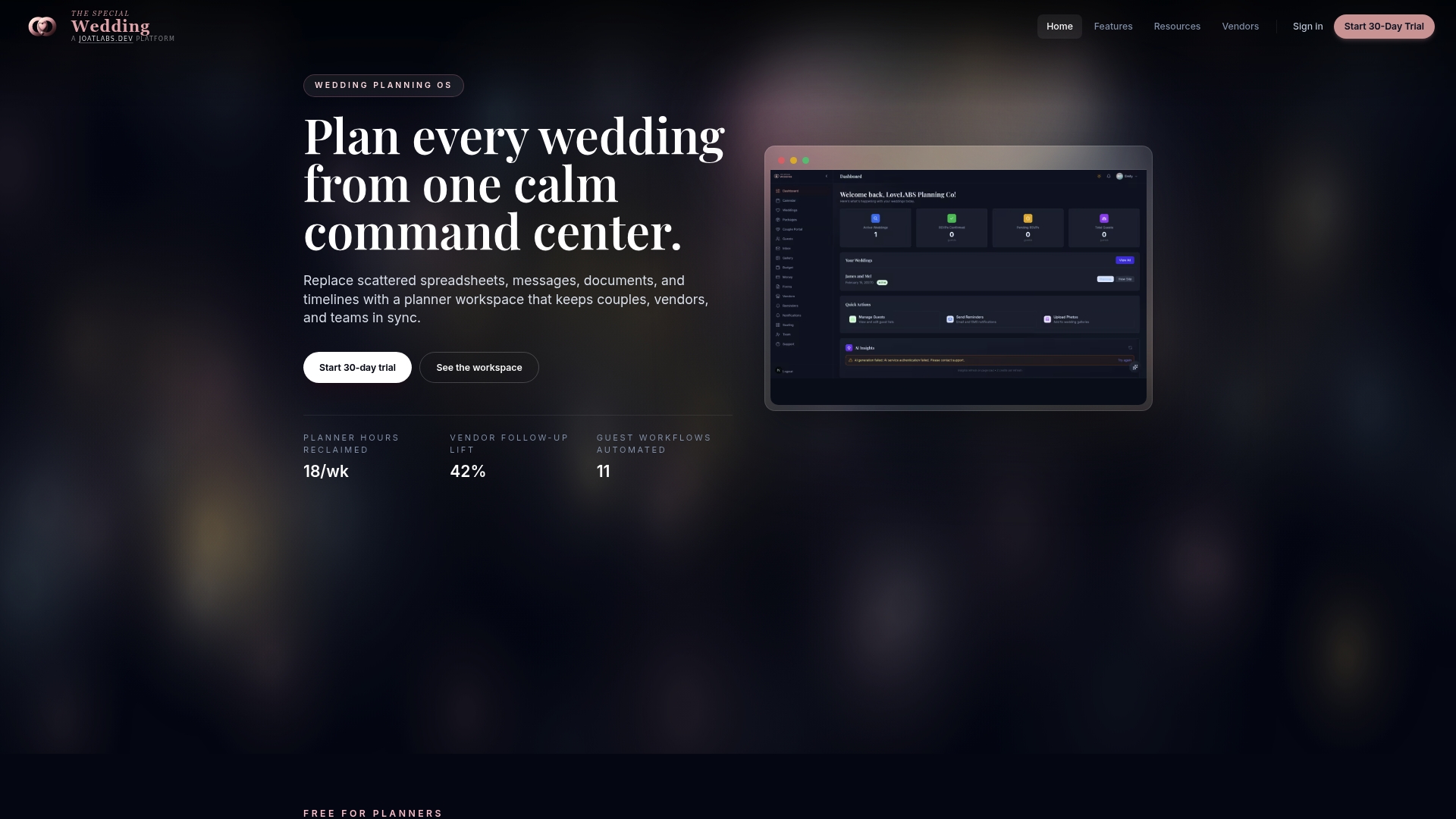
The Thespecialwedding platform consolidates proposals, contracts, event timelines, vendor tracking, client portals, and invoicing into one place. Whether you are a solo planner managing a handful of weddings or a growing studio coordinating dozens, the platform scales to your volume with team collaboration tools and custom branding options. Plans are structured to deliver ROI within your first few months of use. You can also explore the vendor directory to see how vendor integration works in practice before you commit. The goal is a planning business that runs with less friction and more clarity, for you and your clients.
FAQ
What is a wedding planning dashboard?
A wedding planning dashboard is a centralized digital workspace where planners manage vendor contacts, client communications, event timelines, budgets, and invoicing from a single platform, replacing fragmented tools like spreadsheets and email threads.
How much time can a dashboard save per wedding?
Most planners report meaningful reductions in administrative time, with 68% citing an end to repetitive communication cycles. The exact savings depend on your current workflow, but several hours per event is a realistic expectation.
When do planners typically see ROI from a dashboard?
Wedding planning firms typically see ROI within 3 to 6 months, primarily through reduced software subscription costs and the ability to manage more events without adding staff.
Do dashboards work without internet on the wedding day?
Only if the platform includes offline access. Offline-readiness is a critical feature that lets you access vendor contacts and timelines when venue Wi-Fi is unavailable, which happens more often than planners expect.
Can a dashboard improve client satisfaction?
Yes. Branded client portals with live timelines and payment schedules reduce the volume of anxious check-in messages and give couples confidence in your process, which directly increases referral rates.
Recommended
Free wedding planner templates
Skip the blank page — these templates ship with the form fields you actually need.
Browse all 9 free templates →