Wedding Quote Approvals: A Workflow Guide for Planners
Wedding Quote Approvals: A Workflow Guide for Planners
A correct wedding quote approvals workflow anchors a written reference price, enforces versioned proposals with e-signature, and automates vendor notifications so your agency closes estimates faster and with less margin loss. Here are three things to do right now:
- Set a written reference price early before client conversations.
- Enable version control and e-signature in your planning platform.
- Configure a deposit trigger that fires automatically once the client signs.
Must-have controls for any approval process:
- Audit trail for every quote version and change
- Approval thresholds by dollar band and role
- Payment capture linked to the signed document
The specialwedding offers a starter workflow template you can load on day one at Thespecialwedding.
Key Takeaways
A structured wedding quote approvals workflow, anchored in writing and enforced through versioned proposals, e-signature, and automated deposit capture, is the single most reliable way to protect margin and close events faster.
| Point | Details |
|---|---|
| Anchor price in writing | Set a written reference price 14–21 days before procurement to control the negotiation baseline. |
| Tie concessions to conditions | Never discount unconditionally; link every concession to term, payment timing, or scope reduction. |
| Automate deposit capture | Configure payment to trigger automatically on e-signature so no deposit is missed or delayed. |
| Assign approval thresholds | Set dollar-band thresholds by role to prevent unauthorized discounts from eroding margin. |
| Run a 30-day pilot first | Test the workflow on 3–5 events before full rollout and measure approval time against the 10-day target. |
| Thespecialwedding | Covers versioning, client portal, e-signature, payment capture, and vendor notifications in one platform. |
Table of Contents
- What do wedding quote approvals actually mean for professional planners?
- Core software features every reliable approval workflow needs
- How to build a step-by-step wedding quote approval workflow
- How to set roles, approval thresholds, and escalation rules for agencies
- Negotiation best practices and version control for proposals
- US contract, deposit, and recordkeeping considerations
- KPIs to track and example dashboards that show approval health
- Rollout checklist and pilot timeline for agencies adopting an approvals workflow
- Ready-to-use client messages and negotiation scripts
- What running approval workflows at scale actually teaches you
- Thespecialwedding handles your entire quote approvals workflow in one place
- Sources
What do wedding quote approvals actually mean for professional planners?
In a wedding-planning SaaS context, “wedding quote approvals” refers specifically to the structured process of sending, negotiating, versioning, and formally approving vendor and client cost estimates inside your platform. This is not about inspirational sayings or family blessings. It is an operational workflow that moves a proposal from draft to signed contract and captured deposit.
Planners who instrument this process track four measurable goals:
- Average approval time: how many days from estimate sent to client signature
- Estimate-to-contract conversion rate: the percentage of quotes that become signed agreements
- Negotiation rounds per estimate: how many back-and-forth revisions a quote goes through before approval
- On-time deposit capture rate: deposits collected within the agreed window after signing
Every stakeholder has skin in the game. The planner owns the proposal. The account manager tracks the pipeline. The client approves scope and price. The vendor confirms availability and terms. Finance verifies deposit receipt. When any one of these parties is left out of the loop, approval time stretches and margin shrinks. Tying these goals to revenue is straightforward: faster approvals mean earlier deposit capture, fewer negotiation rounds protect margin, and a clean audit trail prevents costly disputes.
Core software features every reliable approval workflow needs
Not every platform is built for this. Before you commit to a tool, verify it covers these capabilities:
- Client portal with proposal viewing and approval actions
- Versioned proposals that preserve every draft with timestamps
- Redline and change history so clients and planners see exactly what changed
- E-signature integrated directly into the proposal flow
- Payment capture triggered by the signed document
- Approval routing with configurable thresholds by role and dollar amount
- Audit trail for dispute resolution and tax recordkeeping
- Role-based permissions separating planner, finance, and vendor access
- Vendor notifications sent automatically after client approval
- Templated estimates that pull from your event CRM to reduce manual entry
On the integration side, your platform needs to connect with your CRM or event record, calendar, accounting software, and your vendor directory. Vendor RFP automation that includes structured templates, automated distribution, scoring, and a DocuSign handoff removes the manual coordination that drains agency hours.
| Feature | Operational risk it addresses |
|---|---|
| Audit trail | Dispute resolution, tax recordkeeping |
| E-signature | Enforces written consent before work begins |
| Versioned proposals | Prevents scope creep and “I never agreed to that” |
| Payment capture trigger | Eliminates delayed or missed deposits |
| Role-based permissions | Stops unauthorized discounts |
| Vendor notifications | Removes manual follow-up after approval |
When evaluating platforms, treat missing e-signature or versioning as disqualifying. Those two features alone prevent the majority of post-event billing disputes.
How to build a step-by-step wedding quote approval workflow
Use this sequence as your operational template. Copy it into your platform or playbook.
- Trigger event. A new lead or event record is created in your CRM. This starts the clock.
- Prepare the estimate. Pull scope, vendor line items, and pricing from your templates. Set your written anchor price before any client discussion.
- Send with written anchor. Deliver the proposal well in advance before procurement begins. The Gangly framework shows that anchoring this early and pre-pricing 4–6 tradeable variables substantially protects margin.
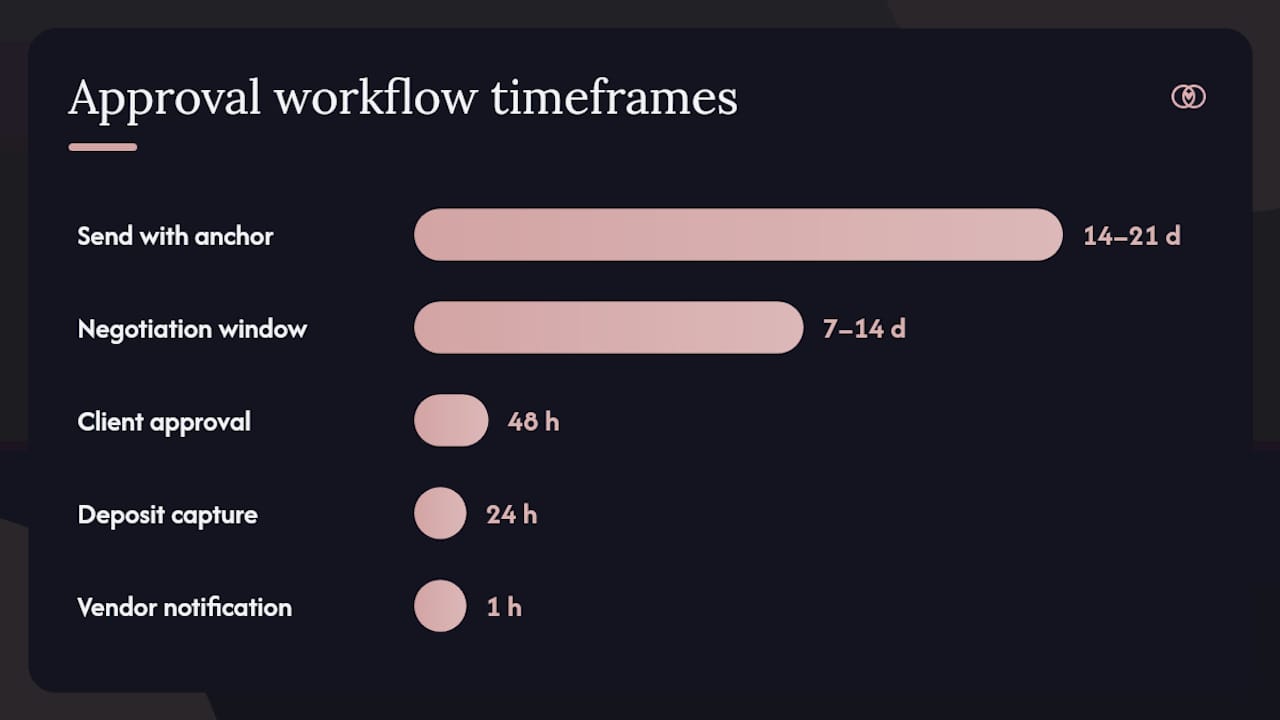
- Negotiation window. Allow 7–14 days for sub-$100,000 events. Larger events may need up to 21 days. Route all revision requests through the platform, not email.
- Conditional concessions. Tie any discount to a condition: faster payment, longer term, reduced scope, or a case study agreement. Never give an unconditional price reduction.
- Client approval. The client clicks “Approve” inside the portal. This locks the version.
- E-signature. The platform sends the contract for signature immediately after approval. No manual step.
- Deposit capture. Payment is triggered automatically on signature. Target capture within 24 hours of signing.
- Vendor notification. Confirmed vendors receive automated booking confirmations with scope and timeline details.
Pro Tip: Capture agreed price and terms in writing within 4 hours of any verbal negotiation. Delaying paperwork beyond a day loses 22% of negotiated value to scope creep, per Gangly customer benchmarks.
| Workflow stage | Target timeframe | Automation available? |
|---|---|---|
| Estimate preparation | Same day as trigger | Yes (CRM pull) |
| Send with anchor | 14–21 days before procurement | Yes (scheduled send) |
| Negotiation window | 7–14 days | Partial (reminders) |
| Client approval | Within 48 hours of final version | Yes (portal action) |
| E-signature | Same day as approval | Yes |
| Deposit capture | Within 24 hours of signature | Yes |
| Vendor notification | Within 1 hour of deposit | Yes |
CRM workflow automation patterns show how approval gates and notification triggers reduce manual steps across the entire proposal-to-contract flow.
How to set roles, approval thresholds, and escalation rules for agencies
Role design is where most agencies leak margin. Without clear thresholds, any team member can offer a discount to close a deal faster.
Recommended roles and responsibilities:
- Planner: prepares estimates, sends proposals, manages negotiation within pre-approved parameters
- Senior planner / account owner: approves concessions above the planner’s threshold, handles escalations
- Finance: verifies deposit receipt, flags payment discrepancies, manages refund requests
- Vendor liaison: coordinates vendor confirmations after client approval
- Legal (for complex events): reviews contract language before signature on events above a set dollar threshold
Suggested approval thresholds:
- Under $10,000: planner can approve independently
- $10,000–$50,000: senior planner co-approval required
- Above $50,000: finance sign-off required before sending
Set a 24–48 hour SLA for internal approvals. If a senior planner does not respond within that window, the system should escalate automatically to the account owner.
Pro Tip: Build a pre-priced trade-variable matrix before any negotiation season. List each tradeable variable (term, payment timing, add-on removal, case study), its cost to your agency, and its perceived value to the client. Gate all concessions through this matrix so your team trades value rather than discounting price.
This approach, supported by the reopt Handbook on proposal and negotiation, converts price conversations from positional bargaining into conditional trades that protect your margin while giving clients apparent flexibility.
Negotiation best practices and version control for proposals
Anchor early. A written reference price sent 14–21 days before procurement sets the psychological baseline for every conversation that follows. Clients who see a number first negotiate from that number, not from an imagined lower figure.
Version control rules to enforce:
- Immutable base scope: once the initial proposal is sent, the base scope cannot be edited in place. All changes create a new version.
- Semantic versioning: label quotes as v1.0, v1.1, v2.0 so everyone knows which document is current.
- Mandatory change log entries: every new version requires a note explaining what changed, the dollar delta, and who requested the change.
- Change log fields to capture: who requested the change, date and time, line items affected, dollar delta, and the approval ID of the person who authorized it.
Pre-price your trade variables before the negotiation begins. A four-column internal template works well: variable, cost to your agency, estimated value to the client, and default trade condition. Load these values into your deal record before the first client call. When a client asks for a discount, you offer a trade from the matrix instead of a price cut.
Timing also matters for vendor-side negotiations. End-of-quarter timing and multi-year commitments can materially affect the rates vendors are willing to accept, a pattern documented across event-management software procurement.
US contract, deposit, and recordkeeping considerations
Every approved quote should convert into a contract that includes these elements:
- Scope of services with explicit exclusions
- Cancellation and rescheduling policy with specific timelines and penalties
- Deposit amount and timing (typically 25–50% of total contract value, due at signing)
- Refund rules tied to cancellation windows
- Payment schedule for remaining balance
- E-signature clause confirming the digital signature carries the same legal weight as a handwritten one
For recordkeeping, retain signed proposals, all version history, payment receipts, and vendor confirmations. The IRS recommends keeping business records for at least three years, and contracts with payment disputes may require longer retention. Store everything in your platform’s audit trail, not in a local folder.
Consult a licensed attorney for complex multi-vendor arrangements, destination events, or contracts above your standard dollar threshold.
KPIs to track and example dashboards that show approval health
Primary KPIs every agency should monitor:
- Average approval time (days from estimate sent to signature)
- Approval-to-sign conversion rate
- Negotiation rounds per estimate
- Time to deposit (hours from signature to payment captured)
- Percentage of deals requiring vendor renegotiation after client approval
Secondary KPIs worth watching:
- Quote open rate inside the client portal
- Client portal login frequency
- Vendor response rate to booking confirmations
- Late-change frequency (changes requested after v1.0 approval)
A practical dashboard has three widgets: SLA breach alerts (approvals past their target window), pipeline by approval stage (draft, sent, negotiating, approved, signed, deposited), and aging approvals (quotes open more than 14 days with no client action).
Use these benchmarks to tune your reminder cadence. If approval time consistently exceeds 10 days, shorten your follow-up interval from 72 hours to 48 hours. If negotiation rounds average above 3, your anchor price or trade-variable matrix needs recalibration.
Rollout checklist and pilot timeline for agencies adopting an approvals workflow
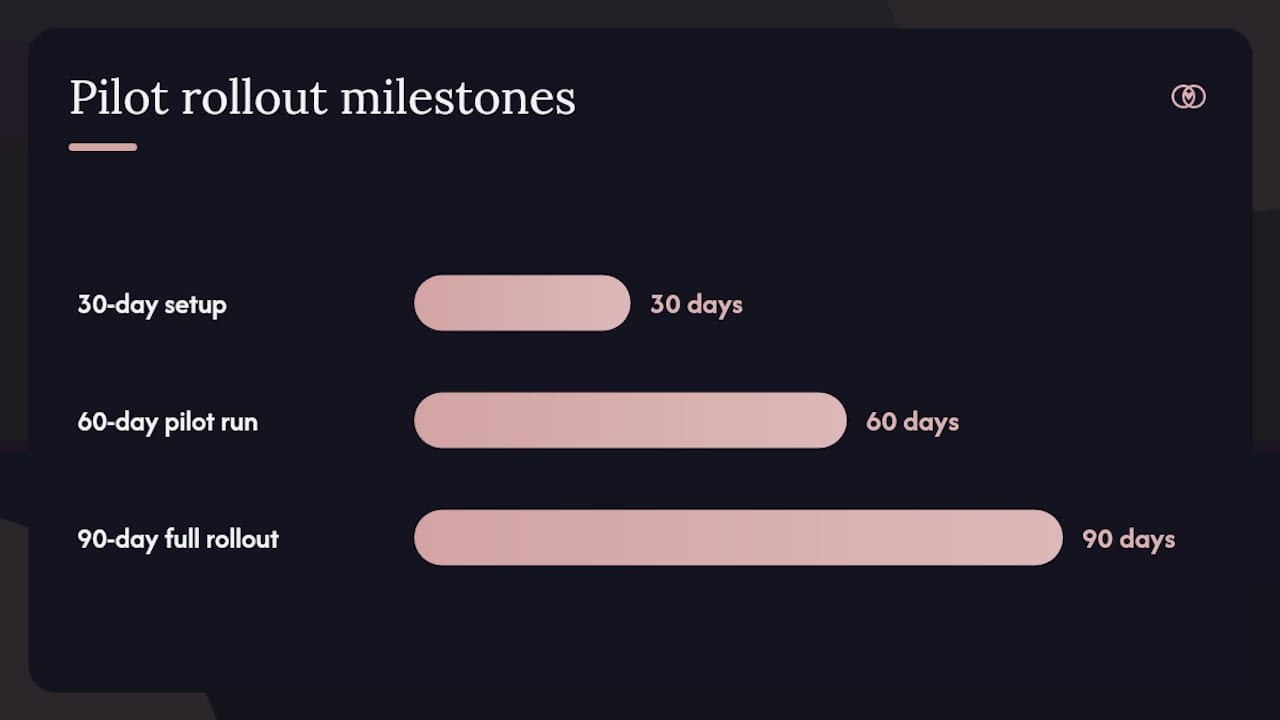
Start with a pilot of 3–5 events of varying size before rolling out to your full book of business. Choose events with different vendor counts and budget levels so you stress-test the workflow across scenarios.
30-day milestones:
- Select pilot events and assign a dedicated pilot coordinator.
- Build or import your estimate templates into the platform.
- Configure roles, permissions, and approval thresholds.
- Connect your CRM, calendar, and payment integrations.
- Train the team on the new workflow with a live walkthrough.
60-day milestones:
- Run the first pilot events end-to-end through the new workflow.
- Collect approval time and conversion data from the pilot.
- Identify friction points (steps where the team reverts to email or manual action).
- Iterate on templates, thresholds, and reminder timing.
90-day milestones:
- Roll out to the full event calendar.
- Brief clients on the new portal experience before their first proposal arrives.
- Review KPIs against the benchmarks above and adjust SLAs.
Rollback trigger: if pilot approval time is longer than your current manual process after 30 days, pause and diagnose before expanding. An AI-orchestrated workflow that generates RFPs from CRM data and routes drafts for human review can accelerate setup, but always keep a human-in-the-loop review gate before any document goes to a client or vendor.
For solo planners, the organization tips in this guide offer a lighter-weight version of the same rollout.
Ready-to-use client messages and negotiation scripts
Initial estimate send: Negotiation reply (conditional concession): Approval confirmation: E-signature reminder (sent at 48 hours if unsigned): Internal finance handoff: For auto-populated fields, your CRM should push: client name, event date, event ID, vendor list, deposit amount, and contract version number into every template. Wedding questionnaire intake templates can feed these fields from the first client touchpoint.
What running approval workflows at scale actually teaches you
The most common failure mode is not a missing feature. It is a missing discipline. Planners who skip the written anchor, accept verbal approvals, or let negotiation happen outside the platform consistently lose margin, even when their platform has every feature on the checklist.
The fixes that work at the platform level are simple: enforce the written anchor before any quote goes out, require post-call capture in under 4 hours, and use trade-variable templates so every team member negotiates from the same pre-priced matrix. These three habits, more than any single feature, separate agencies that protect margin from those that discount their way through every season.
AI-assisted RFP generation and best-in-class quoting software can accelerate document creation, but the human-in-the-loop review gate is non-negotiable. An automated draft that skips coordinator review before reaching a client or vendor is a liability, not an efficiency.
Thespecialwedding handles your entire quote approvals workflow in one place
Thespecialwedding maps directly to every item on the must-have checklist: versioned proposals, a client portal with built-in approval actions, e-signature, payment capture triggered by signature, approval routing by role and dollar threshold, and automated vendor notifications. Agencies managing multiple events get a single audit trail across their entire book of business, not a folder of PDFs.

The platform connects your invoice and finance handoffs to the same workflow, so deposit capture and vendor confirmations happen without a separate billing step. Vendors listed in the Thespecialwedding directory, from V2 Events at Vast in Oklahoma City to Castle Event Rentals in Mustang, OK, receive automated booking confirmations the moment a client signs. Start your 30-day free trial at Thespecialwedding and load your first approval workflow template today.
Sources
Use these resources for deeper implementation guidance, negotiation frameworks, and legal review where indicated.
- Price Negotiation: How to Hold Margins Under Pressure — Gangly Blog
- Proposal and Negotiation | B2B SaaS Sales and CS - reopt Handbook
For complex multi-vendor arrangements or high-value contracts, consult a licensed attorney to review your contract language and deposit terms before use.
This article is general information, not a substitute for advice from a qualified financial advisor. Consult a qualified financial professional about your own circumstances before acting on anything here.
Recommended
- Wedding planning time management: a pro guide for planners | The Special Wedding Blog
- Wedding Lead Management for Planners: 2026 Guide | The Special Wedding Blog
- Wedding Planner Contract Essentials: What to Include in 2026 | The Special Wedding Blog
- Solo Wedding Planner Organization Tips That Work | The Special Wedding Blog
Free wedding planner templates
Skip the blank page — these templates ship with the form fields you actually need.
Browse all 9 free templates →