Wedding RSVP Questions: Copy-Ready Wording for Couples
Wedding RSVP Questions: Copy-Ready Wording for Couples
Every RSVP needs four things: confirmation of attendance, the guest’s full name and party size, meal preference or dietary restrictions, and a clear deadline with reply instructions. Get those four right, and every vendor conversation becomes straightforward. Miss one, and you’re chasing guests by phone two weeks before the wedding.
Here’s a copy-ready block you can drop directly into a paper card or an online form link:
For your invitation insert: “Kindly reply by [Date]. Accept online at [URL] or return this card by [Date].”
For your RSVP form or card:
- Will you be joining us? ☐ Joyfully accepts ☐ Regretfully declines
- Guest name(s): ___________________________
- Number attending: ____
- Meal preference (per guest): ☐ Chicken ☐ Beef ☐ Vegetarian
- Dietary restrictions or allergies: ___________________________
According to Jotform’s RSVP wording guide, setting your deadline roughly four weeks before the wedding gives you enough buffer to chase stragglers and still deliver final counts to your caterer on time. KnotUploader’s RSVP guide reinforces the same principle: keep the form short, collect only what you’ll act on, and add optional questions at the end if you need them.
Table of Contents
- What are the essential wedding RSVP questions to ask?
- How should you ask about food and dietary needs?
- What extra questions do destination and multi-event weddings need?
- How do you ask about accessibility and children on an RSVP?
- What fun questions can you add to your RSVP?
- Paper RSVP cards vs. online forms: what goes where?
- When should you send RSVPs, and how do you follow up?
- What do real couples actually ask on their RSVPs?
- Key Takeaways
- What planners actually prioritize on every RSVP
- Useful sources and where to find RSVP templates
What are the essential wedding RSVP questions to ask?
The questions below aren’t optional. Each one feeds a specific vendor or logistical decision, and skipping any of them creates a gap you’ll have to fill manually later.
Attendance confirmation
A simple accept/decline checkbox is standard, but the wording matters. “Joyfully accepts” and “regretfully declines” are traditional; “Will attend” and “Unable to attend” work for modern or minimalist designs.
Plus-one name
If you’ve extended a plus-one invitation, add a dedicated name field. Pre-filling the card with “Mr./Ms. ___________________________” signals that you expect a name, not just a checkbox. On an online form, make this field appear only when the guest selects “accepts” to keep the form clean.
RSVP deadline and reply method
State the deadline on the card itself, not just in the invitation letter. Guests often keep the card and lose the envelope. For online RSVPs, include both the URL and a QR code so guests can reply from any device.
Pro Tip: Pre-fill paper cards with the guest’s name before mailing. This prevents illegible handwriting from creating mystery guests at your seating chart and confirms exactly which household the card came from.
Building a solid client questionnaire follows the same logic: every field should map to a decision you’ll actually make.
How should you ask about food and dietary needs?
Meal questions are where most RSVPs either work well or fall apart. The right approach depends on your service style.
Plated dinner: Ask for a specific entrée selection per guest. Vague responses like “two chicken” on a card for a party of three create problems at the caterer’s final count meeting. Use initials on paper cards when space is tight.
- “Please initial each guest’s meal choice: Chicken © / Beef (B) / Vegetarian (V)”
- “Guest 1: ___ Guest 2: ___ Guest 3: ___”
Buffet or family-style: Skip the entrée selection entirely and ask only about dietary restrictions. A buffet already accommodates variety; what you need to know is whether anyone requires a gluten-free plate or a nut-free preparation.
Sample wording templates
- Entrée selection: “Please select one entrée per guest: ☐ Filet Mignon ☐ Pan-Seared Salmon ☐ Mushroom Risotto (V)”
- Dietary restrictions: “Any food allergies or dietary restrictions? ___________________________”
- Kids’ meal: “Child’s meal (ages 12 and under): ☐ Chicken tenders ☐ Pasta ☐ Same as adults”
Pro Tip: Use a free-text field for dietary restrictions rather than a fixed checkbox list. A guest with a sesame allergy or a low-FODMAP requirement won’t find their need on a standard list. Free text catches what checkboxes miss.
One practical sequence for collecting this data:
- Ask attendance first.
- Show meal fields only for guests who confirm attendance.
- Add the dietary restriction field after the entrée selection.
- Place the kids’ meal question last, visible only when the party size includes children.
Loverly’s RSVP question guide notes that meal preference and dietary restrictions consistently rank among the most common questions couples include, which reflects how directly those answers affect vendor planning.
What extra questions do destination and multi-event weddings need?
A single-day local wedding needs four fields. A destination wedding or multi-day celebration needs considerably more, and the structure of those questions matters as much as the content.
Events to list separately
If your wedding spans multiple events, ask guests to confirm attendance for each one individually. Don’t assume that a “yes” to the ceremony means a “yes” to the farewell brunch.
- “Which events will you attend? ☐ Welcome Party (Friday, 7 PM) ☐ Ceremony & Reception (Saturday) ☐ Farewell Brunch (Sunday, 10 AM)”
Destination-specific logistics fields
For destination weddings, travel and accommodation details feed directly into shuttle scheduling, room-block management, and airport transfers. Collect:
- Arrival date and departure date
- Hotel block usage: “Will you be staying at [Hotel Name]? ☐ Yes ☐ No ☐ Already booked elsewhere”
- Shuttle sign-up: “Will you need the shuttle from [Hotel] to the venue? ☐ Yes ☐ No”
- Flight info (if you’re arranging airport pickups): “Arrival flight number and time: ___________________________”
Real couples on the r/weddingplanning community frequently flag flight info and shuttle sign-ups as the fields they wish they’d added earlier, particularly when coordinating group transportation.
Formatting tip for online forms
Use conditional logic so destination-specific fields appear only when a guest confirms attendance. Showing shuttle questions to guests who decline wastes their time and clutters the form. WedSites’ RSVP guide specifically recommends conditional fields and grouping related questions to reduce friction.
- Show event checkboxes after attendance confirmation.
- Trigger travel fields only when a destination event is selected.
- Keep shuttle and hotel fields on the same screen or page section.
How do you ask about accessibility and children on an RSVP?
These questions are often skipped because they feel awkward to phrase. They shouldn’t be. A guest who needs wheelchair access or a sign language interpreter can’t advocate for themselves if you never asked.
Accessibility needs
A short free-text field is better than a checkbox list here. Mobility, hearing, vision, and sensory needs vary too widely for a fixed list to cover.
- “Do you have any accessibility requirements we should know about? ___________________________”
- “Please let us know if you need any accommodations, including mobility assistance, hearing support, or dietary modifications: ___________________________”
Children and seating
For events where children are invited, ask for ages. A child under two may need a high chair; a child over twelve may eat from the adult menu. Without ages, your caterer and rental company are guessing.
- “Children attending (name and age): ___________________________”
- “Will you need a high chair? ☐ Yes ☐ No”
For adults-only events, state it clearly on the invitation itself rather than on the RSVP form. The RSVP shouldn’t be where guests first learn children aren’t invited.
Pro Tip: Route accessibility responses to a private contact field or a separate email address rather than a shared spreadsheet. This respects guest privacy and ensures sensitive information reaches only the people who need it.
What fun questions can you add to your RSVP?
Optional engagement questions serve two purposes: they give guests something enjoyable to answer, and several of them produce real planning value. The key word is optional. Place them at the end of the form, after all required fields.
Questions that deliver planning value:
- Song request: “What song will get you on the dance floor? ___________________________” — feeds directly into the DJ or band’s playlist. The Knot’s RSVP question list highlights song requests as one of the most popular optional prompts precisely because they’re fun for guests and useful for entertainment vendors.
- Drink preference: “Beer, wine, or cocktails? ___________________________” — helps your bar team estimate quantities.
- Dietary preference for cocktail hour: “Any snack preferences for the cocktail hour? ___________________________”
Questions that are purely sentimental (no planning value, but high guest delight):
- “Share a piece of advice for the couple: ___________________________”
- “What’s your signature dance move? ___________________________”
- “How did you meet the couple? ___________________________”
Pro Tip: Before adding any optional question, ask yourself: “What will I do with this answer?” If you can’t name a specific action, cut the question. A form with three optional questions guests enjoy answering beats a form with eight they skip.
Paper RSVP cards vs. online forms: what goes where?
The format shapes what you can realistically collect. Paper cards have space constraints; online forms don’t, but they carry their own risk of becoming too long.
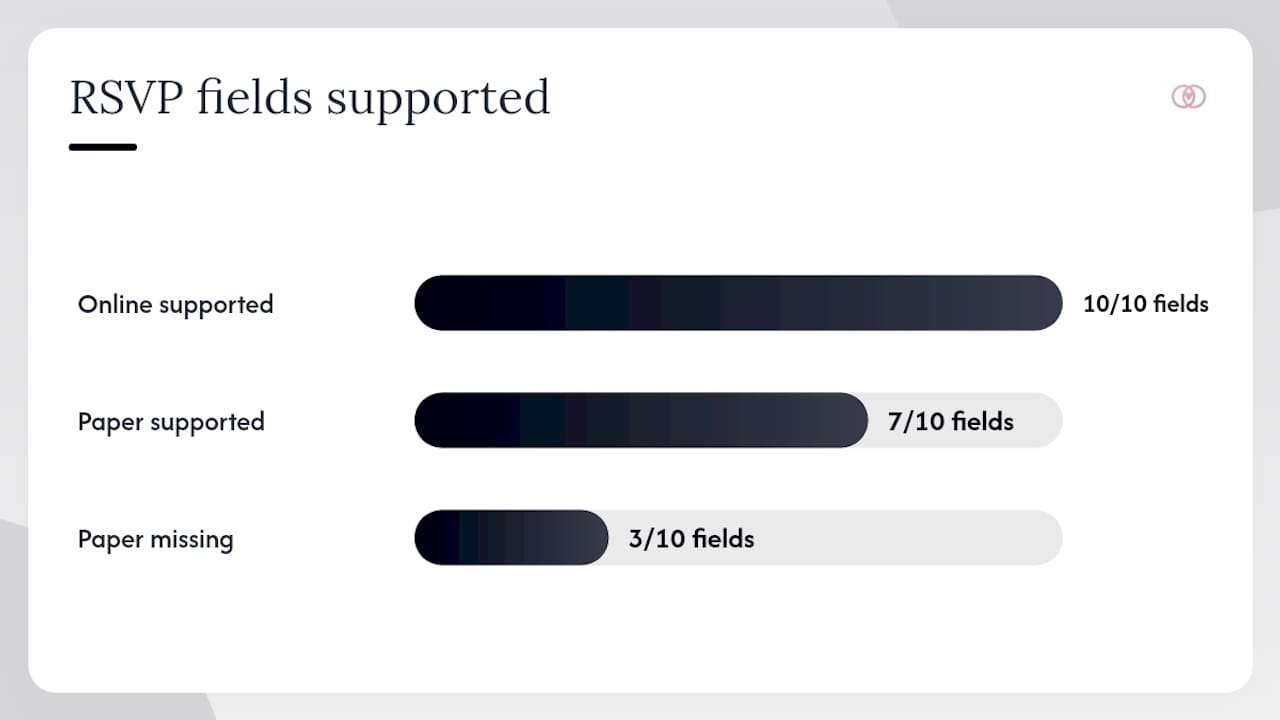
Field comparison: paper card vs. online form
| Field | Paper card | Online form |
|---|---|---|
| Guest name(s) | ✓ Required | ✓ Required |
| Attendance yes/no | ✓ Required | ✓ Required |
| Number attending | ✓ Required | ✓ Auto-calculated |
| Meal choice | ✓ Initials only | ✓ Per-guest dropdown |
| Dietary restrictions | ✓ Short free text | ✓ Free text field |
| Plus-one name | ✓ Limited space | ✓ Conditional field |
| Event checkboxes | ✗ Too complex | ✓ Conditional |
| Travel/shuttle info | ✗ Too complex | ✓ Conditional |
| Song request | ✗ Space issue | ✓ Optional field |
| Accessibility needs | ✓ Short free text | ✓ Free text field |
Planner export checklist
Once responses are in, use your RSVP dashboard to:
- Export attendance count and per-guest meal totals for the caterer
- Flag dietary restrictions for the kitchen
- Pull shuttle sign-up numbers for the transportation vendor
- Close the form and archive responses before the vendor deadline
Thespecialwedding’s RSVP tracking guide walks through exactly how to set up that export workflow so vendor counts go out accurately and on time.
When should you send RSVPs, and how do you follow up?
Timing is where most couples lose control of the response rate. The sequence below keeps you ahead of vendor deadlines without constant manual chasing.
Recommended timeline:
- Send invitations 8–12 weeks before the wedding
- Set the RSVP deadline 3–4 weeks before the wedding
- Submit final vendor counts 10–14 days before the wedding
That 3–4 week window between your RSVP deadline and the wedding date is the buffer you need to chase non-responders and still hit your caterer’s final headcount, as Jotform’s wording guide recommends.
Reminder message templates
First reminder (10 days before deadline): “Hi [Name], we’re so excited to celebrate with you! Just a reminder that RSVPs are due by [Date]. Reply at [URL] or let us know if you have any questions.”
Final nudge (3–5 days before deadline): “Hey [Name], we’re finalizing our guest list and would love to include you! Please RSVP by [Date] at [URL]. We can’t wait to see you.”
What do real couples actually ask on their RSVPs?
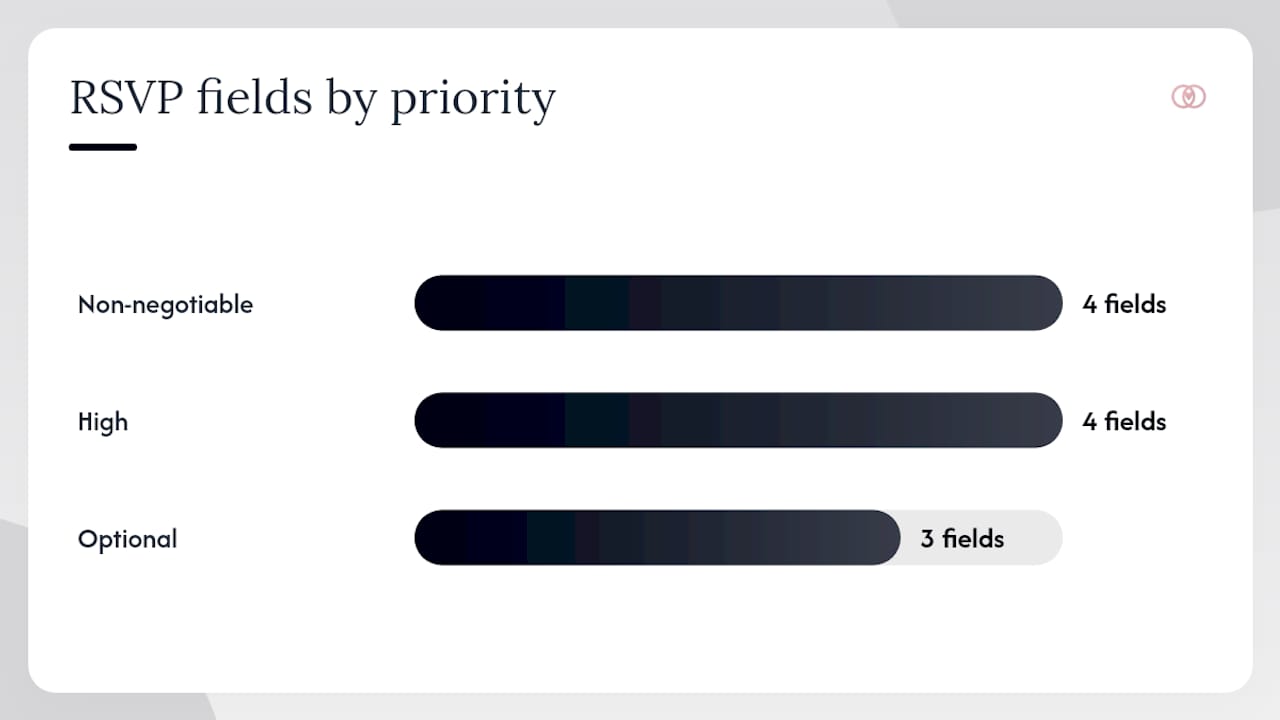
Across wedding planning guides and community forums, a clear pattern emerges: most RSVPs cluster around the same five to seven fields, with a handful of optional additions for destination or multi-day events.
Priority field breakdown
| Field | Priority | Why it matters |
|---|---|---|
| Attendance yes/no | Non-negotiable | Determines every other vendor count |
| Guest name(s) | Non-negotiable | Required for seating, place cards, and vendor lists |
| Meal choice (plated) | Non-negotiable | Caterer needs per-guest counts 10–14 days out |
| Dietary restrictions | Non-negotiable | Safety and kitchen prep requirement |
| Plus-one name | High | Seating chart accuracy |
| Event attendance (multi-day) | High for multi-day | Venue and catering counts per event |
| Travel/shuttle info | High for destination | Transportation logistics |
| Accessibility needs | High | Vendor and venue preparation |
| Song request | Optional | DJ/band playlist input |
| Message to couple | Optional | Sentimental, no operational value |
| Drink preference | Optional | Bar quantity estimates |
WedSites’ RSVP form guide makes the case that a guest should be able to complete your RSVP on a phone in under two minutes. That’s the practical ceiling for form length. If your field list takes longer than that, cut the lowest-priority optional questions first.
The fields vendors need earliest are attendance and per-guest meal or dietary data. Everything else can wait, be optional, or be collected through a separate follow-up. Thespecialwedding’s guest management strategies reinforce this: prioritize the data your vendors will ask for first, and build the rest of the form around it.
Key Takeaways
The four non-negotiable RSVP questions are attendance, guest name(s), meal preference or dietary restrictions, and a clear deadline with reply instructions — get those right and every vendor conversation becomes straightforward.
| Point | Details |
|---|---|
| Four required fields | Attendance, guest names, meal/dietary needs, and RSVP deadline are non-negotiable on every RSVP. |
| Deadline timing | Set your RSVP deadline 3–4 weeks before the wedding; submit final vendor counts 10–14 days out. |
| Mobile-first forms | Guests should complete your online RSVP in under two minutes on a phone — cut any field that slows that down. |
| Optional questions last | Place fun or sentimental questions at the end of the form, after all required fields, and only include them if you’ll act on the answers. |
| Export before closing | Lock the form at your deadline and export attendance and meal counts to vendors before the cutoff. |
What planners actually prioritize on every RSVP
After working across dozens of weddings, the fields that consistently cause the most last-minute chaos are the ones that seem obvious: per-guest meal choices and dietary restrictions. Couples often assume guests will volunteer that information if it’s important enough. They don’t. A guest with a severe shellfish allergy will quietly eat around the problem, and you’ll find out about it at the reception when the kitchen is already in service.
The three things worth building into every RSVP setup, regardless of wedding size or format:
Use conditional fields. A form that shows every possible question to every guest is a form guests abandon halfway through. Show travel questions only to destination guests, show meal fields only to confirmed attendees, and show kids’ meal options only when a child is listed. The form feels shorter because it is shorter, for each individual guest.
Lock the form before your vendor deadline, not after. Leaving the form open “just in case” invites late responses that arrive after you’ve already submitted counts. Set an automatic close date and communicate it clearly in your reminder messages.
Route sensitive information privately. Accessibility needs, medical dietary requirements, and similar details don’t belong in a shared spreadsheet that your whole vendor team can see. A private email field or a note that routes to the planner only keeps that information where it should be.
When chasing late RSVPs, this wording tends to work: “We’re finalizing our seating and catering numbers this week and want to make sure we have everything right for you. Could you reply by [Date]? It only takes a minute at [URL].” It’s specific, it’s warm, and it gives the guest a clear reason to act now rather than later.
Thespecialwedding’s questionnaire template guide covers how to standardize these fields across multiple weddings so you’re not rebuilding the same form from scratch each time.
Useful sources and where to find RSVP templates
The resources below cover wording, form building, and printable reply-card templates for both paper and online RSVPs.
Wording and template guides:
- What to Ask on Your Wedding RSVP: Meals, Plus-Ones & Custom Questions | KnotUploader
- 20 Common & Fun Questions to Ask Wedding Guests
- Wedding invitation RSVP wording: Examples, etiquette & templates | Jotform Blog
- What Questions To Ask On Your Wedding RSVP Form ♥ WedSites Blog
- 28 Practical & Fun Wedding RSVP Questions for Guests
- The Ultimate Guide to RSVP Questions for Your Destination Wedding in Portugal
- RSVP Questions : r/weddingplanning
- Guest Management Strategies for Weddings That Work | The Special Wedding Blog
Online form builders:
- Jotform — drag-and-drop RSVP form builder with conditional logic, mobile-friendly templates, and automatic response exports
Printed reply cards:
- The Inviting Place (Tulsa, OK) and Mercury Press Plus (Oklahoma City, OK) both offer custom stationery and printed RSVP card design through Thespecialwedding’s vendor directory.

If you’re managing RSVPs across multiple weddings, Thespecialwedding’s platform centralizes guest responses, automates reminders, and exports vendor-ready counts from a single dashboard. Explore the V2 Events at Vast venue listing to see how venue-specific RSVP logistics connect to the broader planning workflow.
Pro Tip: Before publishing your RSVP form, complete it yourself on a phone. Time how long it takes. If it runs past two minutes, remove the lowest-priority optional field and test again.
A short, well-structured RSVP form that collects the right data at the right time is one of the highest-leverage moves in wedding planning. Every field you add after the four essentials should earn its place by feeding a specific vendor decision or guest experience outcome. The couples and planners who get this right spend less time chasing responses and more time on the details that actually show up on the day.
Recommended
- Wedding RSVP Tracking System: Your 2026 Planning Guide | The Special Wedding Blog
- The Role of Wedding Questionnaire Templates for Pros | The Special Wedding Blog
- Guest Management Strategies for Weddings That Work | The Special Wedding Blog
- Manage wedding guest lists without staff | The Special Wedding Blog
Free wedding planner templates
Skip the blank page — these templates ship with the form fields you actually need.
Browse all 9 free templates →