Wedding Planners: Run a Booking in a Week With Publisher Vendor CRM
Wedding Planners: Run a Booking in a Week With Publisher Vendor CRM
A specialist wedding vendor CRM is the right move if you juggle more than a handful of weddings a year or coordinate more than three vendors per event. Generic sales CRMs weren’t built for milestone billing tied to a wedding date or vendor-by-vendor quote comparisons. Your next step: run a two-week trial focused on exactly two things, milestone invoicing and vendor cards, before you commit. A platform like Thespecialwedding is built around that exact workflow.
TL;DR:
- Wedding-specific CRMs support milestone billing and vendor quote comparisons, which are essential for accurate invoicing and efficient vendor management.
- Vendor cards hold comprehensive vendor histories, including quotes, contact info, and past events, preventing duplicate efforts and reducing last-minute confusion.
- Features such as timeline automation and direct vendor communication streamline day-of planning and accommodate last-minute changes more effectively than generic CRMs.
- Integration options like calendar sync, payment processors, and data export are crucial for seamless workflow and data security.
- Proper onboarding, support, and data migration processes ensure quick adoption, reduce risks, and maximize the CRM’s ROI in busy wedding seasons.
Thespecialwedding Bring Wedding Work Into One Workspace
TheSpecialWedding helps planners coordinate vendors, timelines, guests, communications, and client work through one collaborative platform.Explore TheSpecialWedding
Table of Contents
- Wedding Vendor CRM vs. Generic Sales CRM: The Quick Breakdown
- What a Wedding Vendor CRM Actually Does
- How to Choose the Right Platform: Criteria, Questions, and Red Flags
- Workflows and Templates You Can Copy This Week
- Pricing Models and Budgeting for CRM Software
- Integrations and Migration: What to Connect and How to Move Your Data
- Your First 30 Days: Onboarding Checklist and KPIs
- Data Security and Privacy in Wedding Vendor Software
- Support and Training: What to Expect from a CRM Provider
- Real Scenarios Where a CRM Changes the Outcome
- Why the Shift to Event-Centric CRMs Is Accelerating
- Try a Wedding Vendor CRM Built Around Your Actual Bookings
- Sources
Wedding Vendor CRM vs. Generic Sales CRM: The Quick Breakdown
The core tradeoff comes down to this: generic sales CRMs track deals through a pipeline, but weddings aren’t deals. They’re single events with dozens of moving vendor relationships, a fixed date that can’t slip, and payment schedules tied to milestones instead of close dates. An event-centric CRM builds around the date and the vendor network. A repurposed sales CRM makes you bolt that structure on yourself.
Here’s who benefits most from making the switch:
- Solo planners handling 15+ weddings a year gain the most time back, since manual vendor follow-up eats a disproportionate share of a one-person operation.
- Boutique studios with two to five planners need shared vendor records so nobody re-emails a florist who already quoted last week.
- Venue managers juggling multiple in-house events benefit from vendor cards tied to venue-specific preferred lists.
Must-have features: lead capture, milestone billing, vendor cards with saved quotes, timeline automation, and a client/vendor portal. Expect pricing anywhere from free starter tiers to $150 to $300 per month for agency-level plans with multiple seats.
What a Wedding Vendor CRM Actually Does
Most planners think “CRM” means contact storage with a nicer interface. That undersells what a purpose-built system handles for a wedding business, where a single event might involve twelve vendors, four payment milestones, and a timeline that has to survive a dozen last-minute changes.
Core client and booking functions
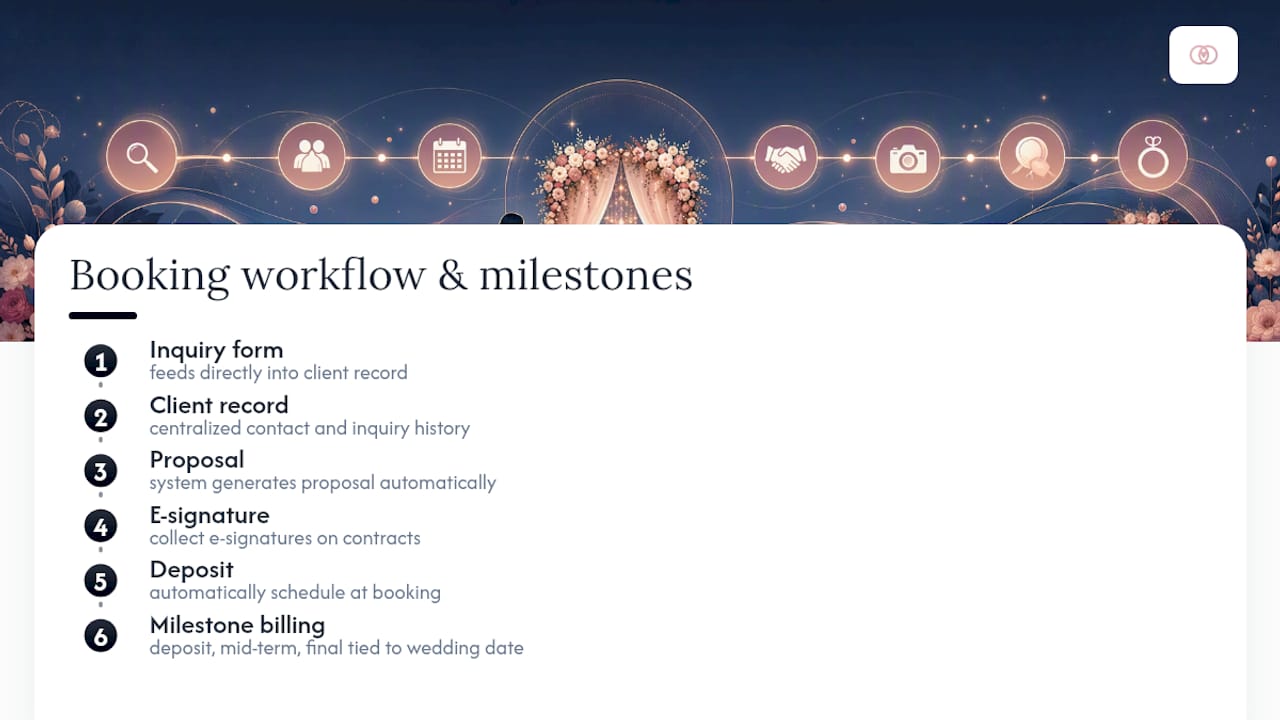
A wedding vendor CRM starts with lead capture: an inquiry form feeds directly into a client record instead of landing in an inbox you’ll dig through later. From there, the system should generate proposals, collect e-signatures on contracts, and schedule deposits automatically. The billing piece matters more than most planners realize going in. Wedding payments don’t follow a typical invoice cycle. They follow the event date: deposit at booking, a mid-term payment at some fixed interval before the wedding, and a final balance due shortly before the big day. That structure, sometimes called event-centric milestone billing, is fundamentally different from project-based invoicing most general CRMs assume, and it’s one of the clearest signals you’re looking at a tool built for this industry rather than adapted to it.
Vendor management that actually saves time
This is where a specialist tool earns its keep. Vendor cards act as a permanent record for each supplier, floral, catering, photography, rentals, holding contact details, saved quotes, past contract terms, and communication history in one place. Vendor manager tools built for weddings let planners message vendors directly from a single dashboard, save favorites, and attach files per vendor rather than hunting through email threads.
Side-by-side quote comparison fields matter more than they sound. A proper comparison has to capture what’s excluded, not just the headline price. Coverage hours, editing counts, travel fees, and taxes all belong in that comparison, because two photography quotes that look $200 apart can flip once you account for a mileage surcharge one vendor buries in the fine print.
Here’s the typical event workflow a CRM should support end to end:
- Inquiry lands and auto-populates a lead record.
- Deal converts to an event once the contract is signed.
- Vendor checklist auto-generates based on event type and package.
- Milestone invoices schedule automatically off the wedding date.
- Day-of timeline pulls from vendor confirmations and pushes updates to everyone involved.
Some newer platforms now layer AI-assisted vendor outreach on top of this, with automated inquiry drafting tied to response-rate benchmarks near 85%. That’s worth asking about in a demo, but don’t let AI features distract from whether the basic vendor card and billing structure actually fits your workflow.
Pro Tip: Before you evaluate any software, list your three most vendor-heavy wedding types from last year and map exactly how many quote comparisons, contracts, and payment milestones each one involved. That number tells you whether you need a full vendor CRM or just a lighter scheduling tool.
Operational needs round out the picture: role-based permissions so junior planners can’t edit contracts, separate client and vendor portals so each party sees only what’s relevant to them, automated reminders for pending signatures or overdue vendor confirmations, and reporting that shows which vendors respond fastest and which ones consistently run late.

How to Choose the Right Platform: Criteria, Questions, and Red Flags
Choosing a wedding vendor CRM comes down to five criteria that actually predict whether the tool will hold up once you’re running six weddings simultaneously.
- Event-centric billing: Does the platform support deposit, mid-term, and final payment scheduling tied to the wedding date, not a generic invoice date?
- Vendor quote comparison: Can you build a side-by-side field comparison that captures exclusions, not just totals?
- Timeline automation: Does the day-of timeline update automatically when a vendor confirmation changes?
- Mobile vendor access: Can a planner update a vendor status or check a timeline from a phone at a venue with weak signal?
- Data portability: Can you export everything, contacts, contracts, and invoice history, without a support ticket?
What to ask in a demo
Bring a specific scenario, not a generic feature list. Ask the sales rep to show you a milestone invoice schedule built from a real wedding date, not a sample project template. Ask how vendor cards handle multiple quotes from the same vendor across different weddings. Ask what happens when you need to bulk-import 200 existing contacts and 40 vendor records, and get them to actually run it, not describe it. If the platform advertises Zapier or API access, ask for one working example relevant to wedding workflows, not a generic marketing slide.
Pro Tip: Ask to see the vendor onboarding email a new supplier receives when you add them to the portal. If it reads like a generic system notification with no branding, that’s a preview of how your vendors will perceive your business every time you invite one.
Red flags that should end the conversation
Watch for a platform that pushes you toward exporting to a spreadsheet for “advanced” invoicing. That’s a sign the billing engine wasn’t built for this industry. Manual vendor re-entry between the CRM and a separate scheduling tool is another warning sign, since it means the vendor management piece is bolted on rather than integrated. If a sales rep can’t produce a real milestone invoice example on the spot, or if pricing tiers hide fees behind “contact us” instead of a clear published range, walk away. Review aggregators like G2 and Capterra are worth checking before a demo, since real user feedback on mobile usability and billing accuracy tends to surface issues sales calls won’t mention. Combine what you read there with your own hands-on test, since marketing copy and lived experience don’t always match.
Workflows and Templates You Can Copy This Week
The gap between a CRM that looks good in a demo and one that actually works shows up in the details of a single booking, from first inquiry to the vendor showing up on the wedding day. Here’s the sequence worth mapping before you build anything in your own system.
- Inquiry: A couple fills out an intake form specifying date, guest count, and budget range. This auto-creates a lead record.
- Proposal: You generate a proposal from a template matched to their package tier, adjusted for any custom line items.
- Contract: The proposal converts to a contract with e-signature fields for both parties.
- Deposit: Signing the contract triggers a deposit invoice, typically 25 to 30% of the total, due within a set window.
- Vendor onboarding: Once the deposit clears, you invite vendors, florist, caterer, photographer, into a shared portal tied to that specific event.
- Day-of timeline: A master timeline auto-populates from vendor confirmations, with automated updates pushed to everyone if a time slot shifts.
Template fields worth building now
A vendor card template should capture more than a phone number. Build fields for: service category, base rate, add-on pricing, coverage hours, travel radius, insurance status, and a running log of past events with that vendor. A quote comparison template needs columns for price, what’s excluded, cancellation terms, and payment schedule, laid out so you can scan three vendors in under a minute.
A milestone invoice schedule template typically looks like this: deposit at signing, second payment at the halfway point between booking and the event, final balance due 14 to 30 days before the wedding. Build the schedule as a reusable template once, and every new event just needs the actual date plugged in.
Centralizing vendor quotes and contract storage in one place cuts down on the day-of confusion that comes from checking three different email threads to confirm a delivery time, and it eliminates the duplicate data entry that happens when the same vendor detail lives in a spreadsheet, an email, and a sticky note.
Adapting these templates scales with your business size. A solo planner might run everything off one vendor card template and a single milestone schedule. A studio with five planners needs role permissions layered on top, so each planner sees their own events but shares the same vendor database. Larger agencies typically add a review step where a lead planner approves vendor contracts before they go out, which the workflow above accommodates by inserting an approval stage between proposal and contract.
For a deeper look at how studios structure these systems at scale, why agencies adopt integrated wedding platforms walks through the reasoning in more detail.
Pricing Models and Budgeting for CRM Software
Most wedding vendor CRMs price on a tiered subscription model, with feature access, not just seat count, driving the jump between tiers.
- Starter tier (often free or under $30/month): basic contact management, single-user access, limited templates.
- Solo professional tier ($30 to $80/month): full milestone billing, unlimited events, client portal access.
- Studio/team tier ($80 to $200/month): multiple seats, role permissions, vendor portal, shared vendor database.
- Agency tier ($200 to $300+/month): advanced reporting, white-label branding, API access, priority support.
The feature that jumps most sharply between tiers is usually vendor portal access. Basic tiers often limit you to internal vendor notes, while mid-tier and above unlock a shared portal vendors can log into directly.
A quick ROI formula: multiply hours saved per week on vendor admin by your effective hourly rate, then compare that monthly total against the subscription cost. If a CRM saves you five hours a week and your time is worth $50 an hour, that’s $1,000 a month in recovered capacity against a $150 subscription. CRM adoption research points to measurable reductions in administrative time once customer and vendor records get centralized, which is the mechanism behind that math. The fragmented task switching that eats a planner’s day, checking email, then a spreadsheet, then a text thread, also carries a documented productivity cost from microstress, which is the less obvious line item in that ROI calculation. For concrete invoice structures to budget against, sample milestone invoicing templates show what a real payment schedule looks like in practice.
Integrations and Migration: What to Connect and How to Move Your Data
Prioritize four integrations before anything else: calendar sync (Google or Outlook), payment processing (Stripe or Square), email, and an accounting export path (QuickBooks or a CSV format your bookkeeper accepts). A CRM that can’t push milestone invoices into your existing accounting workflow just creates a second bookkeeping system to maintain.
Migration follows a predictable sequence:
- Export your current contacts and vendor list as CSV files.
- Map fields between your old system and the new one, especially custom fields like vendor category or event type.
- Import contacts first, then vendor records, then active event data.
- Test milestone invoices on a dummy event before touching a live client.
- Verify every vendor contact imported with correct email and phone data.
Pro Tip: Run your migration in a sandbox environment first if your provider offers one, and test with three real vendor records rather than a spreadsheet of dummy data. A real photographer’s quote with add-ons and exclusions will expose import errors a generic test record never will.
Most marketplace platforms also advertise export tools specifically so you’re not locked in if you switch again later, worth confirming before you sign.
Your First 30 Days: Onboarding Checklist and KPIs
Set a realistic 30-day window to get fully operational rather than trying to migrate everything on day one.
- Week 1: Import all existing contacts and vendor records.
- Week 1: Set up three sample events representing your typical wedding types.
- Week 2: Configure milestone invoicing templates for deposit, mid-term, and final payments.
- Week 2: Invite your five most-used vendors to the vendor portal.
- Week 3: Run one full test event from inquiry through mock contract signing.
- Week 4: Go live with one real upcoming wedding before migrating your full book of business.
Involve your whole team early, not just at launch. A lead planner should own vendor database accuracy, while any associate planners get assigned specific event types to test so feedback comes from more than one perspective.
Three KPIs worth tracking in the first 90 days: time spent per event on administrative tasks (aim for a clear downward trend by week eight), average vendor response time through the portal versus email, and the percentage of milestone payments collected on time without a manual follow-up.
Data Security and Privacy in Wedding Vendor Software
Wedding CRMs hold a specific mix of sensitive data most business software doesn’t: payment card details, signed contracts with personal information, and vendor pricing that competitors would love to see. That combination raises the stakes on security questions most planners skip during a demo.
Ask directly whether payment processing is PCI compliant, meaning the platform never stores raw card numbers itself but routes them through a certified processor like Stripe or Square. Ask who has access to vendor pricing data internally. If every team member sees every vendor’s negotiated rate, that’s a risk if someone leaves and takes that pricing knowledge to a competing studio.
Client portals need the same scrutiny. A couple sharing guest lists, budget details, and personal contact information through a portal should have confidence that data isn’t visible to other clients or exposed through a public link. Ask whether the platform encrypts data in transit and at rest, and whether it publishes a clear data retention policy for closed events. Wedding data has a long tail: couples sometimes request their information be deleted years after the event, and your provider should have a documented process for that request rather than making you dig through settings menus to find it.
Support and Training: What to Expect from a CRM Provider
Training quality varies more than pricing does across this category. Some providers offer nothing beyond a help center and a chatbot; others assign an onboarding specialist who walks your team through vendor card setup and milestone billing configuration live.
Ask specifically whether support includes onboarding calls or just documentation. A platform built for solo planners might get by with video tutorials and a searchable knowledge base, but a studio with five team members switching systems mid-season benefits enormously from live training sessions where a support rep answers questions about your specific vendor list, not a generic use case.
Response time matters more once you’re live than during the sales process. Ask what the support SLA looks like for a paying customer, not a trial user, and whether phone or chat support exists for urgent issues, like a milestone invoice that failed to send the week of a wedding. Community resources also matter: some providers run planner forums or regular webinars covering seasonal topics like peak-season vendor negotiation, which extends the value of the subscription well past the software itself.
Real Scenarios Where a CRM Changes the Outcome
Consider a boutique studio running eight weddings in a single peak month, each with an average of ten vendors. Without a shared vendor database, two planners on that team risk contacting the same florist with conflicting quote requests for different events, creating confusion that damages the vendor relationship. A shared vendor card system prevents that overlap entirely, since every planner sees the same vendor history and active quotes.

Or take a solo planner managing milestone billing manually through a spreadsheet and a payment link sent by email. A missed reminder means a deposit arrives late, pushing back vendor bookings that depend on that payment clearing first. Automated milestone invoicing removes that single point of failure by triggering reminders automatically ahead of each due date.
A third scenario: a venue manager coordinating in-house events where vendors rotate between preferred lists. Vendor cards tagged by venue and event type let that manager pull up exactly which caterer worked well for a 200-guest reception last spring, without relying on memory or a scattered email search.
Why the Shift to Event-Centric CRMs Is Accelerating
Planners aren’t switching platforms because generic CRMs got worse. They’re switching because wedding businesses have grown more complex, more vendors per event, tighter timelines, higher client expectations for transparency. An event-centric platform fits that complexity instead of forcing planners to build workarounds. The studios that adapt fastest are the ones treating vendor coordination as a system to design, not a set of relationships to remember.
— JOATLABS
Try a Wedding Vendor CRM Built Around Your Actual Bookings
A specialist wedding vendor CRM replaces the spreadsheet-and-email juggling act with one workspace built specifically around the deposit-to-final-payment cycle and vendor coordination this article just walked through. Instead of adapting a generic sales tool to fit weddings, you get milestone billing, vendor cards, and client portals designed for exactly this workflow from the start.

If you’re testing the platform, start with three things: import a batch of your existing vendor contacts, build one vendor card with saved quotes and exclusions, and set up a milestone invoice schedule against a real upcoming wedding date. Those three tests will tell you within a week whether the system fits how you actually work. Browse the vendor directory to see how vendor profiles look in practice, and check out example listings like The Cove Event Space in Bethany, Oklahoma, or Komplete Event Rentals in Tulsa to get a feel for vendor onboarding. Start a trial at Thespecialwedding and run your next real booking through it before your next slow week ends.
Sources
CRM adoption statistics, microstress research, vendor manager features, AI reporting tools.
- Crm
- The hidden toll of microstress | HBR
- Wedding Vendor Manager Tool, Find Wedding Vendors | WeddingWire
Recommended
Free wedding planner templates
Skip the blank page — these templates ship with the form fields you actually need.
Browse all 9 free templates →