Wedding Vendor Performance: Scorecards & SLAs That Scale
Wedding Vendor Performance: Scorecards & SLAs That Scale
Run wedding vendor performance with three moving parts working together: a standardized scorecard, onboarding SLAs that set expectations before contracts are signed, and automated monitoring built into your event platform. Skip any one of the three and vendor quality becomes a guessing game across your event calendar.
Here’s the fast version, then we’ll break down each piece:
- Onboard every vendor the same way. One checklist, one SLA template, no exceptions for “we’ve worked with them before.”
- Score every vendor on the same KPIs after every event. Response time, on-time arrival, contract compliance, payment adherence, and quality issues.
- Review scores on a fixed cadence and let low scores trigger a workflow. Not a conversation you have to remember to have.
Industry-standard KPI categories, a KPI dashboard approach that tracks vendor and revenue metrics side by side, and Thespecialwedding’s vendor directory and onboarding templates all point toward the same conclusion: vendor reliability in weddings is measurable, not a matter of gut feeling.
Key Takeaways
Consistent scoring, standardized onboarding SLAs, and automated data capture are what turn wedding vendor performance from a guessing game into a repeatable business system.
| Point | Details |
|---|---|
| Standardize onboarding | Use one intake checklist and SLA template for every vendor, regardless of prior relationship. |
| Score the same seven KPIs | Track responsiveness, arrival, compliance, payment adherence, quality, and flexibility after every event. |
| Use rolling averages | A 6-event average catches problems fast; a 12-event average supports long-term relationship decisions. |
| Set escalation thresholds | Trigger probation after two low scores and removal after a third, with a replacement vendor ready. |
| Automate the platform layer | Thespecialwedding’s onboarding templates, shared timelines, and dashboards capture scorecard data without manual entry. |
Table of Contents
- What KPIs Should You Track for Wedding Vendor Performance?
- How Do You Build a Vendor Scorecard That Holds Up Across Events?
- What Should Be in Your Vendor Onboarding Checklist?
- How Do You Monitor Vendor Performance Without Adding More Work?
- What’s the Right Response When a Vendor’s Score Drops?
- How Do You Roll Up Vendor Scores Across Multiple Weddings?
- A Photographer Scorecard in Practice
- Managing Vendor Performance Inside TheSpecialWedding.io
- Where to Find Templates and Tools to Get Started
- Frequently Asked Questions
- Sources
What KPIs Should You Track for Wedding Vendor Performance?
Seven metrics cover almost every performance question a planner asks about a vendor, and each one has a clear data source behind it.
- Responsiveness: time to first reply and time to follow-up on open questions. SLA target: initial response within 24 hours.
- Availability and confirmation: how far ahead a vendor confirms staffing. SLA target: confirmed 14 days before the event.
- On-time arrival and setup: whether the vendor hits the agreed window on the shared timeline.
- Contractual compliance: signed contract on file, current insurance certificate, terms matching what was quoted.
- Payment milestone adherence: deposits and balances paid on schedule, tracked against the payment schedule in the contract.
- Quality and issues reported: client feedback plus day-of incident logs, not just a star rating.
- Flexibility: how the vendor handles overtime requests or last-minute scope changes.
Pull the data from places you already touch daily: CRM timestamps for responsiveness, the shared event timeline for arrival and setup, invoice records for payment adherence, and short client feedback forms sent within a week of the wedding. A vendor comparison worksheet with consistent fields, ideally the same ten fields for every vendor category, keeps this from turning into a different spreadsheet for every planner on your team.
How Do You Build a Vendor Scorecard That Holds Up Across Events?
A scorecard only works if two different planners scoring the same vendor land on roughly the same number. That means fixed categories, fixed weights, and no room for “I just had a good feeling about them.”
- Pick your categories and weight them by business risk. A workable starting split: reliability 35%, communication 25%, contractual compliance 20%, quality 20%.
- Score each category 1 to 5 per event, based on the logged data, not memory. A florist who arrived on time but sent invoices late scores high on reliability, low on compliance.
- Multiply each score by its weight and sum for an event score. A vendor who scores 5/5/3/4 across the four categories produces a weighted score you can compare against every other vendor in that category, regardless of who did the scoring.
- Roll individual event scores into a moving average. A 6-event rolling average catches operational problems fast; a 12-event average smooths out one bad wedding and is better for long-term relationship decisions.
- Set explicit thresholds. Below a set score for two consecutive events triggers probation; a third miss triggers removal from your preferred list.
Pro Tip: Build a ‘true cost’ adjustment into your scorecard, factoring in overtime, travel, and required staff meals on top of the quoted price. A vendor with a low quoted rate and high overtime fees usually scores worse on the recalculated cost than the vendor you passed over.
Timestamped logs and reconciled invoices beat subjective notes every time a score gets disputed.
What Should Be in Your Vendor Onboarding Checklist?
Every vendor should enter your system through the same door, with the same paperwork and the same expectations set before the first shared timeline goes live.
- Intake form: service category, primary and backup contact, standard pricing structure.
- Insurance and contract collection: certificate on file, contract signed and stored.
- Payment schedule setup: deposit, milestone, and final balance dates entered into your system.
- Shared timeline access granted, so day-of check-ins are visible to everyone, not relayed through text messages.
- Pre-event walkthrough scheduled, timed to the event’s complexity rather than a fixed date on the calendar.
Timing matters more than the checklist itself. For full-service weddings, aim for contract signature 30 to 90 days before the event, final staffing confirmation 14 days out, and final invoicing within 7 days after. Tighter timelines raise day-of risk, so build in buffer for anything with more than three vendor touchpoints.
Bake SLA language directly into the contract: response-time expectations, arrival windows, substitution rules if a lead staffer cancels, invoicing terms, and cancellation policy. A contract that spells these out is the difference between a scorecard with teeth and one that’s just an internal opinion.

How Do You Monitor Vendor Performance Without Adding More Work?
The data you need is already generated by your normal workflow. The trick is capturing it automatically instead of reconstructing it from memory after the fact.
- CRM timestamps for inquiry, booking, and response time.
- Shared event timelines with arrival and check-in markers vendors confirm themselves.
- Day-of attendance logs noting exact arrival versus the agreed window.
- Invoice and payment records reconciled against the contract schedule.
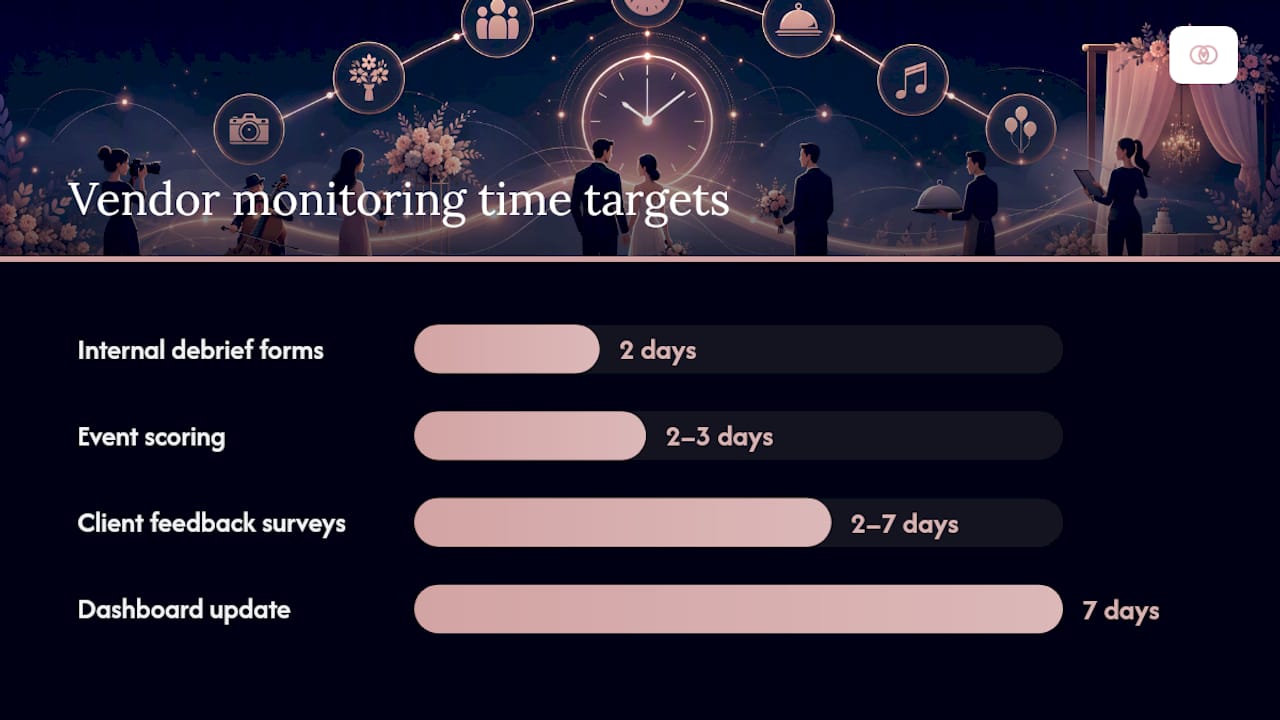
- Client feedback surveys sent automatically within 2 to 7 days after the wedding, while details are still fresh.
- Internal debrief forms completed by your on-site team within 48 hours.
Automate the parts that don’t need judgment: email parsing for response-time tracking, webhook or CSV imports for invoices, and status flags that fire automatically on a missed payment or a no-show. Score each event within 48 to 72 hours of the wedding, update your dashboard weekly, and hold a monthly review meeting focused on trending problems rather than individual complaints.
Pro Tip: Surface four fields on your main dashboard, rolling average score, number of events scored, trend direction, and outstanding contract or payment issues. Anything more turns a monitoring tool into a spreadsheet nobody opens.
What’s the Right Response When a Vendor’s Score Drops?
Consistency here matters as much as the scoring itself. A vendor treated differently than a peer with the same infraction is a legal and trust problem waiting to happen.
- Document and notify. An informal corrective note naming the specific incident, with evidence attached.
- Probationary period with a measurable improvement plan and a fixed re-evaluation date.
- Contractual remediation or reduced referrals if the improvement plan isn’t met.
- Removal from your preferred list, with a replacement vendor already lined up.
A corrective email should name the incident, cite the logged evidence, state the required fix, and give a deadline, not vague language about “doing better.” Reserve immediate replacement for no-shows, repeated safety issues, or contract breaches, none of which warrant a probation period. Assign one person to own each vendor category so probation and removal decisions don’t vary by which planner happened to handle that event.
How Do You Roll Up Vendor Scores Across Multiple Weddings?
Individual event scores are useful. Aggregated across your full roster, they tell you where your agency is actually leaking money and margin.
Report these figures monthly or quarterly:
- Average vendor score by category (florists versus caterers versus photographers).
- Percentage of vendors meeting SLA targets.
- Incidents per 100 events.
- Cost of vendor-related issues, including replacement fees and penalties.
- Referral conversion rate from your preferred-vendor list.
Set alert thresholds for sudden score drops rather than waiting for the quarterly review to notice a pattern, and map seasonal dips by category since some vendors overextend during peak booking months. A monthly report built around an executive summary, top and bottom performers, recurring issues, and sourcing priorities gives leadership something to act on instead of just a stack of raw numbers.
A Photographer Scorecard in Practice
One planner scored a photographer across three weddings using the standard rubric: a 4.6 weighted average on the first event, a 3.1 on the second after a late arrival and a missed invoice deadline, and a 4.8 on the third following a documented improvement plan.
- Event two triggered a probation period with a written remediation plan.
- The photographer’s third-event score cleared the threshold to return to the preferred list.
- The documented SLA meant there was no dispute when the planner withheld the final balance pending the improvement plan.
The rolling average, not any single event, is what should decide whether a vendor stays on your preferred list. One bad wedding proves nothing on its own; three bad weddings in a row proves everything.
Adapt a sample scorecard from Thespecialwedding’s vendor directory and onboarding flow rather than building one from scratch.
Why a consistent vendor-performance system matters
Consistency is what turns vendor management from day-of firefighting into a predictable operation that protects your margins. A scorecard only earns trust when it’s applied the same way to every vendor, every time, with evidence behind every number.
Managing Vendor Performance Inside TheSpecialWedding.io
Running scorecards and SLAs in a spreadsheet works until you’re managing 40 vendors across a dozen weddings at once. That’s when the manual version starts costing you more hours than it saves.

Thespecialwedding builds the playbook above directly into the platform instead of leaving it to a patchwork of spreadsheets and email threads:
- Vendor onboarding templates and intake forms that capture insurance, contracts, and payment schedules the same way for every vendor category.
- Shared timelines with day-of check-ins, so arrival and setup data feeds your scorecard automatically instead of relying on a text message from the venue.
- A vendor directory and reporting dashboard that surfaces rolling scores, outstanding payment issues, and trend direction without a separate spreadsheet.
If you’re managing vendor relationships across multiple events right now, browse the vendor directory to see how a profile and onboarding flow are structured, then start a trial to put your own scorecard on it.
Where to Find Templates and Tools to Get Started
Start with a vendor vetting toolkit for interview questions and contract checklists, a KPI dashboard template for revenue and margin tracking, and a vendor comparison worksheet for scoring fields. For day-of data capture, read about shared wedding timelines and browse the platform’s vendor directory for a working example.
Frequently Asked Questions
How often should we score wedding vendor performance? Score every vendor within 48 to 72 hours of each event, then review rolling averages weekly on active accounts and hold a monthly meeting to catch trending issues across your full roster.
What’s a reasonable SLA for vendor response time? Most agencies set an initial response window of 24 hours and require final staffing confirmation 14 days before the event, tightening for weddings with more complex vendor coordination.
How many events should a vendor score before we make a probation decision? Two consecutive low-scoring events is a common trigger for probation; a single bad wedding rarely justifies removal on its own unless it involves a no-show or safety issue.
Who should own vendor performance data at an agency? Assign one team member per vendor category to run reviews and maintain the scorecard library, which keeps scoring consistent across planners handling different weddings.
Can vendor performance tracking work without dedicated software? Spreadsheets can work for a small roster, but agencies managing multiple weddings usually need a platform like Thespecialwedding to automate timeline check-ins, invoice tracking, and dashboard reporting at scale.
Sources
- Wedding Vendor Toolkit — Interview Questions, Comparison Sheets & Contract Checklist | Wedding Planner Toolkit
- Wedding Vendor Comparison Worksheet: How to Use One | MyWeddingKit
- Monthly KPIs Wedding Professionals Should Actually Track - Boda Bliss
Recommended
- Wedding Vendor Service Categories: A Couple’s 2026 Guide | The Special Wedding Blog
- Client Reporting for Wedding Agencies: Prove Value Monthly | The Special Wedding Blog
- Wedding Day Vendor Runsheet: A Planner’s Complete Guide | The Special Wedding Blog
- Vendor Task Management for Wedding Events: 2026 Guide | The Special Wedding Blog
Free wedding planner templates
Skip the blank page — these templates ship with the form fields you actually need.
Browse all 9 free templates →