What Is an Agency Wedding Client Portal for Planners
What Is an Agency Wedding Client Portal for Planners
An agency wedding client portal is a branded, secure online hub where your agency and each couple manage the entire event project together — contracts, timelines, payments, guest lists, vendor details, and messaging all in one place, replacing scattered emails and spreadsheets with a single collaborative workspace. The core components include e-sign contracts, automated invoicing, milestone timelines, guest and seating management, file galleries, and in-app messaging. For agencies specifically, the payoff is immediate:
- Time saved: Routine tasks like signature collection, payment reminders, and status updates run automatically, freeing your team for creative work.
- Professional client experience: Couples log into a branded portal that looks and feels like your agency’s product, not a generic third-party tool.
- Data ownership: All project files, contracts, and communications live in your system, not in a client’s inbox or a vendor’s cloud.
Table of Contents
- What core features does an agency wedding client portal provide?
- The business case: why portals pay off for agencies
- How a portal actually works from lead to post-event
- What integrations and technical factors should you evaluate?
- How to roll out a portal at your agency in 30/60/90 days
- What security and access controls should you require?
- How to choose the right portal and spot the red flags
- Why Thespecialwedding is built for agency workflows
- Expert tips for scaling your agency with a portal
- Key Takeaways
- The case for moving now, not later
- Thespecialwedding gives agencies a real operational advantage
- Useful sources and further reading
What core features does an agency wedding client portal provide?
A digital wedding planning workspace does far more than store documents. Each feature maps directly to a workflow your team already runs — the portal just removes the manual steps. A client portal consolidates contracts, invoices, timelines, guest lists, file galleries, and messaging into a single, branded workspace for each couple.
| Feature | What it does for your agency |
|---|---|
| Client project hub | One URL per couple — all project data visible to planner, couple, and approved vendors |
| Contracts & e-sign | Send, track, and store signed agreements without PDF email chains |
| Invoices & payments | Automated payment schedules with Stripe/ACH; reduces late collections |
| Timeline & milestones | Shared event timeline with trigger-based notifications for each deadline |
| Guest list & seating | RSVP tracking synced directly to seating charts; eliminates manual reconciliation |
| Vendor directory & call sheets | Day-of contact sheets auto-populated from vendor records |
| Galleries & moodboards | Secure file delivery and inspiration boards in one location |
| Messaging & notifications | Threaded in-app communication replaces scattered texts and emails |
| Templates & automation | Reusable intake forms, contract templates, and workflow triggers |
| Reporting & dashboards | Multi-event overview showing payment status, task completion, and open items |

Purpose-built wedding planning suites include tools for guest list tracking, RSVPs, seating charts, timeline templates, and vendor call sheets — features many horizontal CRMs simply don’t offer out of the box. A practical example: when a couple submits their final RSVP count, a well-configured portal automatically updates the seating chart and triggers a notification to the catering vendor, with no manual step from your team.
The business case: why portals pay off for agencies
The ROI of a wedding client portal shows up in three places: admin hours, payment speed, and contract value. Well-configured portals reduce repetitive admin because contracts, invoices, signature collection, and status questions are handled in-app, cutting back-and-forth emails significantly.
Here’s where agencies consistently see the gains:
- Admin time reduction: Automating reminders, intake questionnaires, and payment schedules removes hours of manual follow-up per wedding.
- Fewer email threads: Real-time collaboration means planners and couples work in the same live project rather than exchanging spreadsheet versions and email threads.
- Faster invoice collection: Payment schedules with automated reminders shorten the gap between invoice sent and payment received.
- Fewer version-control errors: One source of truth for seating charts, timelines, and vendor contacts eliminates the “wrong version” problem entirely.
- Premium packaging opportunities: A white-labeled portal with your agency’s branding becomes part of your service offering, justifying higher contract values.
- Upsell visibility: Dashboards that surface open items and upcoming milestones make it easy to identify where add-on services fit naturally.
Some portal providers offer a free starter tier for planners and a paid professional tier for agencies that need branding and multi-event management. That pricing structure means you can test the workflow before committing to a full agency rollout.
How a portal actually works from lead to post-event
The client journey inside a well-built portal follows a clear arc, and understanding it helps you see where your team’s time goes — and where it stops going.

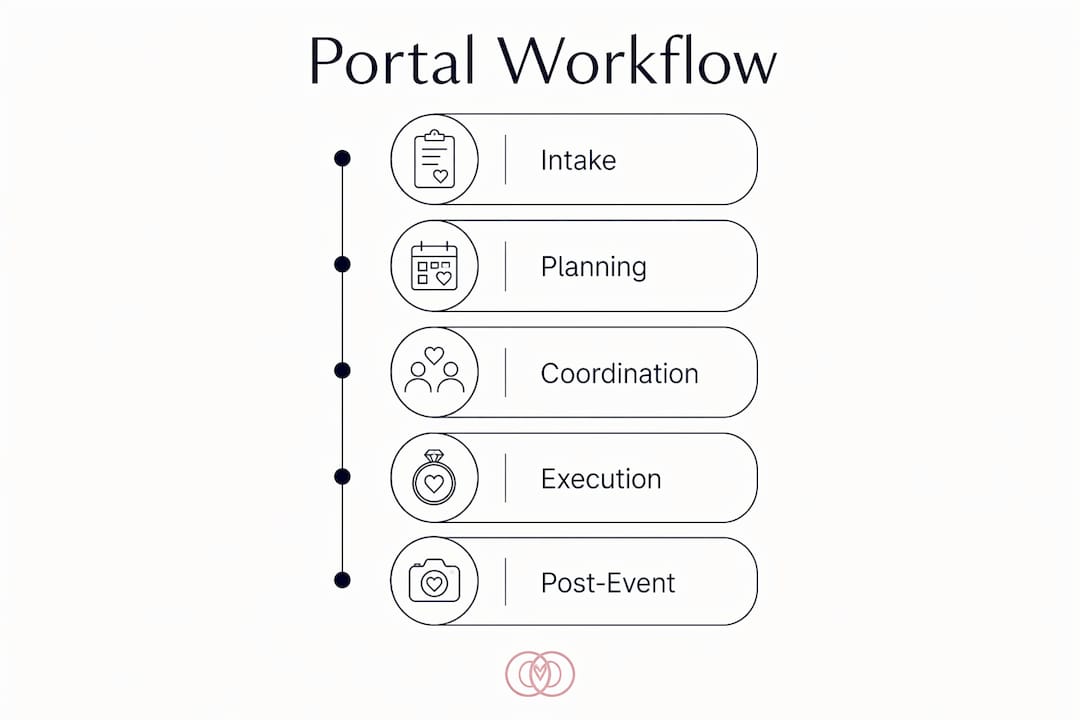
It starts at intake. A prospective couple fills out a branded questionnaire linked from your website or proposal. Their responses populate a new project record automatically, and your team gets a notification. No data entry. From there, the planner sends a contract directly through the portal. The couple reviews, signs, and pays the deposit without leaving the platform.
Once the project is active, the couple sees a planning timeline with milestone dates: venue confirmation, catering tasting, final headcount, rehearsal logistics. Each milestone can trigger an automated notification to the couple, the lead coordinator, or a vendor contact. Your team works in the same project view, with role-based access controlling what each person can see or edit. A lead coordinator might have full edit rights; a florist vendor contact might only see their call sheet and delivery window.
The day-of phase is where portals earn their keep. Call sheets auto-populate from vendor records. The couple’s final seating chart is locked and accessible on mobile. Any last-minute changes get logged in the project, not buried in a text thread. After the event, the portal handles gallery delivery, final invoice collection, and a feedback request, all from the same workspace. Coordinator roles and permissions inside portals are worth mapping carefully before you go live — the right access structure prevents both information gaps and accidental edits.
What integrations and technical factors should you evaluate?
A portal is only as useful as the tools it connects to. The integrations that matter most for wedding agencies fall into four categories.
Payment processing is non-negotiable. Look for native Stripe and PayPal support, plus ACH for larger deposits. Confirm whether payment processing fees are bundled into the platform subscription or passed through separately — that distinction affects your pricing math.
Calendar sync with Google Calendar and Outlook keeps your team’s event schedule aligned with the portal’s milestone timeline. Without it, you’re manually duplicating dates. Gallery and file delivery integrations let you deliver final photos or vendor documents directly through the portal rather than through a separate service. Portal builders for event teams let agencies create interactive timelines, vendor cards, moodboards, and budget dashboards without code, which matters when your team doesn’t have a developer on staff.
CRM and email connections allow lead data to flow from your inquiry form into the portal project without re-entry. For agencies managing 20 or more weddings annually, that alone saves meaningful hours.
On the technical side, ask vendors about mobile responsiveness — your couples and vendors will access the portal from their phones constantly. API availability and webhook support matter if you want to connect accounting tools like QuickBooks. Data ownership is the question most agencies forget to ask: confirm you can export all project data in a standard format (CSV, PDF) and that client data is stored on servers in the United States. Vendor portals in wedding planning add another layer of technical consideration — vendor-facing access needs its own permission tier, separate from client-facing views.
How to roll out a portal at your agency in 30/60/90 days
A phased rollout protects your active clients and gives your team time to build confidence with the new system. The safe rollout pattern is to configure templates and run one pilot before migrating active clients, then measure time saved across five pilot events before scaling.
Days 1–30: Setup and configuration
- Configure your agency’s branding: logo, colors, subdomain.
- Build your core template library: intake questionnaire, standard contract, payment schedule (deposit, mid-point, final balance), and day-of call sheet.
- Set up your team roles and permission levels.
- Connect payment processing and calendar sync.
- Select one upcoming wedding as your pilot — ideally a couple who is organized and communicates well.
Days 31–60: Pilot and measure
- Invite your pilot couple through the portal and walk them through the client view.
- Run the full workflow: intake through contract, payment schedule, timeline, and vendor call sheet.
- Track three metrics: hours spent on admin per week, days from invoice sent to payment received, and number of email threads outside the portal.
- Collect feedback from the couple and your coordinator at the 30-day mark.
- Revise templates based on what the pilot revealed.
Days 61–90: Scale to full agency
- Migrate all new inquiries to the portal workflow.
- Move active weddings in planning phase into the portal, starting with those furthest from their event date.
- Train additional coordinators using the revised templates.
- Set a 90-day review: compare admin hours, payment collection speed, and client feedback scores against your pre-portal baseline.
Pro Tip: Write your client invite email before you go live. A two-paragraph note explaining what the portal is, why you use it, and what the couple should do first removes 90% of onboarding confusion before it starts.
What security and access controls should you require?
Security questions feel like homework until a data breach makes them urgent. Ask every vendor these questions before signing a contract.
Encryption and infrastructure:
- Is data encrypted at rest and in transit (TLS 1.2 or higher)?
- Where are servers located, and does the vendor comply with U.S. data residency requirements?
- What is the backup cadence, and how quickly can data be restored?
- Does the vendor hold SOC 2 Type II certification or an equivalent audit?
Access controls:
- Does the platform support role-based permissions (planner, coordinator, couple, vendor)?
- Can shared links be set to expire after a defined period?
- Are audit logs available so you can see who accessed or changed a record?
- Is two-factor authentication available for agency team accounts?
Data ownership and contract language:
- Who owns the client data — your agency or the platform?
- Can you export all project data in a portable format at any time?
- What happens to your data if you cancel the subscription?
The contract language on data ownership is the clause most agencies skip. Make sure it explicitly states that your agency retains ownership of all client records, and that the vendor cannot use your data for training, analytics, or marketing without your written consent.
How to choose the right portal and spot the red flags
The evaluation checklist for an agency differs from what a solo planner needs. You’re looking for multi-event management, team access, and white-label support — not just a pretty client interface.
Evaluation checklist:
- Multi-event dashboard: can you see all active weddings and their status in one view?
- White-label or subdomain branding: does the portal URL and interface reflect your agency, not the vendor’s?
- Template automation: can you build reusable workflows that trigger on milestone dates?
- Seating and guest sync: does the seating chart update when RSVPs change?
- Pricing model fit: is pricing per planner seat, per active event, or flat monthly? Per-client-seat pricing can become expensive fast at scale.
Red flags to walk away from:
- Opaque per-client pricing with no published rate card.
- No data export tool or a vendor that hedges on data portability.
- Poor mobile UX — if the demo looks broken on a phone, your couples will notice.
- Missing vendor collaboration features: if vendors can’t access their call sheets in the portal, you haven’t replaced email.
- No team permission levels: a platform that gives every user the same access is not built for agencies.
Key capabilities agencies look for include branded client portals, vendor directories, budget tracking, seating tools, and white-label or subdomain branding options. If a vendor can’t demonstrate all five in a live demo, ask why. Many agencies discover that the cost in developer hours to adapt a horizontal CRM for seating, RSVP-linked seating sync, and vendor call-time sheets exceeds the price of a purpose-built wedding product — a calculation worth running before you commit to a generic platform.
Why Thespecialwedding is built for agency workflows
Thespecialwedding maps directly to the agency checklist above. The platform was designed for professional planners and studios managing multiple weddings, not for couples planning their own event.
| Agency need | How Thespecialwedding addresses it |
|---|---|
| Branded client portal | Custom subdomain and agency branding on every client-facing view |
| Multi-event dashboard | Real-time overview of all active weddings, tasks, and payment status |
| Guest list & seating sync | RSVP tracking connected directly to seating chart updates |
| Vendor call sheets | Day-of vendor contacts auto-populated from the vendor directory |
| Template library | Reusable intake forms, contracts, timelines, and payment schedules |
| Team collaboration | Role-based access for planners, coordinators, and vendor contacts |
| AI-driven automation | Automated reminders, workflow triggers, and intake validation |
| Budget & quote tools | Budget tracking and vendor quote negotiation built into the project view |
Onboarding is structured for agencies: the platform provides template libraries you can configure before your first client invite, and the setup process is designed to get a pilot wedding live within the first week. Migration support is available for agencies moving active projects from spreadsheets or other tools. The vendor directory is built into the platform, so your preferred vendors are already accessible when you build call sheets and timelines.
Expert tips for scaling your agency with a portal
Once the portal is live, the agencies that get the most from it are the ones that treat it as an operational system, not just a client-facing tool.
Template libraries are your highest-leverage asset. Every time your team builds a new workflow from scratch, that’s time that could have been saved by a template. Audit your most common wedding types — intimate ceremony, full-service multi-vendor event, destination wedding — and build a dedicated template set for each.
Delegate coordinator roles deliberately. Role-based access isn’t just a security feature; it’s a management tool. When coordinators have clearly scoped access, they can work independently without needing to check in for every update. That’s where agencies find real time savings at scale.
Automate reminders before they become problems. Payment reminders, document approval requests, and RSVP deadline nudges should all run automatically. Manual follow-up on these items is the single biggest source of unnecessary admin hours in most agencies.
Track the right KPIs from day one. The metrics that matter are: hours of admin per wedding per week, days from invoice sent to payment received, and client satisfaction scores. Measure your baseline before the portal goes live, then compare at 90 days. Reducing miscommunication by keeping project data, invoices, and contracts in one place frees planners to focus on creative work — but you need the numbers to prove it internally and to clients.
Use the portal as a selling point. When you pitch new clients, show them the portal during the sales conversation. A branded, organized workspace signals professionalism before the contract is signed. Agencies that do this consistently report it as a differentiator in competitive markets.
Key Takeaways
An agency wedding client portal replaces scattered tools with a single branded workspace that handles contracts, payments, timelines, guest management, and vendor coordination — all under your agency’s name.
| Point | Details |
|---|---|
| Core definition | A portal is a branded hub consolidating contracts, payments, timelines, guest lists, and messaging for each wedding project. |
| Agency-specific features | Multi-event dashboards, role-based team access, seating sync, and vendor call sheets are the features that separate agency tools from solo-planner tools. |
| Selection criteria | Prioritize white-label branding, data export, mobile UX, and per-seat pricing transparency when evaluating vendors. |
| Rollout approach | Run a 30/60/90-day phased rollout: configure templates, pilot one wedding, measure KPIs, then scale to all active projects. |
| Thespecialwedding | Thespecialwedding offers an agency-ready platform with branded portals, seating sync, vendor call sheets, template automation, and a 30-day free trial. |
The case for moving now, not later
The agencies that treat a client portal as a “nice to have” are the ones still answering the same status-update emails at 10 PM. The shift happening in the wedding industry right now isn’t about technology for its own sake. It’s about what clients expect. Couples who manage their finances in an app, track their packages in real time, and sign documents on their phones are not going to be impressed by a PDF attached to an email. They’ll notice the difference between an agency that has its process together and one that doesn’t.
The strategic advantage of adopting a portal now is that it compounds. Every template you build, every workflow you automate, every coordinator you train on the system makes the next wedding faster and the one after that faster still. Agencies that wait another season to make the move are not just losing time — they’re losing the compounding efficiency that early adopters are already building. The practical next step is straightforward: pick one active wedding, configure your templates, and run a 30-day pilot. Measure what changes. The data will make the decision for you.
Thespecialwedding gives agencies a real operational advantage
Running a wedding agency on disconnected tools costs more than the subscription price of replacing them. Thespecialwedding was built specifically for professional planners and studios who manage multiple weddings and need a system that scales with them — not a generic project management tool retrofitted for events.

The platform gives you branded client portals, automated payment schedules, seating and guest sync, vendor call sheets, and a multi-event dashboard, all under your agency’s name. Setup takes days, not months, and the template library means your first client invite goes out looking polished. Start with a 30-day free trial and run your next wedding through the full portal workflow. No long-term contract required to see whether it fits.
Useful sources and further reading
These resources cover the technical, operational, and strategic dimensions of wedding client portals in more depth:
- Why Agencies Use Wedding Software Platforms in 2026 — Thespecialwedding Blog: Covers agency motivations, ROI benchmarks, and the case for purpose-built tools over horizontal CRMs.
- Vendor Portals in Wedding Planning: A 2026 Guide — Thespecialwedding Blog: Focused on vendor collaboration workflows, permission structures, and day-of coordination inside portals.
- Coordinator Access to Wedding Portals: A Pro Guide — Thespecialwedding Blog: Practical breakdown of role-based access and how to structure coordinator permissions.
- Wedding Planner Client Communication: A 2026 Guide — Thespecialwedding Blog: How portals reduce miscommunication and what communication workflows actually look like in practice.
- How AI Is Changing Wedding Planning — Thespecialwedding Blog: Covers automation, AI-driven intake validation, and which AI features are worth using versus which are noise.
- New HoneyBook Client Portal: Ultimate Guide for Wedding Pros — Sonia Smith Creative: Detailed walkthrough of portal-based management and how transparency reduces planner miscommunication.
- White Label Wedding Planning Dashboard — RapidDev: Market analysis of white-label options, configuration trade-offs, and the real cost of adapting horizontal CRMs for wedding workflows.
- Wedding Client Portal for Event Planners — RationalGo App Builder: Feature reference for portal building blocks including timelines, vendor cards, moodboards, and budget dashboards.
Recommended
- Coordinator Access to Wedding Portals: A Pro Guide | The Special Wedding Blog
- Vendor Portals in Wedding Planning: A 2026 Guide | The Special Wedding Blog
- Why Agencies Use Wedding Software Platforms in 2026 | The Special Wedding Blog
- Wedding Agency Capacity Planning: A 2026 Guide | The Special Wedding Blog
Free wedding planner templates
Skip the blank page — these templates ship with the form fields you actually need.
Browse all 9 free templates →