Wedding Production Schedule for Vendors: A Planner's Guide
Wedding Production Schedule for Vendors: A Planner’s Guide
A vendor production schedule is the vendor-facing run-of-show that specifies exact arrival times, load-in windows, setup-complete targets, vendor action cues, responsible owners, and escalation contacts — distinct from any guest-facing itinerary. Think of it as the operational backbone of your event: when it is built correctly, vendors look to your production notes for cues rather than texting the couple.
Three things every planner should know upfront:
- A solid vendor schedule shifts you from message relay to operational leader — responsibilities are shared, not questions.
- Use a staged release: draft (4–6 weeks out), near-final (2–3 weeks out), frozen final (5–7 days out).
- Include arrival windows, on-site logistics, and escalation contacts to stop small delays from compounding into service failures.
Table of Contents
- Why a vendor production schedule prevents cascading failures
- Core fields every vendor production schedule must include
- On-site logistics vendors need that planners often overlook
- How to build, version, and distribute the schedule step by step
- Common mistakes planners make with vendor production schedules
- A sample vendor run sheet you can adapt today
- How to share the schedule, get confirmations, and enforce it on the day
- Which platform features actually solve vendor schedule problems
- Key Takeaways
- The operational lesson most planners learn too late
- Thespecialwedding makes vendor run sheets a repeatable system
- Useful sources and further reading
Why a vendor production schedule prevents cascading failures
A single misaligned cue can unravel an entire reception. When a ceremony runs 20 minutes late, portrait time compresses, cocktail hour gets cut short, and catering scrambles to hold hot food — all because delays compound without a synchronized master plan. Professional planners describe this as “invisible architecture”: when it holds, guests never notice; when it cracks, every vendor feels it.

The operational gains of a tight vendor schedule are concrete. Clear ownership means vendors know who cues them. Predictable load-in windows prevent bottlenecks at the freight entrance. Fewer on-site calls reach the couple. And when something does shift, a single escalation contact resolves it in seconds rather than minutes. For agencies running multiple weddings on the same weekend, that accountability structure is what keeps each event independent and on track. Learning why vendors rely on shared timelines is the first step toward building schedules they will actually follow.
Core fields every vendor production schedule must include
A vendor-facing run of show is an internal operations document, not a guest itinerary. Every row must carry enough data for a vendor to act without calling you.
Mandatory fields:
- Event anchor and segment time — the fixed ceremony or reception start that all other times reference
- Vendor name and on-site lead — who is physically present and accountable
- Direct and escalation contact — cell number for the lead, backup number for the owner or agency
- Arrival/load-in window — the earliest and latest acceptable arrival (e.g., 10:00–10:30 AM)
- Setup-complete time — the hard deadline before guests or the next vendor needs the space
- Exact location(s) — room name, entrance, floor, and staging zone
- Vendor action column — what the vendor does at each cue (“DJ begins cocktail playlist,” “florist clears ceremony arch”)
- Equipment list and power needs — amps, plug types, table count, rigging points
- Parking and freight instructions — dock number, elevator access, vehicle size limit
- Dependencies — which vendor or setup must be complete before this row can begin
- Buffer windows — 10–15 minutes built in after every major transition
- Contingency notes — rain plan, generator backup, alternate room
- File and version metadata — filename, version number, date issued, who approved
Sample rows:
| Time | Segment | Vendor | Action | Dependency | Escalation |
|---|---|---|---|---|---|
| 10:00 AM | Load-in | Florist | Enter via freight dock B, setup ceremony arch | Linens on tables | Lead planner cell |
| 3:30 PM | Ceremony cue | DJ | Begin processional track on planner cue | Officiant in position | Sound tech cell |
| 5:00 PM | Cocktail hour | Caterer | Open passed apps station, bar live | Guests cleared from ceremony space | Catering captain cell |
| 7:15 PM | First dance | DJ | Fade cocktail music, announce couple | Planner green-light signal | Lead planner cell |
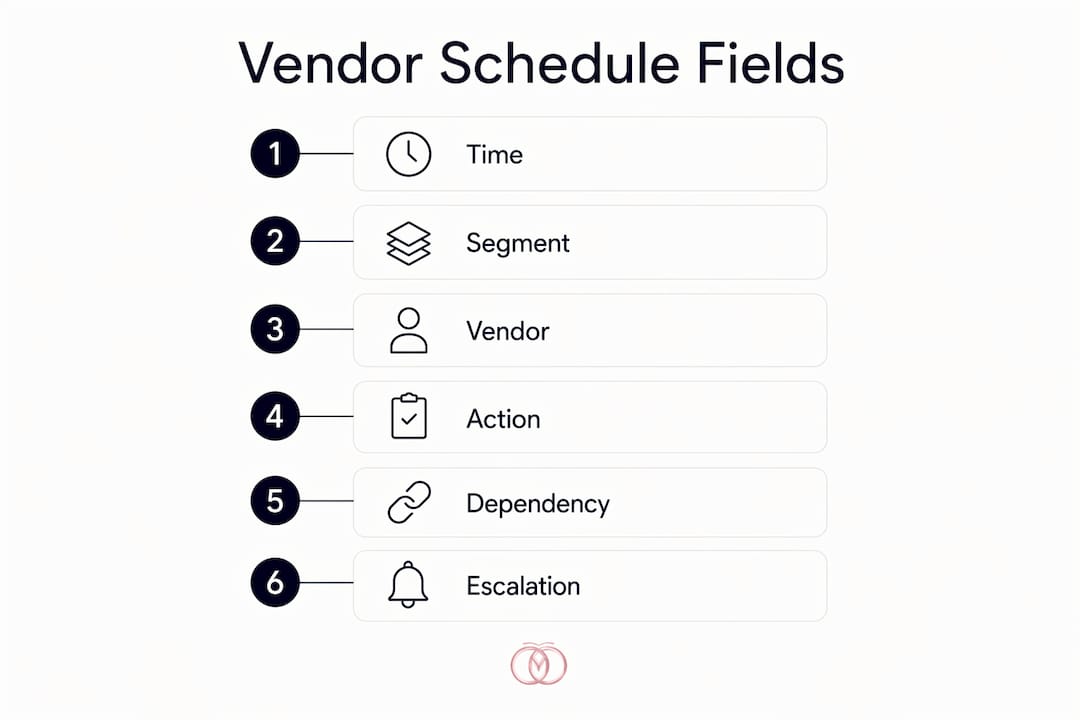
Pro Tip: Add a “setup-complete” column separate from “arrival.” Vendors who arrive on time but set up late are the most common source of ceremony delays — tracking both times closes that gap.
On-site logistics vendors need that planners often overlook
Call times alone are not enough. Vendors need access, power, staging, and load-in sequencing just as much as they need a schedule row. Planners who skip this layer generate the most on-site friction.
Cover these specifics in every production schedule:
- Site access windows — when the building opens, which entrance vendors use, and who holds the key or access code
- Freight doors and elevators — dimensions, weight limits, and booking windows if the venue requires them
- Power specifications — available amps per zone, plug types (standard 120V, 20A, or 208V for bands and production), and generator location if applicable
- Mic check and soundcheck timing — block this as a named segment with a hard end time so it does not eat into setup for other vendors
- Staging and load-in sequence — which vendor enters first matters; a florist blocked by a catering truck loses 30 minutes
- Vendor parking — designated lot, permit requirements, and tow-away zones
Pro Tip: Pre-label staging zones with colored tape and post a one-page load-in map at the freight entrance. Vendors who can self-navigate their zone reduce your on-site calls by half before the ceremony even starts.
How to build, version, and distribute the schedule step by step
Use a staged release and assign one timeline owner per event. That single rule prevents the most common failure mode: multiple versions circulating simultaneously.
- Anchor the fixed times — lock ceremony start, venue access open, and hard-out time first.
- Collect vendor input windows — ask each vendor for their required setup duration and load-in preference during onboarding.
- Draft the master schedule — build the full run sheet with all fields populated; flag dependencies and buffer windows.
- Distribute the draft 4–6 weeks out — send to vendors for feedback on arrival windows and equipment needs.
- Issue the near-final version 2–3 weeks out — incorporate vendor feedback, lock segment times, and note any open items.
- Freeze the final version 5–7 days out — no further changes without a formal change-log entry approved by the timeline owner.
- Distribute final call sheets — send per-vendor call sheets (each vendor receives only their relevant rows), a full master PDF to the venue, and a printed pocket run for on-site leads.
Version-control rules:
- Use timestamped filenames:
EventName_VendorSchedule_v3_2026-03-15.pdf - Maintain a change log noting what changed, who requested it, and who approved it
- During the final week, route all change requests through the timeline owner only — no direct vendor-to-vendor adjustments
Common mistakes planners make with vendor production schedules
Most failures trace back to three root causes: missing dependencies, stale versions in circulation, and no single owner. Each mistake has a direct fix.
Missing load-in windows. When the schedule lists only a ceremony start time, vendors guess their arrival. A florist who arrives at the same time as the catering truck creates a freight bottleneck that delays both. Fix: issue vendor-specific call sheets with explicit arrival windows and load-in sequence numbers.
No buffer time. Back-to-back segments with zero margin mean one late vendor cascades into every subsequent cue. A 20-minute ceremony delay can compress portrait time and push catering service past the contracted window. Fix: build 10–15 minute buffers after every major transition and a 30-minute cushion before the ceremony.
Distributing the full master to every vendor. A DJ who receives a 14-page master document will miss their specific cues in the noise. Fix: share selectively — master to planner and venue, tailored call sheets to each vendor.
Stale versions. Every revision you send creates the risk of a vendor arriving with the wrong one. Fix: state clearly when a version is final, use timestamped filenames, and send one authoritative update rather than incremental edits.
For multi-function events like multi-day or Indian weddings, split the master run sheet by function while keeping a single master owner and one escalation tree across all functions.
A sample vendor run sheet you can adapt today
A compact, vendor-facing run sheet contains nine columns and fits on a single printed page for on-site leads.
| Time | Segment | Duration | Location | Owner | Vendor Action | Equipment | Notes | Escalation |
|---|---|---|---|---|---|---|---|---|
| — | Vendor load-in | — | Freight dock B | Lead planner | Florist, caterer, AV enter in sequence | Per vendor list | Elevator reserved | Lead planner cell |
| — | Soundcheck | — | Ballroom stage | AV lead | DJ/band mic check, line test | 2x 20A circuits | — | AV tech cell |
| 3:00 PM | Ceremony setup complete | — | Garden terrace | Florist lead | All florals placed, arch complete | — | Confirm with planner | Lead planner cell |
| 3:30 PM | Ceremony | — | Garden terrace | Officiant | DJ cues processional on planner signal | Wireless mic | Rain plan: ballroom | Lead planner cell |
| 4:15 PM | Cocktail hour | — | Foyer | Catering captain | Passed apps begin, bar opens | — | Buffer: 10 min | Catering captain cell |
| 5:15 PM | Reception doors open | — | Ballroom | Lead planner | DJ plays entrance music | — | — | Lead planner cell |
| 7:00 PM | First dance | 5 min | Ballroom floor | DJ | Announce couple on planner cue | — | — | Lead planner cell |
Export and distribution checklist:
- PDF: export at letter size, landscape, with headers on every page for printed copies
- CSV: export for import into planning software or shared drives
- Mobile link: share a live-view link so on-site leads can pull the current version on their phones
- Print settings: 100% scale, no scaling to fit; use a monospace or table-optimized font for column alignment
How to share the schedule, get confirmations, and enforce it on the day
Written confirmations and a single day-of timeline owner are the two strongest enforcement tools you have.
Vendor onboarding checklist:
- Send the draft schedule and ask for written acknowledgment of call time and setup-complete time
- Require the name and direct cell of the vendor’s on-site lead (not the office or booking contact)
- Collect vehicle type and freight dimensions for accurate load-in sequencing
- Confirm power and equipment needs match what the venue provides
What to ask vendors to confirm in writing:
- “Please confirm your arrival window, setup-complete time, and the name of your on-site lead.”
- “Please confirm you have reviewed the load-in sequence and parking instructions.”
- “Please confirm your equipment list and power requirements match the venue spec.”
Day-of enforcement tactics:
- Hold a pre-shift huddle 30 minutes before vendor load-in begins — walk through the sequence, confirm escalation contacts, and flag any last-minute changes
- Give every on-site lead a printed pocket run (one page, their rows only)
- Post the escalation tree at the venue coordinator’s station and the freight entrance
- Designate a logistics lead specifically for load-in; the lead planner should not be managing freight and ceremony prep simultaneously
Which platform features actually solve vendor schedule problems
The right platform cuts stale versions, speeds confirmations, and gives on-site teams a live dashboard. The feature set matters more than the interface.
| Planner Need | Platform Feature to Look For |
|---|---|
| Version control | Timestamped document versions with change-log history |
| Per-vendor call sheets | Filtered exports showing only each vendor’s relevant rows |
| Live update push | Real-time notifications to vendors when a segment time changes |
| Escalation contacts | Dedicated contact fields per vendor role (lead, backup, owner) |
| PDF and CSV export | One-click export in both formats for print and import |
| Mobile pocket run | Responsive mobile view or shareable link for on-site access |
| Vendor onboarding | Intake forms that collect load-in, power, and freight data at booking |
| Confirmation tracking | Read-receipt or acknowledgment status per vendor per document |
Thespecialwedding consolidates all of these into one workspace. The platform’s vendor onboarding tools collect load-in windows, equipment specs, and escalation contacts at booking, feeding them directly into the run sheet. Per-vendor call sheet exports, live update push, and mobile pocket runs address the exact distribution and versioning failure modes covered throughout this guide. For agencies managing multiple events, the multi-wedding coordination dashboard keeps each event’s schedule independent while giving the agency a single operational view.
Key Takeaways
A vendor production schedule is the single most effective tool for preventing cascading delays, and it works only when it is versioned, distributed selectively, and owned by one person per event.
| Point | Details |
|---|---|
| Freeze the final schedule | Lock the vendor schedule 5–7 days out and route all changes through a formal change log. |
| Assign one timeline owner | One person per event approves changes and holds the escalation tree. |
| Distribute per-vendor call sheets | Each vendor receives only their relevant rows, not the full master document. |
| Require written confirmations | Ask vendors to confirm call time, setup-complete time, and their on-site lead name. |
| Use Thespecialwedding | The platform’s per-vendor exports, live update push, and onboarding intake replace scattered spreadsheets with one versioned workspace. |
The operational lesson most planners learn too late
The conventional wisdom says a detailed timeline is enough. It is not. The schedule is only as good as the distribution protocol behind it. Planners who freeze their final version 5–7 days out and send per-vendor call sheets rather than the full master document report dramatically fewer on-site calls and vendor confusion. The reason is simple: a vendor who receives 14 pages will skim; a vendor who receives one page with their name at the top will read every line.
The one tip that rarely appears in template guides: designate a separate logistics lead for load-in. Your lead planner cannot manage freight sequencing at the dock and ceremony prep in the garden at the same time. Split those roles before the day starts, and your schedule holds even when two vendors arrive simultaneously at the wrong entrance.
Thespecialwedding makes vendor run sheets a repeatable system
Running five weddings a month on scattered spreadsheets means five opportunities for a stale version to reach the wrong vendor. Thespecialwedding replaces that with a single workspace where every vendor’s call sheet, load-in window, and escalation contact lives in one place, versioned and ready to export.

From the moment you onboard a vendor through the vendor directory, their equipment specs, power needs, and freight instructions feed directly into your run sheet. Per-vendor call sheet exports, PDF and CSV download, live update push, and mobile pocket runs are built in — no copy-pasting between documents, no version confusion on the day. Start a free 30-day trial at Thespecialwedding and build your first versioned vendor production schedule today.
Useful sources and further reading
- The Velvet Plan — Wedding Day Timeline Guide: Covers staged distribution cadence (draft, near-final, frozen final) and the shift from message relay to operational leader.
- Nunify — Wedding Run of Show Template and Guide: Defines the vendor-facing run of show and minimum column requirements for a production schedule.
- Bliss and Bone — Wedding Day Timeline with Free Template: Illustrates how cascading delays compound and covers selective distribution best practices.
- Mandap Chat — Indian Wedding Run Sheet Template for Planners: Guidance on multi-function run sheets, vendor confirmation checklists, and printed backup protocols.
- Thespecialwedding — How to Share a Wedding Event Timeline with Vendors: Platform-specific distribution practices and per-vendor call sheet examples.
- Thespecialwedding — Wedding Event Runsheet Best Practices for Planners: Run-sheet checklists and enforcement tactics for professional planners.
- Thespecialwedding — Build Your Wedding Day-of Coordination Timeline: Step-by-step timeline building guidance for day-of coordination across multiple events.
Recommended
- Wedding coordinator’s role in vendor scheduling | The Special Wedding Blog
- Wedding planning time management: a pro guide for planners | The Special Wedding Blog
- How to Share Wedding Event Timeline with Vendors | The Special Wedding Blog
- Solo Wedding Planner Organization Tips That Work | The Special Wedding Blog
Free wedding planner templates
Skip the blank page — these templates ship with the form fields you actually need.
Browse all 9 free templates →