Centralized Communication for Wedding Planners: A Full Guide
Centralized Communication for Wedding Planners: A Full Guide
Centralize your client, vendor, and guest communications on a single planner-grade platform. That is the fix for missed messages, slow vendor confirmations, and the chaos of managing five weddings across eight different apps. When every conversation, approval, and timeline update lives in one place, you stop losing hours to duplicate replies and start closing decisions faster.
Centralized communication for wedding planners means one system, not one app for texting, another for contracts, and a group chat for every vendor. The platform you choose needs to cover three roles at minimum:
- A client portal where couples see timelines, approve selections, and message you without digging through email threads.
- A vendor workspace where florists, caterers, and photographers confirm details and share files without a forty-message group chat.
- A guest SMS channel for RSVPs, meal choices, and day-of logistics that doesn’t require anyone to download an app.
Get those three right, and you’ll see the effects immediately: fewer missed messages, faster approvals on vendor changes, and clean, exportable data you can hand to a caterer or drop into a billing report without retyping a thing.
Key Takeaways
Centralizing client, vendor, and guest communication on one planner-grade platform is the single highest-leverage change a wedding planning business can make to cut manual work and scale event volume.
| Point | Details |
|---|---|
| One platform, three roles | Cover client portal, vendor workspace, and guest SMS in a single connected system. |
| Templates remove repetition | Build save-the-date, RSVP, load-in, and reminder templates before broadcasting to full lists. |
| Vendor cadence prevents chasing | Use a 30/14/7/1-day confirmation rhythm with a shared, acknowledged run sheet. |
| Six-week rollout works | Pilot one wedding, train on it, then expand agency-wide by week five. |
| TheSpecialWedding.io fits agencies | Combines client portals, vendor workspaces, SMS, and multi-event templates for a 30-day pilot. |
Table of Contents
- Why Centralizing Wedding Communication Boosts Efficiency
- What Platform Features Actually Centralize Communication?
- Which Communication Templates Cut Repetitive Messages?
- How Do You Keep Vendors Aligned Without Constant Follow-Up?
- How Should You Structure Communication Across Multiple Weddings?
- Which Integrations Remove the Most Manual Work?
- How Do You Roll Out a Centralized Platform in Six Weeks?
- How Does TheSpecialWedding.io Deliver This for Professional Planners?
- What Does It Take to Stop Chasing Messages and Start Running Events?
- Ready to Pilot Centralized Communication for 30 Days?
- Where Can Planners Learn More About Centralized Workflows?
- Frequently Asked Questions
Why Centralizing Wedding Communication Boosts Efficiency
Scattered communication is the single biggest hidden cost in wedding planning. Every time a florist emails a substitution request, a bridesmaid texts about parking, and a venue coordinator calls about load-in times, you’re reconstructing context from three different tools. That reconstruction time is the real tax on your business, and it rarely shows up on an invoice.
A single source of truth changes the math. When the guest list, vendor contacts, contracts, and event timeline all live in one connected system, a change in one place updates everywhere it needs to. Update a ceremony start time and the vendor run sheet, client portal, and day-of schedule all reflect it instantly. No more re-sending the same PDF to nine people because someone made an edit nobody else saw.
By the numbers: Planners who centralize RSVP and guest data through a shared dashboard report cleaner exports and fewer manual guest list edits, since dietary and meal data now feeds directly into vendor-ready CSV exports instead of being retyped from a spreadsheet.
That single source of truth pays off in three concrete ways:
- Time saved on repetitive replies. Automated confirmations and a client portal absorb the “what time is hair and makeup” questions before they ever reach your phone.
- Faster vendor confirmations. A shared run sheet with built-in acknowledgment beats a group text where three vendors never respond.
- Fewer day-of surprises. When arrival times, contact people, and access instructions live in one place, nobody is improvising at 7 a.m. on the wedding day.
Pro Tip: Set up an approval queue for any vendor-initiated change, big or small. A florist swapping peonies for garden roses shouldn’t require a phone call. It should require one tap from you in the platform, logged and timestamped.
Those savings compound into business outcomes. Fewer hours spent chasing responses means higher billable utilization across your team. Fewer day-of fire drills mean less overtime for assistants. And clients who see real-time updates instead of radio silence tend to rate their experience higher, which shows up in referrals more than in any survey.
What Platform Features Actually Centralize Communication?
Not every “all-in-one” wedding tool actually centralizes anything. Some just move your spreadsheet into a prettier interface. The features below are the ones that genuinely replace a fragmented tool, not just repackage it.
- Client portal with secure messaging replaces the email thread that gets three replies deep and impossible to follow.
- Vendor workspace replaces the group text where half the vendors mute notifications after week one.
- Two-way SMS with a dedicated number replaces the personal cell phone number you’re currently giving out to 150 guests.
- Broadcast messaging replaces the individual “reminder” texts you’re sending one by one before the RSVP deadline.
- Approval and queue systems replace the verbal “just tell the caterer it’s fine” that never gets documented.
- Shared timelines and run sheets replace the printed schedule that’s already outdated by the rehearsal.
- Guest RSVP and meal tracking replaces the manually updated spreadsheet a planner-grade RSVP tracking system can automate end to end.
- File galleries replace the scattered Dropbox links nobody can find two weeks before the event.
- Role-based permissions replace the awkward moment when a vendor sees a client’s budget by accident.
- CSV and PDF exports replace the hours spent reformatting data for a caterer’s headcount or a venue’s insurance file.
Here’s how those features map against the tools most planners are actually replacing:
| Feature | Replaces | Why It Matters Operationally |
|---|---|---|
| Client portal + messaging | Email threads | Keeps client conversation searchable and tied to the event |
| Vendor workspace | Group texts, forwarded emails | Gives every vendor one place to confirm and upload |
| Two-way SMS with dedicated number | Personal phone number | Protects your number and keeps guest chats logged |
| Broadcast messaging | Manual bulk texts | Sends RSVP reminders instantly to large groups of guests |
| Approval/queue system | Verbal or DM approvals | Creates a timestamped record of every change |
| Shared timelines/run sheets | Printed or emailed PDFs | Updates propagate instantly to every stakeholder |
| Guest RSVP + meal tracking | Spreadsheets | Feeds vendor-ready exports without retyping |
| File galleries | Scattered cloud links | Keeps deliverables tied to the right event |
| Role-based permissions | Shared logins, open chats | Limits visibility to what each party actually needs |
| CSV/PDF exports | Manual reformatting | Produces vendor and billing-ready documents instantly |
Solo planners and agencies need different depths of the same feature set. Agencies coordinating multiple weddings per weekend need multi-wedding templates, dedicated team seats, and white-labeling so every client sees your brand, not the software’s.
Which Communication Templates Cut Repetitive Messages?
Most of what you type into a client or guest message has already been typed by you, verbatim, for a different wedding. Templates aren’t a nice-to-have. They’re the mechanism that turns centralized communication from a filing system into an actual time-saver.
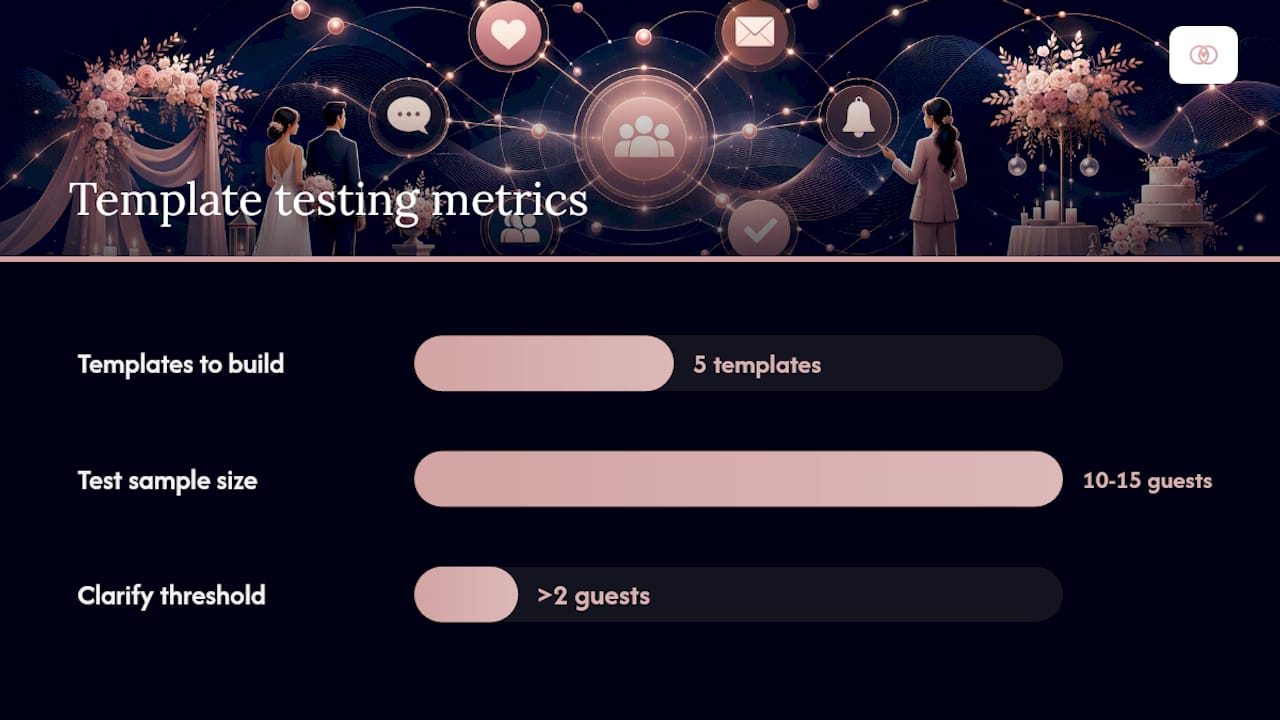
Build these five first:
- Save-the-date SMS with wedding date, location, and a link to the guest portal.
- RSVP collection flow that prompts for attendance, meal choice, and dietary restrictions in one exchange.
- Vendor load-in confirmation confirming arrival window, access point, and on-site contact.
- Rehearsal reminder sent 48 hours out with time, location, and parking notes.
- Day-of arrival window messages for vendors and wedding party, staggered by role.
The real efficiency gain comes from the conversational flow behind each template. A guest texts a question, an automated reply answers it from your knowledge base, and anything the system can’t answer gets escalated straight to you or an assistant. That structure, an AI text assistant modeled on SMS-first guest coordination, keeps a human in the loop only when a human is actually needed.
To build a template that holds up under pressure:
- Draft the message in plain language, not planner jargon.
- Test it on a small guest segment (bridal party, immediate family) before broadcasting to the full list.
- Capture edge cases in a shared knowledge base: parking restrictions, dress code nuances, a backup contact if the primary planner is unreachable.
- Review response rates after 48 hours and adjust wording if confusion shows up in replies.
Pro Tip: Send your RSVP template to 10 to 15 guests first. If more than two ask the same clarifying question, rewrite the template before you broadcast it to the full guest list.
How Do You Keep Vendors Aligned Without Constant Follow-Up?
Vendor communication breaks down for one reason more than any other: nobody agreed on a cadence, so everyone improvises their own. Fix the cadence and most of the chasing disappears.
A reliable rhythm looks like this:
- Preliminary intake at booking: capacity, specs, and initial availability confirmation.
- 30-day confirmation of contract terms, quantities, and staging needs.
- 14-day confirmation of arrival windows and final headcounts.
- 7-day confirmation of load-in access, parking, and day-of contact.
- 1-day check-in confirming no last-minute changes.
- Day-of contact point for real-time issues.
- Post-event wrap-up to close the loop and request feedback or invoicing.
Standardize the same checklist across every vendor relationship, not just the ones you’re worried about:
- Arrival and setup time
- Named on-site contact person
- Load-in access details (loading dock, freight elevator, service entrance)
- Staging and setup order relative to other vendors
- Parking arrangements
- Insurance certificates and equipment specs on file
Shared run sheets solve the redundancy problem that vendor group texts create. Instead of telling the caterer, then the florist, then the venue coordinator the same setup order three separate times, you publish it once. Vendor-specific permissions mean each vendor sees their own checkpoints without wading through details meant for someone else.
Pro Tip: Require every vendor to acknowledge the shared run sheet in-platform before the week of the wedding. A silent thread is not a confirmation. A logged acknowledgment is.

How Should You Structure Communication Across Multiple Weddings?
Running a single wedding’s communication is manageable in almost any tool. Running twelve weddings at once is where fragmented systems collapse, because messages, files, and vendor contacts start bleeding across events.
The fix is structural, not just behavioral. Each wedding gets its own dedicated thread and document set, while the agency maintains a shared workspace above it for cross-event resources like your template library and vendor CRM. A multi-event planner workspace built for this exact split lets an agency scale from one wedding a month to five a weekend without losing track of which guest message belongs to which couple.
Make the separation automatic, not manual:
- Assign a unique event ID to every wedding the moment it’s booked.
- Tag every message, file, and RSVP response with that event ID so nothing has to be manually sorted.
- Build folder structures around the event ID rather than the couple’s name, since names can duplicate but IDs never do.
- Set role-based permissions so a junior planner sees only their assigned weddings, while agency leads see everything.
- Use temporary event seats for freelance assistants who need access for one wedding weekend, then lose it automatically after.
- Give each couple a branded client portal so the experience feels dedicated even when your backend is shared.
Scaling checklist for agencies:
- A living template library that every planner on the team can pull from.
- A shared vendor contact database instead of five personal address books.
- Cross-event reporting so leadership can see utilization and workload at a glance.
- Billing sync tied to each event ID so invoicing never gets mixed between clients.
Which Integrations Remove the Most Manual Work?
Centralizing communication only gets you halfway if you’re still manually copying data between your messaging platform and everything else you run your business on. The integrations that matter most eliminate a specific manual step, not just add a feature for its own sake.
| Integration | Manual Step It Eliminates |
|---|---|
| Calendar sync (Google/Exchange) | Manually re-entering vendor and client appointments |
| Payment gateways | Chasing deposit and balance payments by hand |
| E-signature / contracts | Printing, scanning, or emailing signed PDFs |
| SMS gateway for two-way texting | Using a personal number for guest and vendor texts |
| POS/vendor invoicing | Reconciling vendor invoices against contracts manually |
| File storage (Dropbox/Google Drive) | Hunting for the current version of a floor plan or contract |
The highest-leverage automations trigger off events you already track. A signed contract can automatically trigger a payment request. A calendar date can trigger a 7-day vendor reminder without you lifting a finger. An RSVP marked “attending” can automatically populate a seating chart draft instead of waiting for you to manually enter it.
Data hygiene matters here more than it gets credit for. If your guest export doesn’t cleanly separate meal choice from dietary restriction, or your vendor invoice data doesn’t map to the right event ID, every integration downstream inherits that mess. Build clean exports from day one and every automation after it works better.
How Do You Roll Out a Centralized Platform in Six Weeks?
Switching platforms mid-season is risky. Switching in a structured six-week window, with a single pilot event, is not.
- Week 1: Discovery and template design. Audit current tools, map every recurring message type, and build your first five templates.
- Week 2: Pilot event setup. Choose one active wedding, migrate its data, and set up client and vendor portals for that event only.
- Week 3: Pilot event training. Train assistants on the approval queue, run sheet, and SMS channel using the live pilot wedding.
- Week 4: Vendor onboarding and integrations. Invite vendors from other upcoming weddings, connect calendar sync and payment gateways.
- Week 5: Agency-wide rollout. Migrate remaining active weddings, assign team seats, and set role-based permissions.
- Week 6: Reporting and review. Pull your first cross-event report, document exceptions, and adjust templates based on real usage.
Before you migrate, confirm three things: data ownership and export rights, permission structures for every team role, and sign-off from anyone who touches vendor billing. Skipping stakeholder sign-off is the most common reason a migration stalls in week three.
Keep one open approval queue during rollout specifically for edge cases. Not every wedding fits the template on day one, and forcing it usually creates more friction than the old system did.
Pro Tip: Track two numbers during your pilot: time-to-confirmation on vendor requests and the raw number of manual messages sent per week. A drop in both is proof the migration is working, not just a feeling that it is.
How Does TheSpecialWedding.io Deliver This for Professional Planners?
Everything covered above, the client portal, vendor workspace, approval queues, and multi-event templates, is exactly what Thespecialwedding was built to run. It replaces the scattered mix of spreadsheets, texts, and email threads with one collaborative workspace designed specifically for professional planners and agencies, not couples planning a single wedding.
The platform maps directly onto the checklist you’ve just read:
- Client portals give couples one branded place to approve decisions and message you.
- Vendor workspaces hold every vendor’s contact sheet, run sheet, and acknowledgment in one thread.
- Two-way SMS handles guest RSVPs and meal tracking without anyone downloading an app.
- Approval queues log every vendor change with a timestamp, replacing verbal sign-offs.
- Multi-event templates and team seats let agencies scale from one wedding a month to a full weekend roster, backed by a workspace built for multi-event operations.
- CSV and PDF exports turn guest and vendor data into caterer- and billing-ready documents in a few clicks.
Migrating a pilot wedding onto the platform follows the same four steps every time: import your existing guest and vendor data, set up your first three or four message templates, provision a dedicated SMS number for guest coordination, and send vendor invites with role-based permissions already assigned. Most planners have their pilot event fully running within the first week of a trial.
If you’re evaluating vendors while you set up your workspace, the platform’s vendor directory is a practical place to start, whether you’re sourcing a band like Drive for a reception or Occasions for stationery.
What Does It Take to Stop Chasing Messages and Start Running Events?
Most planners don’t lose clients over a design decision or a vendor mishap. They lose margin, sleep, and sometimes clients over the hundred small messages that never should have needed a human reply in the first place. The industry has spent years treating that noise as an unavoidable cost of the job. It isn’t.
What gets underestimated is how much of “planner intuition” is actually just information retrieval. Where’s the contract. What time did the florist confirm. Did that guest ever respond about the vegetarian meal. None of that requires judgment. It requires a system that remembers so you don’t have to. Every hour spent reconstructing context from six different apps is an hour not spent on the parts of this job that actually require your expertise, like reading a room, solving a vendor conflict on the fly, or catching a timeline problem before a client notices it.
This guide is written for agencies and professional planners managing real event volume, not couples planning a single wedding for themselves. The distinction matters because the tools and workflows that make sense at scale look different from what a single couple needs for one event. If the feature mapping in the section above looks like a fit for how your agency operates, that’s intentional. Read on to the next section to see exactly what trying it out looks like.
Ready to Pilot Centralized Communication for 30 Days?
The fastest way to know if a centralized platform fits your agency is to run one real wedding through it, not a demo environment. TheSpecialWedding.io offers a 30-day pilot built around exactly that: full SMS number provisioning, your first set of message templates configured for your workflow, one live pilot event migrated from your current tools, and basic training for you and your team.

The pilot is designed around measurable outcomes, not vague promises. You should expect to see fewer manual messages sent per week and faster vendor confirmation times once your run sheet and approval queue replace group texts and email chains. Track both numbers from day one so you have real data to bring back to your team or your leadership, not just an impression that things feel smoother.
Support during the pilot includes onboarding help for data migration and template setup, so you’re not troubleshooting alone while running a live wedding. If you want to see how vendor coordination looks inside the platform before committing your first event, browse the vendor directory or check out a listing like Blue Door to see how a vendor profile and communication thread come together. When you’re ready, start your 30-day trial and migrate your next active wedding as the pilot event.
For planners coordinating vendors outside the platform’s core categories, resources like officiant software feature guides and event photography portfolio tools round out the integration picture for ceremony and image delivery logistics.
Where Can Planners Learn More About Centralized Workflows?
A few resources go deeper into specific pieces of the workflow covered above.
- How AI Is Changing Wedding Planning covers which AI-driven tools genuinely reduce repetitive guest communication versus which ones just add another dashboard.
- Guest Management Strategies for Weddings That Work breaks down tactical approaches to reducing day-of guest issues.
- Manage Wedding Guest Lists Without Staff is useful for solo planners looking to automate RSVP follow-up without hiring an assistant.
- Why Agencies Use Wedding Software Platforms in 2026 makes the business case for platform adoption with an ROI lens.
- Types of Wedding Event Management Systems in 2026 helps planners understand which platform category fits their business size before evaluating specific tools.
Frequently Asked Questions
What does “centralized communication” mean for wedding planners specifically? It means every client conversation, vendor confirmation, and guest RSVP lives in one connected system instead of spread across email, text, and group chats. The goal is a single source of truth that updates everywhere at once.
Can a centralized platform replace a spreadsheet for guest tracking? Yes. A smart RSVP system collects meal choices and dietary restrictions directly from guests and exports clean CSVs, removing the manual retyping that spreadsheets require.
Is centralized communication only useful for large agencies? No. Solo planners benefit from a client portal and SMS channel alone, since most of their daily friction comes from repetitive one-on-one replies rather than multi-event coordination.
How long does it take to migrate to a centralized platform? A structured rollout typically takes six weeks: one week for template design, two weeks for a pilot event, one week for vendor onboarding, and two weeks for agency-wide expansion and reporting.
What is the biggest mistake planners make when switching communication tools? Migrating every active wedding at once instead of piloting with a single event first. A single pilot exposes template gaps and permission issues before they affect your full client roster.
Recommended
- Wedding Planner Client Communication: A 2026 Guide | The Special Wedding Blog
- Guest Communication in Weddings: A Planner’s Guide | The Special Wedding Blog
- Solo Wedding Planner Organization Tips That Work | The Special Wedding Blog
- Wedding Lead Management for Planners: 2026 Guide | The Special Wedding Blog
Free wedding planner templates
Skip the blank page — these templates ship with the form fields you actually need.
Browse all 9 free templates →