Wedding Payment Workflow for Planners That Flattens 30–60 Day Spikes
Wedding Payment Workflow for Planners That Flattens 30–60 Day Spikes
Building it this way flattens the final-month payment spike, protects your dates from missed deadlines, and gives you a clean paper trail if a vendor dispute ever comes up.
TL;DR:
- Paying vendors with credit cards provides a dispute route for high-risk contracts like venues and catering, which is essential for protection.
- Mapping all payment due dates onto one shared calendar and setting reminders one month, one week, and one day before each is crucial to avoid last-minute shortfalls.
- Automating invoice intake, calendar sync, and client portals can save hours weekly and prevent reconciliation errors, especially across multiple weddings.
- Requiring written amendments for schedule changes, with signatures from both parties, protects against future disputes and miscommunications.
- Using a centralized, automated tracking system reduces the risk of missed payments and improves overall payment management at scale.
Table of Contents
- What does a solid wedding payment schedule actually look like?
- How do you build a wedding payment workflow step-by-step?
- Which tools and tracker fields cut manual work the most?
- How should you handle vendor changes and payment disputes?
- How TheSpecialWedding.io applies this workflow in practice
- How to evaluate TheSpecialWedding.io for your payment workflow
- Why planners overthink this more than they need to
- Sources
What does a solid wedding payment schedule actually look like?
Every vendor contract runs on the same basic rhythm: a retainer at signing, sometimes a mid-stage payment, then a final balance before the event. Retainers typically run 25 to 50% at signing, which locks the vendor’s date and sets the tone for the rest of the relationship. Get that number wrong in your tracker and everything downstream shifts.
Final balances don’t land on one uniform date. Venues often collect their remaining balance 30 to 90 days out, while photographers, caterers, and florists frequently settle up 7 to 30 days before the wedding. That variation is exactly why a single planner tracking six or seven vendors across three different weddings needs a system instead of memory.
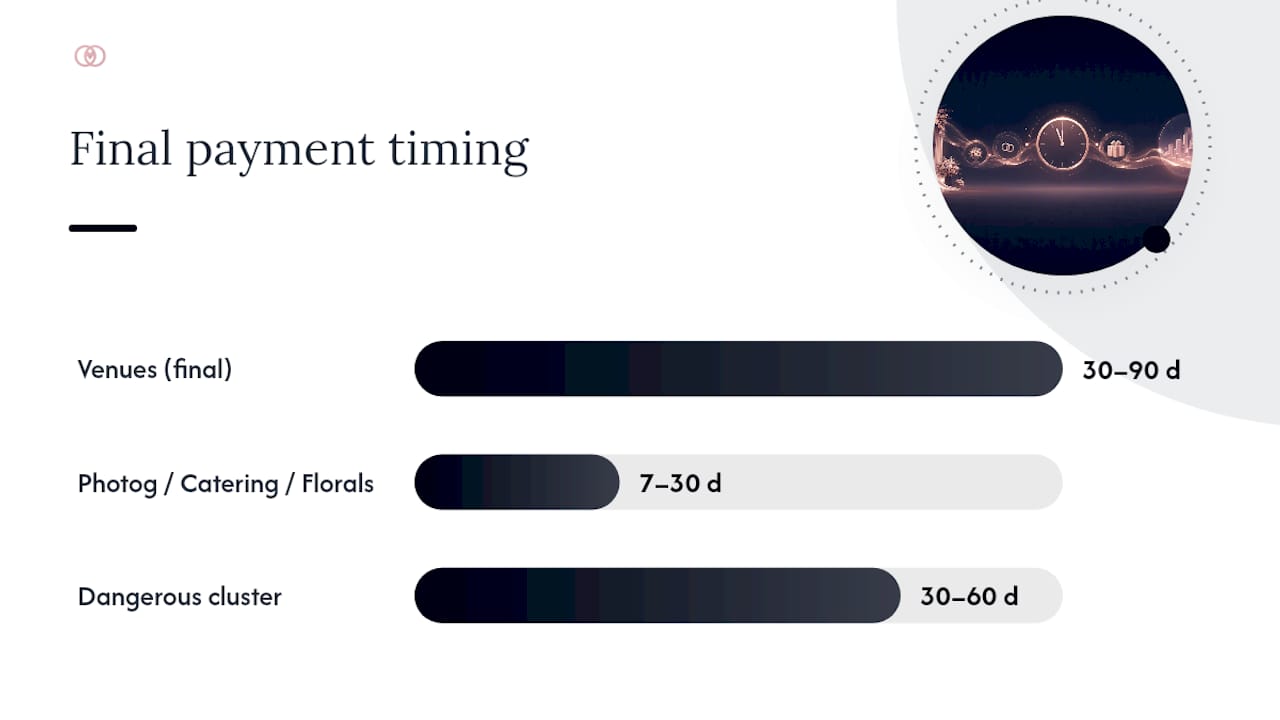
The window 30 to 60 days before the event is where things get dangerous. Multiple final balances cluster in that stretch, and if you haven’t mapped them onto one calendar, you find out about a shortfall the same week it’s due.
A few payment-method rules are worth building into your process from day one:
- Credit cards give you a formal dispute route if a vendor fails to deliver, which matters most for large, high-risk contracts like venues and catering.
- ACH transfers carry lower fees and work well for recurring, low-risk payments once trust is established.
- Checks still show up in smaller markets, but always require a receipt or signed confirmation, never a verbal agreement.
Whichever method you choose, require a signed contract and a receipt or confirmation number for every transaction. That single habit prevents most of the “did we pay this?” scrambles that eat up a planner’s week.
How do you build a wedding payment workflow step-by-step?
Treat this as infrastructure you build once and reuse across every wedding on your books, not a spreadsheet you rebuild from scratch each time.
- Capture the right data for every vendor. At minimum, record the vendor name, service category, total contract amount, deposit paid, remaining balance, next due date, payment method, and a confirmation number or receipt link for each line item.
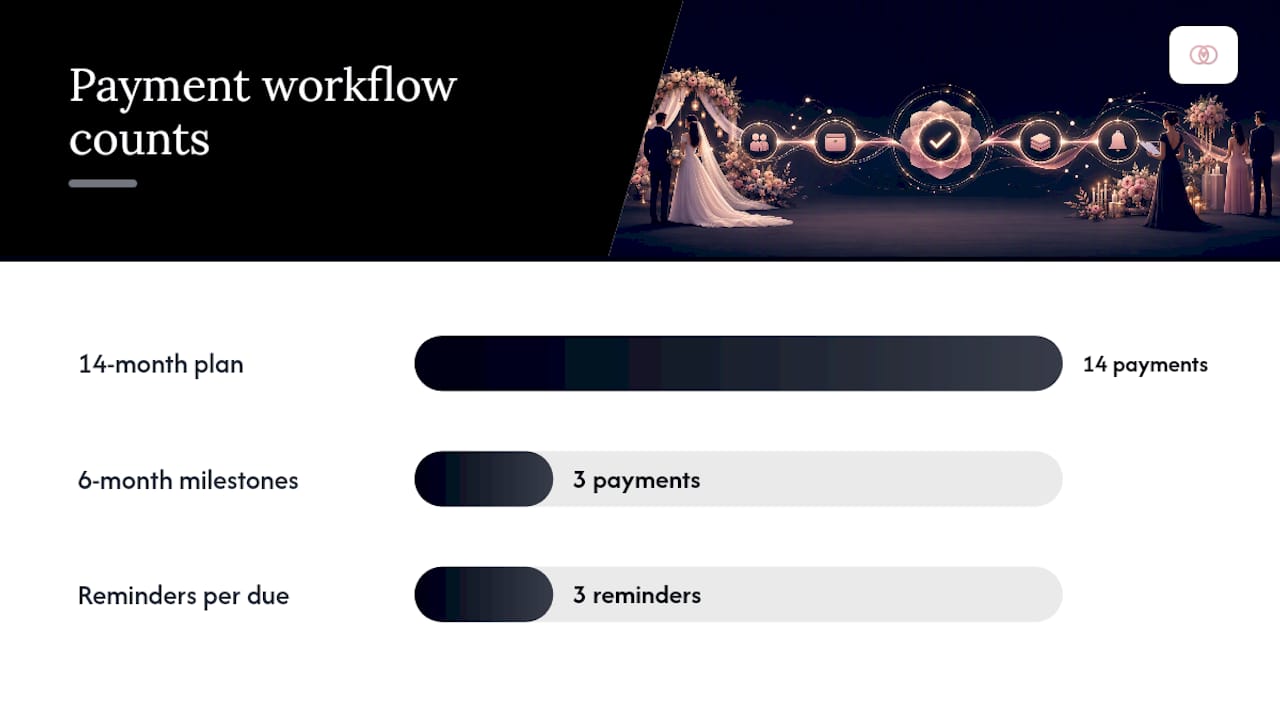
- Pick a scheduling model that fits the timeline. A 14-month engagement can handle monthly installments; a 6-month sprint often needs a milestone structure tied to contract signing, the halfway mark, and final balance.
- Map every due date onto one shared calendar. Group payments by month rather than by vendor so you can immediately see which months carry three or four balances instead of one.
- Set a fixed reminder cadence. Send a notice one month out, one week out, and one day before each due date, and assign a specific person (you, an assistant, or the client) as the owner of that payment.
- Reconcile weekly. Log every receipt, mark the invoice status, and reconcile bank or card activity against your tracker every week rather than waiting until the final month to catch discrepancies.
Pro Tip: *Notify your bank or card issuer roughly 48 hours before a run of large vendor payments hits in the same week. Consecutive high-dollar transactions from one account get flagged as fraud more often than people expect, and a declined final payment two days before a wedding is not a problem you want to troubleshoot live.
Handled this way, a payment schedule stops being a source of late-night anxiety and becomes a routine part of your weekly planning cadence, the same as confirming headcounts or finalizing seating charts.
Which tools and tracker fields cut manual work the most?
The columns you choose determine how much time you spend reconciling later. At minimum, your tracker needs vendor name, service category, contract total, deposit paid, remaining balance, due date, payment method, and a receipt or confirmation link, matching the core fields recommended for wedding vendor payment tracking. For weddings funded by multiple family members, add a payer column and require one consolidated confirmation per vendor so reconciliation after the event stays simple instead of chasing five partial payments across two families.
Automation is where the real time savings show up. Prioritize:
- Calendar sync so due dates populate automatically instead of living in a separate document.
- Invoice intake that lets vendors submit invoices directly into your system rather than by email.
- Client portals so couples see their own balance and due dates without a phone call.
- Role-based access so assistants or associate planners can update payment status without touching contract terms.
For weddings with complex family contributions, an escrow-style pooled account, where funds sit centrally and get released against contract milestones, can simplify authorization compared to tracking five separate Venmo transfers. Centralized trackers with receipt attachments and automated reminders consistently save planners hours each week once they’re managing more than two or three events at once. Run a short weekly report scanning the next 30 and 60 days for balance clusters, and you’ll spot a spike before it becomes a crisis.
How should you handle vendor changes and payment disputes?
Vendors ask for schedule changes more often than couples expect, and how you document that request determines whether it protects you or exposes you later.
- Require a written amendment for any schedule change, listing the new amount, new due date, and signatures from both the vendor and the client, since a text message carries far less weight than a signed contract update if a dispute arises later.
- When a vendor asks for early payment, weigh the request against your card protection. If you can’t get a written amendment, insist on paying by card so you retain a dispute option.
- For missed payments, escalate in writing first: a formal notice citing the contract clause and original due date, sent before any phone call, creates the paper trail you need if the relationship sours.
- For large final balances, propose splitting the payment into two installments early in the planning process. Splitting one large final payment into two smaller ones flattens cash-flow spikes and most vendors accept it when it’s raised well before the final month.
How TheSpecialWedding.io applies this workflow in practice
TheSpecialWedding.io was built around exactly this problem: replacing scattered spreadsheets and email threads with one collaborative workspace for payment tracking, vendor onboarding, and client communication. Its templates, automated reminders, and real-time dashboards mirror the tracker fields and reminder cadence outlined above. The JOATLABS team has documented these patterns directly, including a practical breakdown of reminder cadence for wedding clients, drawn from watching planners manage payment schedules across dozens of simultaneous weddings.
How to evaluate TheSpecialWedding.io for your payment workflow
If you’re piecing together this workflow across three or four spreadsheets right now, you already know where the cracks form: a due date buried in an email thread, a receipt nobody can find in the final week. This platform maps directly onto the workflow above. One integrated tracker, automated reminder sequences, and a client portal replace the manual reconciliation that eats into your Friday afternoons.

The platform’s vendor directory gives you a working view of how vendor onboarding and payment tracking connect in practice, whether you’re coordinating a caterer, a rental company, or a jeweler for an upcoming event. Start with a free tier, load in your current vendor roster, and see whether the automated reminder cadence saves you hours when managing multiple weddings at once.
Why planners overthink this more than they need to
Most planners treat payment tracking as an administrative chore instead of a client-retention tool. That’s backwards. A missed deadline doesn’t just create an awkward call with a vendor, it erodes the client’s confidence that you have their wedding under control, and that confidence is the entire product you’re selling.
The conventional advice, “just use a spreadsheet,” ignores what actually breaks at scale. A spreadsheet works fine for one wedding. It falls apart at four weddings running simultaneously, each with eight vendors on different payment cadences, because nothing forces you to look at the calendar until a due date is already late. Automation isn’t a convenience at that point. It’s the only thing standing between you and a payment you genuinely forgot existed.
The planners who avoid final-month chaos aren’t the ones with better memory or more discipline. They’re the ones who built a system early that doesn’t depend on either.
— JOATLABS
Sources
- How to make a wedding payment schedule
- Wedding Vendor Payment Schedule: Deposits and Final Payments
- Mastering Your Wedding Vendor Payment Schedule: A 2025-2026 Guide | OurVows Blog | OurVows
- Wedding Vendor Payment Tracker | Adaptive
Recommended
Free wedding planner templates
Skip the blank page — these templates ship with the form fields you actually need.
Browse all 9 free templates →