Shared Wedding Event Schedule: Build One That Works
Shared Wedding Event Schedule: Build One That Works

A shared wedding event schedule is a single, time-blocked document that tells every vendor, your wedding party, and you exactly when and where each action happens throughout the day. Share a draft with your vendors 2–4 weeks before the wedding, and treat your ceremony start time as the one anchor you never move.
Without this document, small delays compound into big ones. A 20-minute ceremony delay pushes portraits, compresses cocktail hour, and throws dinner service off by the time your guests sit down. One shared schedule prevents all of that.
Table of Contents
- What does a shared wedding event schedule actually contain?
- Why sharing the schedule protects your entire day
- When should you create and share the schedule?
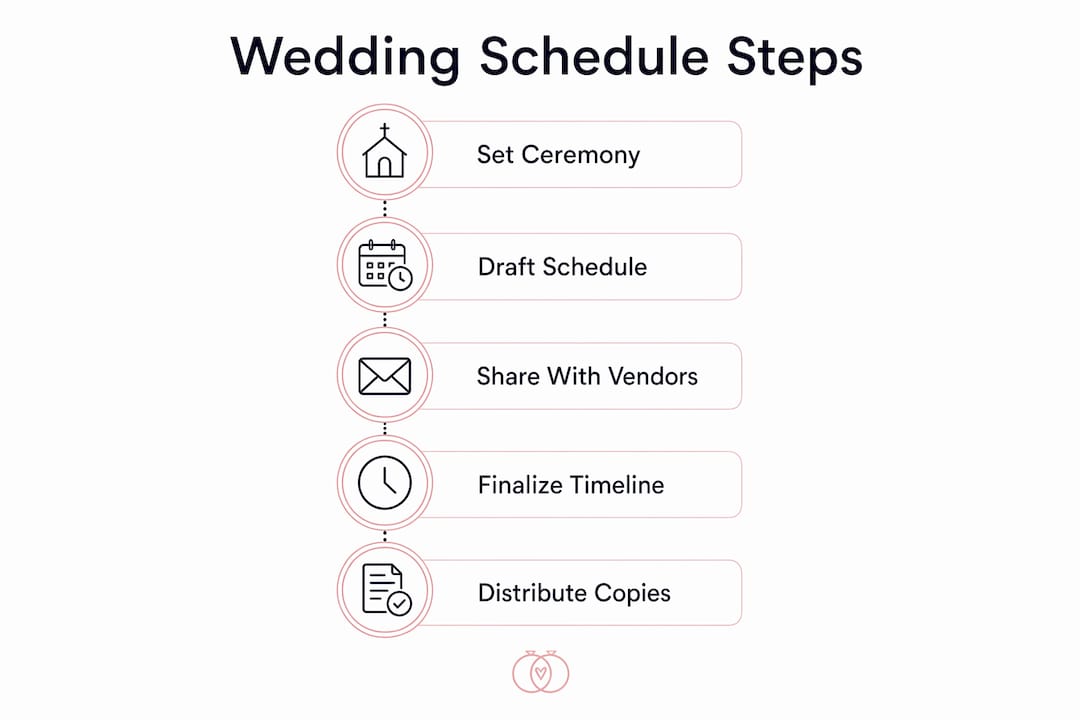
- How to build your schedule step by step
- A sample timeline you can adapt
- Which tools actually work for sharing the schedule?
- Internal runsheet vs. public guest timeline
- Common scheduling problems and how to fix them
- Vendor checklist you can send right now
- Customizing the schedule for cultural and religious weddings
- Key Takeaways
- What professional coordinators actually do differently
- Thespecialwedding handles the coordination work your vendors actually need
- Useful sources
What does a shared wedding event schedule actually contain?
The master document covers every time block from getting-ready through send-off, with enough operational detail for vendors to execute without calling you for clarification.
Core components every schedule needs:
- Ceremony anchor time (the non-negotiable fixed point)
- Vendor call times and setup windows
- Photo blocks, including first look and portrait sessions
- Buffer windows of 10–15 minutes between major transitions
- Travel time between venues, if applicable
- Cue notes for the DJ, MC, and officiant
Who gets which version:
- Vendors and coordinator: the full internal runsheet with minute-by-minute cues, contact numbers, and contingency notes
- Wedding party: a one-page summary with their call times and key moments only
- Guests: a short public timeline showing ceremony start, reception start, and expected end — nothing more
Giving guests the full runsheet creates confusion. Giving vendors only the guest version leaves them without the operational detail they need.
Why sharing the schedule protects your entire day
A shared wedding timeline does more than keep people informed. It prevents the single biggest risk professional planners flag: compounding delays.
Here is how it plays out in practice. The ceremony runs 20 minutes late. Your photographer now has 40 minutes instead of 60 for portraits. Cocktail hour starts late, guests get restless, and the caterer holds dinner service. By the time you sit down, you are 45 minutes behind and the evening never fully recovers.
Protecting the ceremony start time is the one scheduling decision that keeps everything else intact. Every buffer, every vendor call time, and every reception transition depends on it. Planners who build their timelines outward from a locked ceremony anchor consistently run smoother days than those who treat the start time as flexible.
Pro Tip: Build a 15-minute buffer before your ceremony start, not just after. Guests arrive late, vendors need last-minute adjustments, and that window absorbs real-world friction before it becomes a problem.
Sharing the schedule 2–4 weeks out also lets you check vendor contracts for arrival and setup windows before conflicts become emergencies. A florist who needs 90 minutes to set up but whose contract only guarantees venue access 60 minutes before the ceremony is a problem you can solve in advance — not on the day.
When should you create and share the schedule?
| Milestone | Timing | Who Receives It |
|---|---|---|
| Initial draft | 2–4 weeks out | Couple and planner only |
| Vendor draft | 2–4 weeks out | All vendors, photographer, caterer, DJ |
| Final runsheet | 1 week out | Vendors, coordinator, wedding party leads |
| Printed copies | Day-of | Coordinator, photographer, DJ, caterer |
The two-week distribution window gives vendors enough time to flag conflicts and confirm arrival times. Waiting until the week before leaves no room to resolve mismatches.
What to confirm during the vendor draft review:
- Each vendor’s contracted arrival and setup window
- Load-in access and parking logistics
- Any vendor overlap at the same location (florist and rental company, for example)
- Photographer’s required time for each shot category
How to build your schedule step by step
- Set your ceremony start time and commit to it. Every other time block is calculated from this anchor. Write it down and do not move it.
- Work backward for pre-ceremony. Count back from ceremony start: add getting-dressed time, first look (if applicable), travel, and hair and makeup. Most couples need 5–6 hours of pre-ceremony time when photography begins in the morning.
- Add vendor arrival and setup windows. Pull each vendor’s contract and enter their required setup time. Resolve any conflicts now, during the 2–4 week review, not on the day.
- Insert 10–15 minute transition buffers between every major block: end of portraits to ceremony, ceremony to cocktail hour, cocktail hour to reception entrance.
- Decide on a first look. A first look moves portraits before the ceremony, which means you can actually attend your own cocktail hour. Without a first look, all couple portraits happen post-ceremony and compress the cocktail hour window significantly.
Who owns each action:
- Couple: confirms ceremony time and first-look decision
- Planner or coordinator: builds the master runsheet and resolves vendor conflicts
- Photographer: approves portrait time blocks and sunset timing
- DJ or MC: confirms cue list and reception transition times
Pro Tip: Create a one-page call-time extract for each vendor from your master runsheet. The caterer does not need to read the photographer’s cue list. Shorter, role-specific pages reduce errors and speed confirmations.
A sample timeline you can adapt

This example uses a 4:00 PM ceremony with a first look. Adjust every block proportionally if your ceremony starts earlier or later.
| Time | Event | Notes |
|---|---|---|
| — | Hair and makeup begins | Bride and wedding party |
| — | Getting dressed | Allow 30 minutes |
| 1:00 PM | First look | Couple portraits begin |
| 1:30 PM | Wedding party portraits | 45–60 minutes |
| 2:30 PM | Family formals | 30 minutes |
| 3:15 PM | Buffer / touch-ups | 45-minute window before ceremony |
| 4:00 PM | Ceremony | Anchor — never move this |
| 4:30 PM | Cocktail hour begins | Couple joins midway |
| 5:30 PM | Reception entrance | Grand entrance + first dance |
| 6:00 PM | Dinner service | Toasts during dinner |
| — | Sunset portraits | 20–30 minutes |
| — | Open dance floor | — |
| 10:00 PM | Send-off | Confirm with venue on end time |
Sample timeline generators let you enter your ceremony time and service choices to see how a 3:00 PM vs 5:00 PM start affects portrait timing, cocktail hour length, and darkness for sunset photos. Paste this table into Google Docs or directly into Thespecialwedding’s timeline templates to start customizing.
Which tools actually work for sharing the schedule?
Simpler options:
- Google Docs or Sheets: free, easy to share, but version control gets messy when multiple vendors suggest edits
- Printable PDFs: reliable for day-of distribution, but require manual updates every time something changes
- Wedding websites: good for the guest-facing public timeline, not suitable for the operational runsheet
- Group chats: fast for quick updates, but no version history and easy to miss
Planner-grade option:
Thespecialwedding gives planners and couples a single workspace with customizable timeline templates, vendor portals, role-based access, and printable runsheets. When a vendor confirms their arrival time, it updates in one place. Syncing calendars across teams eliminates the version confusion that comes with emailing updated PDFs back and forth.
Pro Tip: Lock the schedule in your planning platform one week out, then export a final PDF for printed day-of copies. Digital files fail when batteries die or venues have poor connectivity — printed copies for your coordinator, photographer, DJ, and caterer are a non-optional backup.
Internal runsheet vs. public guest timeline
These are two separate documents with two different audiences.
| Document | Audience | What It Contains |
|---|---|---|
| Internal runsheet | Vendors, coordinator | Minute-by-minute cues, vendor actions, contact numbers, contingency notes |
| Public timeline | Guests | Ceremony start, reception start, expected end time |
| One-page summary | Wedding party | Call times, key moments, point of contact |
The internal runsheet includes vendor-action columns, cue lists, and contingency plans. It is an operational document, not a guest program. Sharing it with guests creates confusion; withholding it from vendors creates mistakes.
Distribution on the day:
- Coordinator carries the master runsheet
- Photographer, DJ, and caterer each receive their role-specific extract
- Guests receive the public timeline via the wedding website or printed program
Common scheduling problems and how to fix them
Vendor arrival mismatch. A vendor’s contracted setup window does not match your schedule. Fix: pull every contract during the 2–4 week vendor draft review and align setup windows before locking the schedule.
Compressed portrait session. Post-ceremony portraits run short because the ceremony ran long. Fix: add a first look to move portraits before the ceremony, or build a longer buffer between ceremony end and cocktail hour.
Late ceremony start. Guests arrive late, vendors need last-minute adjustments, and the ceremony starts 20 minutes behind. Fix: build a 15-minute buffer before the ceremony start and plan to begin about 15 minutes after the invitation time.
Cocktail hour eaten by photos. The couple spends the entire cocktail hour in portraits and misses their own party. Fix: a first look solves this directly by moving couple portraits to pre-ceremony.
When things run late on the day, the coordinator’s job is to absorb delays in the buffers, not by cutting vendor time. Shorten a transition, not a portrait session or a dinner course.
Pro Tip: Assign one person — your coordinator or a trusted wedding party member — as the single point of contact for all vendors on the day. Vendors with a question should call that person, not you.
Vendor checklist you can send right now
Send this with your vendor draft 2–4 weeks out:
- Event date and ceremony start time (the anchor)
- Vendor arrival time and departure time
- Setup window and load-in access instructions
- Parking location and any load-in restrictions
- Point of contact name and cell number for the day
- Venue address and any access codes or check-in procedures
Final confirmation steps:
- Send the vendor draft 2–4 weeks before the wedding and request a written “confirmed” reply.
- Ask vendors to flag any scheduling conflicts within five business days.
- Send the final runsheet 3–5 days before the wedding.
- Distribute printed copies to coordinator, photographer, DJ, and caterer on the morning of the wedding.
Requiring a written confirmation from each vendor closes the loop and creates a record you can reference if a conflict arises on the day. For more on vendor scheduling procedures, a coordinator’s confirmation workflow is worth building into your process early.
Customizing the schedule for cultural and religious weddings
Not every wedding follows a standard Western ceremony-then-reception structure. Cultural and religious variations require specific adjustments to the shared schedule.
Multi-ceremony weddings (South Asian, Jewish, Nigerian, and others) often include separate rituals with their own vendor requirements. Build each ceremony as its own anchor block with independent vendor call times, and treat travel between ceremony locations as a scheduled buffer, not dead time.
Religious ceremony requirements vary by denomination. Catholic ceremonies with a full Mass typically run 60–90 minutes; Jewish ceremonies with multiple rituals may require specific timing for Shabbat. Confirm the officiant’s required time and build the schedule around their constraints, not the other way around.
Outdoor and destination weddings add weather contingency windows and travel buffers that indoor weddings do not need. Build a 30-minute weather contingency into the ceremony block and confirm a backup plan with your venue.
Extended receptions common in many cultural traditions require the caterer, DJ, and venue to confirm extended service windows in writing before you lock the schedule. A reception that runs four hours in the contract but six hours in practice creates overtime costs and vendor conflicts.
The wedding planning time management principles that apply to standard weddings apply here too — the ceremony anchor, the buffers, and the vendor draft review are non-negotiable regardless of format.
Key Takeaways
A shared wedding event schedule built around a locked ceremony anchor, shared with vendors 2–4 weeks out, and backed by printed day-of copies is the single most effective way to prevent compounding delays.
| Point | Details |
|---|---|
| Lock the ceremony anchor | Set your ceremony start time first and never move it — every other block depends on it. |
| Share vendor draft early | Distribute a draft 2–4 weeks out to surface contract mismatches before they become day-of emergencies. |
| Add transition buffers | Build small buffers between every major block to absorb real-world delays without cascading. |
| Print day-of copies | Digital files fail when batteries die — give printed runsheets to your coordinator, photographer, DJ, and caterer. |
| Use Thespecialwedding | Thespecialwedding’s timeline templates, vendor portals, and printable runsheets keep version control in one place. |
What professional coordinators actually do differently
Most couples build one long document and send it to everyone. Professional coordinators do not.
The real operational habit is splitting the master timeline into role-specific extracts. Your caterer needs their setup window, service cues, and the point of contact. They do not need the photographer’s shot list or the DJ’s cue sequence. Sending a full six-page runsheet to every vendor is how mistakes happen — someone reads the wrong column, misses their cue, or shows up at the wrong time because the document was too long to parse quickly.
The other habit worth copying: assign a single point of contact for all vendor communication on the day. Every question, every delay, every last-minute change goes through one person. That person is not the couple. It is the coordinator, and every vendor should have that number before they arrive.
Thespecialwedding’s per-vendor extract workflow makes this practical. Build the master runsheet once, then generate role-specific one-page exports for each vendor. The runsheet best practices that experienced coordinators use are built into the platform’s template structure, so you are not starting from scratch every time.
Thespecialwedding handles the coordination work your vendors actually need
Coordinating vendors across a shared schedule is where most DIY planning breaks down. Thespecialwedding replaces the scattered spreadsheets, group chats, and emailed PDFs with one workspace built for exactly this.

The platform gives planners customizable timeline templates, a vendor directory with onboarding workflows, role-based access so each vendor sees only their relevant sections, printable runsheets for day-of distribution, and calendar sync to prevent version confusion. When a vendor updates their arrival time, it reflects immediately. When you need to export a one-page call-time summary for your photographer or caterer, it takes seconds.
For planners managing multiple weddings, the version control and vendor confirmation workflows alone eliminate hours of back-and-forth per event. Start a free trial at Thespecialwedding.io and build your first vendor-ready timeline today.
Useful sources
- Wedding Day Timeline — Complete Guide + Free Template (Bliss and Bone): detailed sample timelines with buffer guidance and vendor distribution recommendations.
- Free Wedding Timeline Template (Yopki): downloadable template with vendor draft sharing workflow and printed copy guidance.
- Wedding Timeline Generator (101Planners): enter your ceremony time and service choices to see first-look vs no-first-look trade-offs instantly.
- Wedding run-of-show guidance (Nunify): explains the difference between the internal runsheet and the guest-facing timeline, with vendor-action column examples.
- An Expert-Approved Timeline for Your Wedding Day (Brides): planner-sourced sample timeline with ceremony buffer and sunset portrait guidance.
- Here’s the Best Wedding Timeline & a Free Template (The Knot): free customizable template with multi-planner input on building a timeline that holds up under real-day conditions.
- Thespecialwedding.io timeline templates and vendor onboarding: platform resources for building, sharing, and printing vendor-ready runsheets.
Recommended
- Solo Wedding Planner Organization Tips That Work | The Special Wedding Blog
- Wedding Event Runsheet Best Practices for Planners | The Special Wedding Blog
- How to Share Wedding Event Timeline with Vendors | The Special Wedding Blog
- Wedding planner workspace explained: boost multi-event ops | The Special Wedding Blog
Free wedding planner templates
Skip the blank page — these templates ship with the form fields you actually need.
Browse all 9 free templates →